ON THIS PAGE
Progress0%






Our Global Presence :


iOS app development has evolved significantly, and the manner through which apps are tested has also evolved. An iOS simulator is today often where concepts are pursued, designs are tested and problems are identified way before an application even runs on a real iPhone. Simulators have become part and parcel of the daily routine of most developers and QA teams, particularly in the early build stage and on the rapid iteration cycle.
This guide does not just discuss features lists but looks at which of the iOS simulator tools has worked effectively in the real world. Each option is evaluated in terms of their ability to complete the usual tasks such as UI testing, feature tests, demos, and team work, without depending on marketing statements.
Whether you want to start with a free iOS simulator, a tool to execute the iOS apps on Windows 10, a dependable iOS simulator on Mac or a scalable tool to test with a team, this article dissects the strengths, weaknesses, and the optimal uses of each tool.
Its purpose is to assist you in selecting an iOS simulator that matches your way of building, testing and shipping of apps without the needless complexity and trial-and-error.
It is useful to define what an iOS simulator is and where it fits in the process of the app development process before we explore the best tools. With such knowledge at the beginning it becomes easier to select the appropriate simulator to suit your requirements and minimize wastage of time.
An iOS simulator is a computer program that can recreate the behavior of iOS on your computer. It enables developers and testers to view the appearance and functionality of an app, such as layouts, navigation, and simple functionality on the screens. Simulators can come in handy especially in early stages of development, when there is a need for a quick demo, or when performing quality tests as they eliminate the necessity of a physical iPhone or Mac.
Some individuals use the terms simulators and emulators or actual devices interchangeably despite their difference in purpose. A simulator is concerned with the behavior of software, which can enable you to quickly test and debug applications. An emulator takes an extra step, trying to replicate software and hardware, but still may fail to be close to the real world. A real device, however, is the best source of representation of app behavior, both hardware-specific features and user experience. Knowing these differences will make you have realistic expectations and decide the approach to be used when testing.
Using an iOS app simulator online is convenient and flexible. It enables teams to test applications without having to invest in the physical devices, build them on any computer, and work remotely. By identifying design and functionality problems early, the simulators can save time and lower the development expenses. Nonetheless, consideration should be made of real-device testing later on in the development cycle, particularly prior to an app being submitted to the App Store, in order to ascertain that the app will perform as intended once in the hands of actual users.
The selection of the appropriate iOS simulator can deliver a significant difference in iOS mobile app development. The appropriate tool accelerates testing, minimizes mistakes, and assists groups to deliver apps in a shorter period. Here’s a detailed look at the top 10 iOS simulators in 2026, explaining what each offers, who uses it, and the pricing.
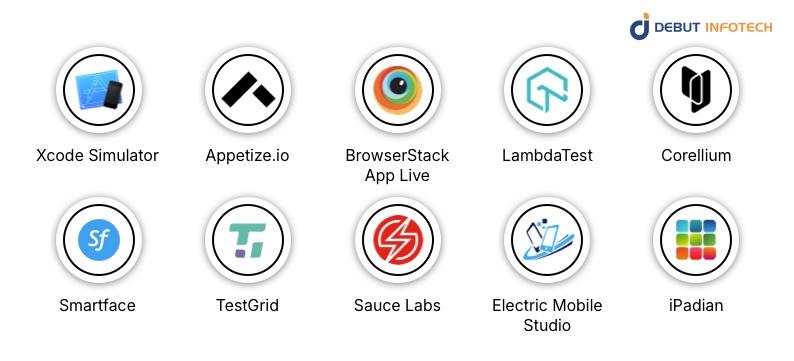
Xcode simulator is the official Apple tool to test iOS applications on Mac. It is mostly utilized by professional developers and QA teams that want to prepare apps in TestFlight or App Store. The simulator offers in-depth simulation at the OS level, and thus is highly accurate to test features and behavior of various versions of iOS. Developers love the speed at which it is updated with new iOS updates. Its biggest disadvantage is that it can only be used on macOS and does not give access to actual hardware sensors, including gyroscopes or accelerators. Xcode has free pricing, and thus it is an excellent option when one already has a Mac. Nonetheless, Windows users or teams that require cloud-based access will have to be offered an alternative.
Appetize.io is an iOS simulator that is a cloud-based service and entirely operated within a web browser. It is ideal in rapid demos or client previewing, where the agency or freelance developer does not need a real iPhone or iPad to demonstrate the apps. It is convenient, requires no setup, and is cross-platform (Windows, Mac, and Linux). Nevertheless, Appetize.io cannot be used to perform full QA testing or load performance due to its inability to simulate device hardware completely. Appetize.io has a free plan with limited use, with paid plans beginning with approximately $40-$60 a month depending on the length of the sessions. Teams that require internet availability and not hardware testing are the ones that should use it.
BrowserStack App Live is a cloud-based service which offers access to actual iPhones and iPads in order to conduct testing remotely. QA teams and developers who require testing apps on a variety of devices and iOS versions but cannot afford all the physical devices use it. The advantage of BrowserStack is that it gives a genuine feel of a real device, which is more precise than emulation. Its drawback lies in cost: individual plans range between about $12.50-$49/mo, and team plans range between $150 and $175/month, which is not as wallet-friendly for small projects. It needs access to the internet because it is cloud-based.
LambdaTest is a cloud-based testing service that can be used when testing web applications and mobile applications. It is used by developers and QA teams to run automated and live tests on iOS apps in an extremely broad range of devices and screen sizes. Its primary strengths include scalability as well as the ability to support automated testing frameworks, and it can be applied in CI/CD pipelines. Its weakness is that it is purely connected to the internet and cannot be tested offline. LambdaTest offers a free version that has restricted minutes and the paid versions begin at about $15-$25 a month. It is best suited to teams that require browser based testing of iOS, though not offline, heavy native app testing.
Corellium is designed to be used in security testing and sophisticated experimentation. Corellium is used by security researchers and development teams to test the vulnerability of apps or investigate advanced capabilities through the simulation of iOS devices. Its ARM-based virtualization is very much near the real-device behavior, and is therefore the best option when it comes to professional security testing. Corellium is, however, costly, with entry level costs about $9,995 annually, and it is also very difficult to learn. Educational or student access can be provided in terms of pay-per-device-hour. It is unlikely to be helpful to beginners or even casual developers.
Smartface is designed to target enterprise-level cross-platform creation, with support for iOS and Android. Enterprises rely on it to coordinate different projects within the same platform to simplify the development and testing processes. Its cloud-based device simulation allows testing on different device types without purchasing physical hardware. The disadvantage is that it has a higher learning curve, particularly among novices. The cost of the starter plan and professional costs $99 and $299 per month respectively, and enterprise pricing is also offered. Individual developers seeking a simple solution might be interested in simpler tools.
Also read this – Enterprise iOS App Development – Complete Deep Dive
TestGrid is a cloud platform simulator that is employed in collaborative cross-device testing. It is used by the QA teams to perform manual and automated tests on various versions of iOS. It’s designed for team collaboration and integrates well into development pipelines. The primary weakness is that it is mainly enterprise-based, and does not have many offline features. Pricing is tailored and according to enterprise needs, and this is less appropriate to individual developers and smaller projects.
Sauce Labs targets testing and CI/CD workflows of the enterprise level. The target market of Sauce Labs is enterprise-level testing and CI/CD workflows. It enables the large teams to perform automated iOS testing on a variety of OS versions and devices. It is commonly used by companies to test applications on large-scale release cycles because it can be connected to development pipelines and offers access to both emulators and real devices in the cloud. It is heavily-featured, but can be costly: virtual cloud testing is approximately $149 per month, real device cloud access is approximately $199 per month, and entry-level live testing is approximately $39 per month. Individual developers might be unable to afford the cost.
Electric Mobile Studio is aimed at developers who create on Windows, and who want to preview and test iOS applications. It offers quality iPhone and iPad simulation and debugging development tools. Nonetheless, it is an expensive utility (approximately $200 as a one-time purchase) that lacks cloud-related capabilities, and is confined to Windows. Mac users can use Xcode for free, making this tool unnecessary for them. Electric Mobile Studio suits best those developers writing and developing on Windows.
iPadian is a fast lightweight simulator to learn and preview apps. It is often used by students or hobbyists to explore iOS UI and app behavior. Although simple to install on windows and easy to use, it is not the real iOS emulator and can not run the App Store programs. Pricing involves a free version and a premium one-time purchase which is about $25. Other simulators should be considered by professional developers who require complete app testing or simulation using real devices.
Not all iOS simulators are designed to do the same task, and making a wrong choice can slow down the process at various phases of mobile app development lifecycle. There are tools that can shine in the earlier stages of design and learning, and also those that are better in serious testing before an App Store launch.
As an illustration, teams that are to submit apps usually require simulators that are as close to the real device behaviour as possible. The most common expectations of QA teams and developers that work with automation or CI/CD pipelines include stability, repeatable testing, and easy integrations. In case the intent is to learn Swift or to explore iOS functionality, simplicity is more important than high-level tools. And in the case of startups, quick demo simulators can prove invaluable when doing an MVP validation with stakeholders.
Related Read: Top Mobile App Development Frameworks in 2026
An online iOS application simulator is extremely helpful in providing quick tests, but it does not give the entire picture of how an application will perform in a real iPhone.
Simulators are excellent when testing layouts, navigation and core functions. Their weakness lies in the places that are more closely related to hardware, such as the behavior of the camera, Bluetooth or NFC communication, battery performance, and the reaction of an application to unreliable network connectivity.
These loopholes are significant since Apple tests apps under real-life conditions. An application which works well in a simulator may still fail in the App Store review, or in the real devices, unless the user has tested those conditions.
This is the reason why high-level teams use simulators at an early stage and check everything on actual devices prior to release. Honesty about these limits contributes to less problems at the last minute and more trustworthy iOS applications in general.
The right iOS Simulator in 2026 is literally a question of what you are attempting to do. Other individuals require a robust environment to do serious apps development and testing and some individuals only want a basic way to test out the iOS ecosystem or preview an app on their computer. Whether it is, advanced, such as Xcode Simulator and Corellium or more lightweight and free, such as Appetize.io, there is an iOS simulator that fits nearly every need and budget.
Teams that build production-ready iPhone apps like those at Debut Infotech, a leading iPhone app development firm often combine simulators with real-device testing to move faster without sacrificing quality. The same would apply to the case of a solo developer, a startup founder, or a larger product team.
If you’re ready to test, build, or experiment, the tools covered above make it easier to get started and find an iOS Simulator that fits how you work, right from your computer.
A. iOS simulators are computer-based simulators that provide an imitation of Apple products such as the iPhone and iPad that operate on a Mac. They also allow developers to create, test and debug apps in Xcode without the need to use physical devices. Different screen sizes, iOS versions and simple interactions are easily tested in simulators and this assists in accelerating the process of development. Nevertheless, they are not a complete copy of real hardware, so it is desirable to test on real hardware before launching an app.
A. An emulator replicates the hardware and the software of a real gadget, such as an Android phone. It simulates the action of the operating system and the application, such as screen size and gestures. The trade-off is speed, it tends to run slower because it’s simulating everything in detail. A simulator, such as the iOS Simulator, works differently. It simulates the action of the operating system and the application, such as screen size and gestures. Simulators are concerned with rapid testing, therefore, they are much faster. Nevertheless, they do not completely simulate physical hardware and thus certain interactions may not be identical.
A. Yes! Since April 2024, Apple officially allows retro game emulators on the App Store. These applications allow you to play retro games, but these applications are subject to copyright regulations, and users must supply their own game files (ROMs). This modification simplifies the process of playing old games on iPhones, however, Apple continues to delete emulators breaking the rules or copyright regulations.

Our Latest Insights


USA

2501 Chatham, Rd Suite R Springfield, IL 62704
+1-708-515-4004
info@debutinfotech.com
UK

7 Pound Close, Yarnton, Oxfordshire, OX51QG
+44-770-304-0079
info@debutinfotech.com
Canada

154 Eden Oak Trail, Kitchener, ON N2A 0H9
+1-708-515-4004
info@debutinfotech.com
INDIA

Sector 101-A, Plot No: I-42, IT City Rd, JLPL Industrial Area, Mohali, PB 140306
9888402396
info@debutinfotech.com

9001:2015
Quality Certified

ISO 27001
Security Certified

A+ Rating
Accredited Business

Certik
Security & Audit


Copyright © 2026, Debut Infotech. All rights reserved. | Privacy Policy