ON THIS PAGE
Progress0%





Our Global Presence :


AI‑driven development transforms how software is built, tested, and deployed by blending machine intelligence with traditional engineering practices.
In 2026, an estimated 84% of developers use or plan to use AI tools as part of their workflow, with about 41 % of all code in 2025 generated or assisted by AI—a clear sign that intelligent systems now shape significant portions of development tasks. These tools automate repetitive coding, streamline test creation, and provide design insights, enabling teams to focus on architecture, logic, and business priorities while maintaining quality.
Integrated correctly, AI‑driven development accelerates delivery cycles, strengthens quality assurance, and supports continuous innovation across the software lifecycle.
In this guide, we’ll discuss AI-driven development, how it works, benefits, tools, steps to implement it, key technologies, challenges and future trends.
AI-driven development is a modern software engineering approach in which artificial intelligence assists developers throughout the entire software lifecycle, from planning and coding to testing and deployment.
AI systems analyze large code repositories, recognize programming patterns, and generate useful suggestions or code outputs based on developer prompts. This approach helps automate repetitive development tasks while allowing engineers to focus on architecture, logic, and product strategy.
Developers still guide the AI driven process, review outputs, and refine implementations to ensure quality, reliability, and alignment with business objectives.
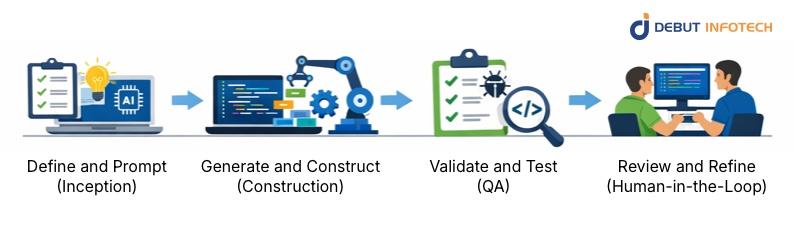
The AI driven development process begins when developers define the project objective and provide structured prompts to AI systems. These prompts describe application functionality, requirements, and expected outputs. AI tools interpret these inputs and propose architectural ideas, code scaffolding, or design suggestions. Clear prompting improves the quality of generated outputs and reduces the need for repeated adjustments during later development stages.
After receiving the initial prompt, AI tools begin generating code components, frameworks, or structural elements for the application. These systems rely on trained models that understand programming patterns across different languages and environments.
Developers review the generated code, adapt it to project requirements, and integrate it with existing modules to construct functional software components efficiently.
AI-driven development platforms assist with quality assurance by generating automated test cases and validation scripts. These tools analyze application logic and suggest tests that verify system behavior under different scenarios.
Developers execute these tests to detect bugs, logical errors, or security vulnerabilities. Early detection helps teams correct issues before deployment, improving software reliability and overall system stability.
The final stage focuses on human oversight and refinement. Developers examine AI-generated code, evaluate performance, and confirm that the implementation aligns with business and technical goals.
Feedback from developers improves the output quality of AI systems over time. This human-in-the-loop model ensures that automation supports development without replacing expert judgment or architectural decision-making.
AI assists development teams during the planning stage by analyzing project requirements, historical data, and technical constraints. These tools can suggest development approaches, estimate timelines, and identify possible risks early in the process. By processing large datasets quickly, AI helps teams make informed decisions and plan software projects with greater clarity and structure.
AI tools support design teams by generating wireframes, interface layouts, and early application prototypes based on written descriptions or feature requirements. Developers and designers can quickly visualize application structures and adjust functionality before full development begins. This process reduces redesign cycles and allows teams to test ideas earlier in the product development phase.
AI improves software testing by generating automated test cases, analyzing code behavior, and identifying potential vulnerabilities. These systems can simulate various user scenarios and detect performance issues that are difficult to identify through manual testing. This leads to stronger test coverage and improves the reliability and stability of applications before deployment.
AI-powered coding assistants help developers write code faster by generating functions, suggesting syntax improvements, and identifying logical errors. These tools analyze project context and existing code to recommend relevant implementations.
Developers still review and refine these suggestions, but the assistance significantly reduces repetitive coding tasks and accelerates overall development progress.
AI systems also support deployment and long-term software maintenance by monitoring application performance and identifying operational anomalies. Predictive analytics tools can detect system issues before they affect users and recommend fixes. This helps development teams maintain application stability, improve uptime, and ensure consistent performance across evolving production environments.
Machine learning enables AI systems to analyze large volumes of code and development data to identify patterns and relationships. These models learn from previous implementations and developer interactions to generate relevant suggestions, automate repetitive coding tasks, and assist with debugging. Over time, machine learning models improve their accuracy, allowing development tools to deliver increasingly useful recommendations.
Natural language processing allows developers to interact with development systems using written or spoken instructions instead of traditional programming syntax. AI tools interpret human language, convert it into structured logic, and generate relevant code outputs. This capability simplifies the development process and enables faster prototyping by translating product ideas directly into functional software components.
Deep learning models use layered neural networks to process complex programming patterns and relationships within large codebases. These systems power advanced development tools that generate sophisticated code, detect subtle errors, and understand context across multiple files.
Deep learning also enables AI systems to improve continuously through training on large-scale programming datasets.
Here’s a table of examples of different types of AI-driven development tools:
| Tool Type | Example | Description |
| AI-Native IDEs | Cursor IDE | AI-native code editor that understands project context, generates code from prompts, explains functions, and assists developers with refactoring and debugging. |
| Replit Ghostwriter | Helps developers generate code snippets, debug errors, and explain unfamiliar code while building applications inside the browser-based Replit IDE. | |
| Coding Assistants / Copilots | GitHub Copilot | Suggests real-time code completions, generates functions, and helps developers write code faster by analyzing surrounding code and project context. |
| Amazon CodeWhisperer | Provides real-time coding suggestions, generates functions from comments, and highlights potential security vulnerabilities during development. | |
| Autonomous Agents | AutoGPT | Performs development tasks autonomously by planning steps, generating code, analyzing results, and working toward developer-defined goals. |
| Devin AI | An AI system capable of writing code, debugging issues, running tests, and completing software engineering tasks under developer supervision. | |
| UI / Frontend Generation | Uizard | Generates application interfaces from sketches or prompts, helping developers quickly build layouts, wireframes, and interactive UI prototypes. |
| Locofy | Converts design files into responsive frontend code, allowing developers to transform visual designs into working components for modern web applications. | |
| Documentation & Context | Mintlify | Generates technical documentation automatically by analyzing codebases and explaining APIs, functions, and system logic for development teams. |
| Swimm | Links documentation to code repositories, helping developers understand the system architecture while keeping documentation in sync with code updates. |
AI-native integrated development environments embed artificial intelligence directly into the coding workspace. These environments provide contextual code suggestions, automated debugging assistance, and real-time performance feedback while developers write code. By analyzing the surrounding codebase, they help developers maintain consistency, detect errors early, and accelerate development workflows.
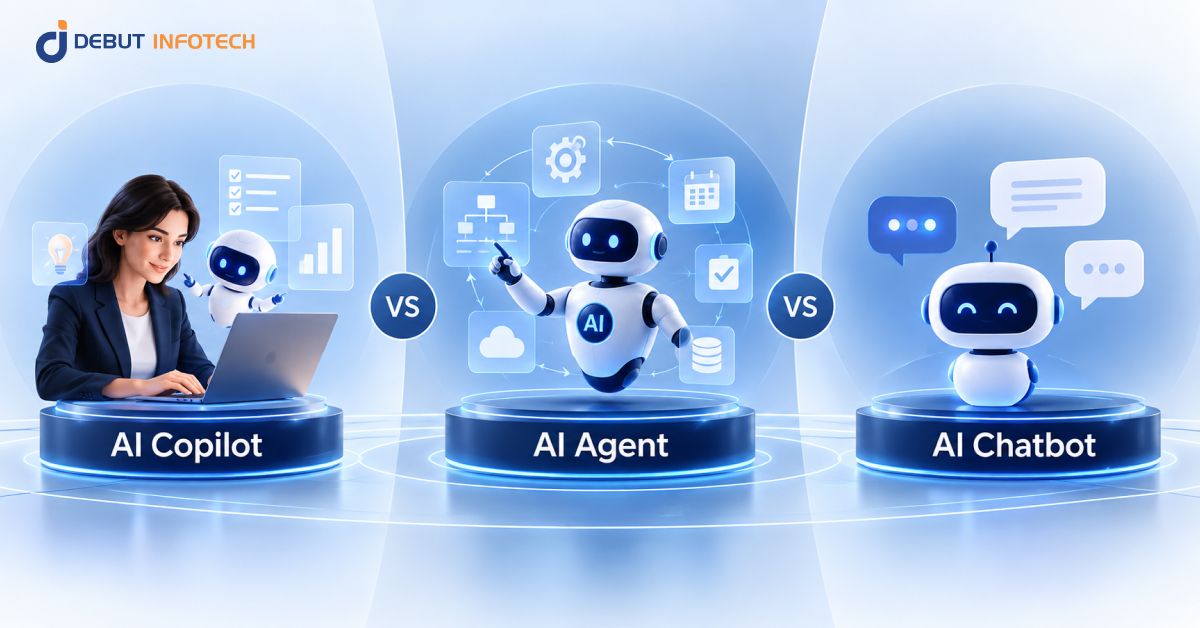
Coding assistants act as real-time development partners, helping programmers generate code snippets, complete functions, and suggest improvements. These tools analyze the current project context and recommend relevant solutions. Developers still control the final implementation, but copilots reduce repetitive work and help maintain coding standards across large development teams.
Autonomous agents are AI systems designed to perform development tasks independently with minimal human intervention. These tools can execute instructions, generate code modules, run tests, and identify issues across different parts of an application. Developers supervise these agents while allowing them to automate routine engineering activities within the development pipeline.
AI-powered interface generation tools convert design prompts or descriptions into functional frontend components. Developers can quickly produce layouts, interface structures, and basic styling without manually writing extensive markup. These tools help accelerate user interface development and allow teams to experiment with different visual concepts during the product design process.
AI documentation tools automatically generate technical explanations, code summaries, and developer notes by analyzing existing codebases. They help teams understand complex logic, maintain project knowledge, and simplify onboarding for new developers. These systems also keep documentation up to date as the software evolves, reducing manual documentation work.
AI-driven development significantly reduces repetitive programming work such as writing boilerplate code, creating basic functions, and generating documentation. With human-in-the-loop supervision, developers review and refine the outputs generated by AI tools. This balance ensures automation improves efficiency while human expertise maintains software quality, security standards, and architectural consistency across the development process.
AI-powered developer tools help teams improve software quality by automatically generating test cases, identifying logical inconsistencies, and detecting potential vulnerabilities early in the development process. Developers gain stronger test coverage without extensive manual effort. This leads to more reliable software systems and reduces the likelihood of costly errors appearing after deployment.
AI-driven insights allow development teams to analyze technical options, evaluate design alternatives, and generate working prototypes faster than traditional workflows. This enables organizations to make development decisions more quickly and deliver software updates in shorter cycles. Faster iteration also enables teams to respond to user feedback and evolving product requirements more efficiently.
By automating many development tasks, AI code development tools reduce the amount of manual engineering effort required for software projects. Teams can complete larger workloads with the same number of developers. This improves operational efficiency and allows organizations to scale their development capabilities without significantly increasing development costs or infrastructure demands.
AI-driven systems analyze user behavior, interaction patterns, and application data to improve the user experience. Development teams can use these insights to personalize application features, adjust interface behavior, and deliver more relevant services. As applications evolve, AI continuously evaluates user activity to support ongoing improvements in usability and engagement.
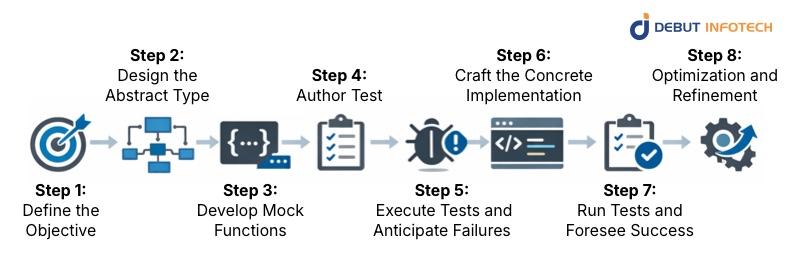
The development process begins with clearly defining the application’s objective, user requirements, and expected functionality. Developers outline the problem the software will solve and the outcomes it must deliver. These clear goals help guide AI tools in generating relevant code suggestions, architectural ideas, and implementation paths during later stages.
In this stage, developers define the core structures, data models, and interfaces that describe how different components of the application will interact. The abstract design serves as a blueprint for the system. AI tools can then use this structure to generate appropriate implementations while maintaining alignment with the intended architecture.
Mock functions are placeholder implementations that simulate how specific components of the application should behave. Developers create these simplified versions to outline expected inputs and outputs. AI tools can analyze these mock structures to generate more complete implementations later while ensuring the system logic remains consistent.
Developers write test cases that define how the application should perform under different conditions. These tests establish clear expectations for functionality, performance, and reliability. AI-assisted development tools can also help generate additional test scenarios to ensure the application behaves correctly before full implementation begins.
The initial tests are executed against the mock implementations to identify gaps in logic or missing functionality. At this stage, failures are expected because the full implementation is not yet complete. These early test results help developers understand what needs to be built or adjusted in the next development phase.
Developers now implement functions and components in full, based on the defined structures and test expectations. AI coding assistants may generate code suggestions, recommend logic improvements, or highlight potential issues. Developers refine these outputs to ensure the system operates correctly and aligns with architectural goals.
Once the concrete implementation is complete, the previously written tests are executed again to confirm that the application meets the defined requirements. Successful results indicate that the system behaves as expected. Developers review the outcomes carefully and address any remaining issues before moving forward with optimization.
The final step focuses on improving system performance, security, and maintainability. Developers refine the codebase, remove inefficiencies, and strengthen application reliability. AI-driven tools can assist by identifying performance bottlenecks, suggesting improvements, and analyzing code quality to ensure the software remains stable and scalable.
Teams should begin by understanding what AI tools can and cannot reliably accomplish in software development. AI systems assist with automation, pattern recognition, and code suggestions, but they do not replace engineering judgment. Developers must carefully evaluate outputs and ensure that generated solutions meet performance, security, and maintainability expectations.
Successful AI-driven development begins with clearly defined goals. Teams must outline the project’s functionality, technical requirements, and desired outcomes before integrating AI tools. Clear objectives help AI systems generate more relevant suggestions while allowing development teams to evaluate outputs against measurable targets and defined business priorities.
AI tools should be integrated carefully into existing development workflows and environments. This includes connecting AI coding assistants, testing systems, and automation tools with current development pipelines. Proper integration ensures teams can benefit from automation without disrupting established coding practices, version control processes, or collaboration structures.
Effective AI-driven development depends on collaboration between developers, product managers, designers, and quality assurance teams. AI-generated outputs still require discussion, review, and coordination. Shared understanding across teams helps ensure that automated suggestions align with the broader product vision and technical standards established within the organization.
AI-powered testing tools should be integrated into the development process to maintain software quality. Automated test generation, continuous testing pipelines, and intelligent defect detection help identify problems earlier. When testing becomes a consistent part of the workflow, development teams can maintain reliability while accelerating feature development and deployment cycles.
AI systems capable of generating code dynamically can significantly accelerate development workflows. These tools analyze project context, existing code structures, and developer prompts to produce working implementations. Developers must still validate the generated code and refine it where necessary to ensure performance, security, and maintainability standards are satisfied.
AI-driven debugging tools analyze code patterns and runtime behavior to identify possible errors or inefficiencies. These AI algorithms can highlight problematic functions, detect logic inconsistencies, and recommend fixes. Developers benefit from faster problem identification while maintaining full responsibility for validating and implementing the suggested corrections.
AI powered development tools improve over time when developers provide feedback on generated outputs. Teams should establish feedback loops where developers refine prompts, correct AI suggestions, and train systems using project data. Continuous learning helps AI tools produce more accurate results and adapt to the organization’s preferred development practices.
Performance optimization remains an important responsibility for development teams. AI tools can analyze execution patterns, identify performance bottlenecks, and recommend improvements to system efficiency. Developers evaluate these insights carefully and implement adjustments that improve responsiveness, scalability, and overall application performance.
AI-driven development often relies on large datasets, code repositories, and training inputs. Proper data management ensures these resources remain organized, secure, and accessible. Development teams must establish clear policies for storing, processing, and protecting data used by AI systems throughout the software lifecycle.
Organizations implementing AI-driven development must address ethical considerations, including responsible AI usage, intellectual property concerns, and data privacy. AI development companies should establish internal guidelines for reviewing AI-generated code and ensure the software they build complies with regulatory requirements and ethical development standards.
The AI-powered software development ecosystem evolves quickly, with new tools and techniques appearing frequently. Teams must stay informed about advancements in AI coding assistants, automation frameworks, and machine learning models. Continuous learning helps developers maintain effective workflows and adopt technologies that improve development efficiency and reliability.
Code reviews remain essential in AI-driven development environments. Even when AI generates large portions of code, developers must review implementations carefully to verify correctness and maintain coding standards. Structured review processes ensure that automation enhances productivity while preserving the quality and maintainability of the final software product.
AI models learn from existing datasets and code repositories, which may contain biases or outdated practices. These biases can influence the code suggestions generated by AI systems. Developers must review outputs critically and ensure that generated solutions follow current standards, security practices, and ethical development guidelines.
AI-driven development tools often require significant computing resources, including powerful processors, cloud infrastructure, and large storage capacities. Organizations must invest in reliable technical environments that support model training, code analysis, and real-time AI assistance. Infrastructure planning becomes important for maintaining performance and development efficiency.
AI-generated code may raise questions related to intellectual property, licensing, and regulatory compliance. Organizations must establish clear policies for using AI outputs within software products. Developers should also ensure that AI tools do not include copyrighted material or violate the legal standards governing software distribution.
One of the main challenges is maintaining a balanced collaboration between AI tools and human developers. Overreliance on automation may reduce developer oversight, while limited use may prevent teams from gaining productivity benefits. Organizations must design workflows where AI supports development while engineers remain responsible for decisions.
Human oversight helps ensure that AI-generated outputs adhere to ethical standards and avoid biased or harmful outcomes. Developers review automated suggestions and verify that software behavior aligns with fairness, transparency, and responsible development practices. This oversight helps organizations build systems that respect ethical guidelines while maintaining trust among users and stakeholders.
AI tools can generate useful code and recommendations, but they may still produce errors or incomplete logic. Human developers review generated outputs to confirm accuracy and reliability. This validation step ensures that applications function correctly, meet technical requirements, and maintain consistent quality across different components of the software system.
Human feedback helps AI systems improve over time. When developers correct AI-generated code, adjust prompts, or refine outputs, the system gains useful learning signals. This continuous interaction allows AI tools to produce more accurate suggestions in future projects while adapting to the coding practices and development preferences of the team.
AI systems may understand programming patterns but often lack deep knowledge of specific industries or business requirements. Human experts contribute domain knowledge that guides system design and decision-making. Their input ensures that the final software solution addresses real operational needs and reflects the practical expectations of the target environment.
Human supervision improves trust in AI-assisted development processes. Developers review how AI-generated outputs are generated and confirm that they comply with established coding standards. Transparent oversight enables organizations to explain development decisions, demonstrate accountability, and maintain confidence among stakeholders who rely on the software they produce.
Many industries operate under strict regulatory frameworks that require clear accountability for software systems. Human oversight ensures that AI-generated code follows compliance rules, data protection standards, and internal governance policies. Developers remain responsible for verifying that applications meet legal obligations before they are released into production environments.
Complex architectural choices, performance trade-offs, and system integrations often require careful reasoning and contextual judgment. AI tools can assist by generating options or recommendations. Still, developers or AI Consultants evaluate those choices and determine the most suitable approach. Human decision-making ensures that software architecture aligns with long-term operational goals.
Agentic AI refers to intelligent systems capable of performing development tasks independently, including generating code, running tests, and resolving issues across projects. These autonomous agents operate within defined workflows and interact with development tools. As these systems mature, they are expected to automate larger portions of software engineering activities.
Natural language software engineering enables developers to describe system requirements, features, and behaviours in everyday language rather than complex programming syntax. AI tools interpret these descriptions and convert them into functional code. This approach can simplify development workflows and enable faster prototyping, especially during early product development stages.
Traditional development cycles often rely on multi-week sprint structures. With AI-driven software development, teams can produce working features much faster. Shorter development bursts, sometimes described as “bolts,” allow engineers to generate, test, and deploy improvements rapidly, enabling organizations to respond more quickly to changing product requirements.
Future development environments are expected to integrate artificial intelligence directly into every stage of the software pipeline. AI-native IDEs will assist with planning, coding, testing, debugging, and deployment in a unified environment. This integration will allow developers to move between tasks more efficiently while maintaining strong visibility across the AI-driven development lifecycle.
Self-healing software systems use AI to monitor application behavior and automatically detect errors, performance issues, or system failures. When problems occur, the system can recommend fixes or apply automated corrections. This capability reduces downtime, improves reliability, and allows development teams to maintain stable applications with less manual intervention.
AI-driven development is changing how modern software is planned, built, tested, and maintained. By combining intelligent automation with human expertise, development teams can accelerate coding, strengthen testing processes, and improve overall software quality. As AI tools continue to mature, organizations that adopt AI-driven development thoughtfully will gain faster delivery cycles, better scalability, and more reliable digital products.
Companies looking to implement AI-driven development effectively can benefit from expert technical guidance. Debut Infotech, an experienced enterprise AI development company, helps businesses integrate advanced AI tools into real-world software workflows. Our team builds intelligent solutions that accelerate development, automate engineering tasks, and support scalable digital platforms across modern technology environments.
A. AI-driven development often relies on tools that help automate coding, testing, and data analysis. Popular options include GitHub Copilot, TensorFlow, PyTorch, and OpenAI Codex. Developers also use platforms like Kubernetes to manage AI-powered applications. These tools handle repetitive tasks, suggest code, and speed up the development cycle.
A. Traditional development depends heavily on manual coding and step-by-step testing. AI-driven development shifts part of that workload to intelligent systems. AI tools can suggest code, detect bugs early, and analyze large datasets during development. Developers still guide the process, though the workflow moves faster and requires fewer repetitive tasks.
A. Several sectors lean heavily on AI-driven development. Healthcare uses it to analyze medical data and support diagnostics. Finance applies it to fraud detection and risk analysis. Retail relies on it for recommendation systems and demand prediction. Manufacturing, logistics, and automotive companies also use AI-powered development to automate processes and improve decision-making.
A. Implementation time varies depending on company size, technical readiness, and project goals. Smaller teams experimenting with AI tools might set things up in a few weeks. Larger organizations building full AI-driven workflows often spend several months integrating tools, training teams, and adjusting existing development processes.
A. Costs can vary widely. A small AI-driven project might cost a few thousand dollars if it uses existing tools and limited data. Larger enterprise systems can run into six figures due to infrastructure, data preparation, and engineering work. Ongoing expenses often include cloud services, AI tools, and maintenance.

Our Latest Insights

USA

2501 Chatham, Rd Suite R Springfield, IL 62704
+1-708-515-4004
info@debutinfotech.com
UK

7 Pound Close, Yarnton, Oxfordshire, OX51QG
+44-770-304-0079
info@debutinfotech.com
Canada

154 Eden Oak Trail, Kitchener, ON N2A 0H9
+1-708-515-4004
info@debutinfotech.com
INDIA

Sector 101-A, Plot No: I-42, IT City Rd, JLPL Industrial Area, Mohali, PB 140306
9888402396
info@debutinfotech.com

9001:2015
Quality Certified

ISO 27001
Security Certified

A+ Rating
Accredited Business

Certik
Security & Audit


Copyright © 2026, Debut Infotech. All rights reserved. | Privacy Policy