ON THIS PAGE
Progress0%






Our Global Presence :





Education app development requires alignment between learning objectives, user needs, instructional content, and scalable technology.
Choosing the right app type such as an LMS, e-learning platform, microlearning app, tutoring app, or assessment solution—depends on the target users and learning goals.
Core features such as multimedia content, assessments, progress tracking, analytics, notifications, offline access, and secure payments should match the app’s intended use rather than add unnecessary complexity.
Scalable architecture, APIs, and suitable mobile app development frameworks help education applications support growing users, integrations, and evolving platform requirements.
Security and accessibility should be built into the development lifecycle through secure authentication, encryption, access controls, inclusive design, and appropriate data protection practices.
Custom education app development provides greater control and adaptability than off-the-shelf platforms, while typically requiring more upfront planning and investment.
Education app development cost and timeline vary according to app type, feature complexity, platforms, integrations, and maintenance needs, making early resource planning essential.
As more schools, colleges, training providers, and businesses utilise digital platforms to deliver learning experiences, the demand for education app development services has rapidly increased. Mobile and web-based education apps are becoming the primary means by which students access information, communicate with teachers, and track their progress. Education applications are now vital for providing flexible, scalable, and individualized learning, from K–12 to professional development.
As digital learning continues to evolve, companies that want to develop educational apps need to know more than just which technology to use. Clear learning goals, user-centered design, and the flexibility to evolve are all essential for effective education apps. This article provides in-depth details on creating education apps, including the basics, the most common types of apps, key considerations for development, and the primary benefits driving their global popularity in the education apps industry.
Education app development refers to the process of designing, building, and maintaining digital applications that support teaching, learning, assessment, and educational management. These apps can be built for mobile devices, tablets, or web platforms and are often tailored to specific learning audiences or institutional needs.
Unlike general consumer apps, educational apps must strike a balance between usability and instructional effectiveness. They often integrate multimedia content, assessments, progress tracking, and collaboration features. As a result, edtech app development requires close alignment between technical teams, educators, and content creators to ensure the final product delivers meaningful learning outcomes.
The global education apps market continues to expand as digital learning becomes mainstream. Factors such as increased smartphone usage, the adoption of remote learning, and the demand for lifelong learning have driven a surge in investment in education technology.
Educational institutions and private organizations are increasingly turning to mobile app development for educational institutions to improve accessibility and engagement. At the same time, learners expect intuitive interfaces, interactive content, and on-demand access, prompting education app development companies to continually innovate.
Education application development is driven by several key objectives that shape how apps are designed and deployed:
These objectives guide decisions throughout the mobile app development lifecycle for education-focused platforms.
Education apps cater to a diverse range of audiences, learning formats, and institutional objectives. From formal academic environments to professional training and informal learning, each app type is designed to address specific educational needs. Understanding these categories helps organizations make informed decisions when developing an educational app that aligns with their learners, content strategy, and long-term growth plans.
| Education App Type | Primary Use Case | Target Users | Typical Features |
| Learning Management System (LMS) Apps | Centralized course and learner management | Schools, universities, enterprises | Course management, assessments, analytics, instructor dashboards |
| E-Learning & Course-Based Apps | Structured self-paced learning | Individual learners, professionals | Video lessons, quizzes, certificates, progress tracking |
| Skill Development & Microlearning Apps | Short, focused skill acquisition | Mobile-first learners, professionals | Bite-sized lessons, repetition, progress tracking |
| Tutoring & Live Learning Apps | Real-time instruction and guidance | Students, exam candidates | Live video, scheduling, chat, screen sharing |
| Assessment & Exam Prep Apps | Knowledge evaluation and readiness testing | Test-takers, certification candidates | Mock exams, timed tests, performance analytics |
| Educational Games & Gamified Apps | Engagement-driven learning | Children, casual learners | Game mechanics, rewards, interactive challenges |
Learning Management System (LMS) apps act as centralized platforms for delivering, managing, and tracking educational content. They are widely used by schools, universities, enterprises, and training organizations to organize courses, assignments, assessments, and learner progress in one place.
LMS apps typically support features such as course enrollment, content uploads, grading systems, progress analytics, and instructor dashboards. Their structured nature makes them ideal for formal education and corporate training environments where consistency, reporting, and scalability are critical.
E-learning and course-based apps focus on delivering structured learning programs through digital formats. These apps often include pre-recorded video lessons, interactive modules, quizzes, and completion certificates. They are commonly used by online learning platforms, professional training providers, and independent educators.
This app type supports self-paced learning, enabling users to progress at their own pace. For organizations entering the education apps market, course-based apps are a popular choice due to their flexibility and broad audience appeal.
Skill development and microlearning apps are designed for short, focused learning sessions. Instead of long courses, these apps break content into small, digestible lessons that learners can complete quickly and easily. They are widely used for language learning, technical upskilling, soft skills training, and continuous professional development.
Microlearning apps are particularly effective for mobile-first users, as they fit naturally into daily routines. Their design emphasizes repetition, progress tracking, and practical application, making them a strong option for developing job-ready skills.
Tutoring and live learning apps enable real-time interaction between learners and instructors. These platforms support one-on-one or group sessions through video calls, live chat, screen sharing, and collaborative tools. They are commonly used for personalized tutoring, exam preparation, and subject-specific coaching.
Live learning apps place strong emphasis on scheduling, communication, and session management. They are especially valuable for learners who benefit from direct guidance and immediate feedback.
Assessment and exam preparation apps focus on evaluating learner readiness through practice tests, quizzes, and performance analytics. These apps are widely used for standardized exams, certifications, and academic assessments.
Key features often include mock exams, timed tests, detailed score analysis, and personalized recommendations based on performance. This app type helps learners identify knowledge gaps and track improvement over time.
Educational games and gamified learning apps combine instructional content with game mechanics such as points, levels, rewards, and challenges. These apps are particularly effective for younger learners, but they are also increasingly used in adult learning.
Gamification enhances motivation, engagement, and knowledge retention by making learning an interactive and enjoyable experience. When designed correctly, these apps strike a balance between entertainment and educational objectives, ensuring that learning outcomes remain the primary focus.
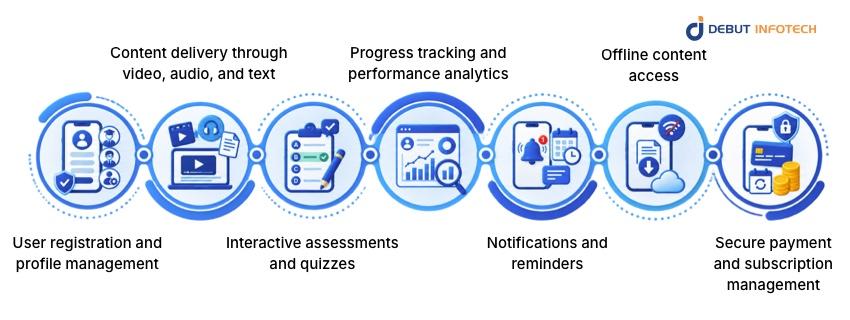
While features vary by app type, most successful education apps share several core functionalities:
Selecting the correct feature set is a crucial step in custom education app development, as unnecessary complexity can significantly impact the usability of the app.
Although this guide does not go into full technical depth, understanding the education app development process at a high level helps stakeholders plan effectively.
The process typically includes requirement analysis, UI/UX design, development, testing, deployment, and ongoing maintenance. Each stage aligns with the broader mobile app development lifecycle, ensuring the app remains stable, secure, and scalable over time.
Close collaboration between product owners, designers, developers, and educators is essential throughout this process to maintain alignment with learning goals.
Modern education apps rely on robust mobile app development frameworks that support scalability and cross-platform compatibility. Choosing the right framework helps reduce development time and ensures consistent performance across devices.
API development plays a crucial role in education apps, enabling integration with third-party services such as video streaming platforms, payment gateways, analytics tools, and content management systems. Well-designed APIs improve flexibility and future-proof the application.
Education apps must handle varying user loads, especially during peak learning periods or live sessions. Scalable architecture ensures smooth performance as the user base grows.
User experience is a key factor in the success of education apps. Apps must be intuitive for learners of different ages and technical backgrounds. Clear navigation, readable interfaces, and responsive design are essential for a seamless user experience.
Accessibility considerations, such as support for assistive technologies and inclusive design, are increasingly important in education application development. Apps that prioritize accessibility reach broader audiences and comply with educational standards.
Education apps often handle sensitive data, including personal information, academic records, and payment details. Strong security practices are crucial for protecting user trust.
Key security considerations include data encryption, secure authentication, role-based access controls, and compliance with data protection regulations. Education app development companies must embed security measures throughout the development lifecycle rather than treating them as an afterthought.
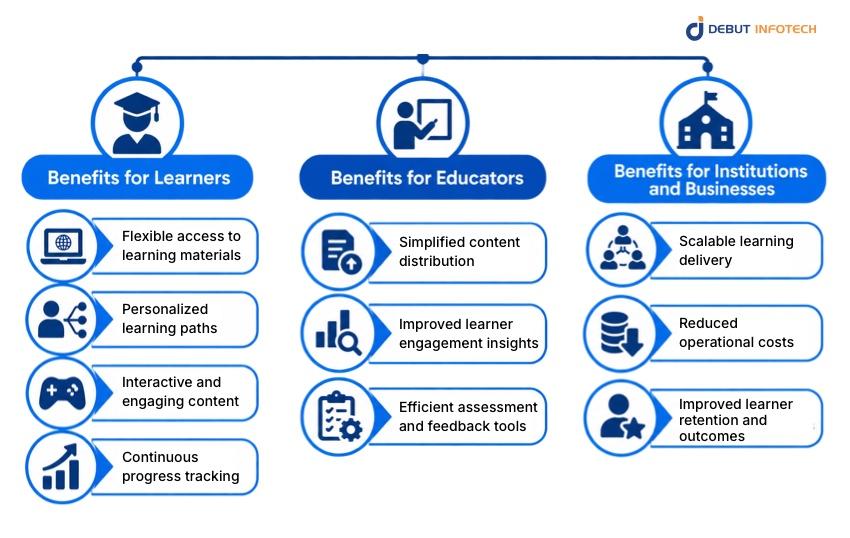
The growing adoption of digital learning platforms underscores the numerous benefits of education app development for learners, educators, and institutions.
These benefits explain why organizations across various industries continue to invest in edtech app development to support modern, efficient, and scalable learning environments.
Organizations often choose between custom-built education apps and ready-made platforms. Custom education app development offers greater flexibility, control over branding, and alignment with specific learning objectives.
While off-the-shelf solutions may reduce initial development time, they often limit customization and scalability options. Many institutions prefer to work with an experienced educational mobile app development company to build tailored solutions that evolve with their changing needs.
The mobile app development timeline for education apps varies based on complexity, features, and platform requirements. Planning resources early helps manage expectations and ensures smoother execution.
Organizations often choose to hire dedicated mobile developers to maintain focus, accelerate development, and support long-term maintenance. Dedicated teams provide continuity and a deeper understanding of the product over time.
Education app development cost depends on factors such as app type, feature complexity, platform selection, and integration requirements. While cost is an important consideration, long-term value and scalability should guide investment decisions.
Engaging experienced education app development companies helps organizations avoid costly rework and ensures efficient use of development budgets.
Selecting the right education app development company is critical for project success. Organizations should evaluate partners based on industry experience, technical expertise, communication practices, and post-launch support capabilities.
Many organizations benefit from collaborating with a trusted provider like Debut Infotech, especially when building scalable, secure, and user-centric education applications tailored to specific learning goals.
Education app development continues to evolve in tandem with advances in technology and learning methodologies. Emerging trends include AI-driven personalization, immersive learning experiences, and data-driven insights to improve outcomes.
Staying aware of these trends helps organizations plan future-ready platforms that remain competitive in the expanding education apps market.
Education app development has become a strategic priority for institutions and organizations seeking to deliver accessible, engaging, and scalable learning experiences. From understanding the types of education apps to recognizing the benefits and key development considerations, a structured approach is essential for success. Thoughtful planning, user-focused design, and scalable technology choices form the foundation of effective education application development.
By working with experienced partners like Debut Infotech, organizations can navigate the complexities of education app development with confidence. With the right strategy and execution, Debut Infotech helps transform learning ideas into impactful digital solutions that support long-term growth, innovation, and meaningful educational outcomes.
Q. What is education app development?
Education app development is the process of designing and building digital applications that support learning, teaching, assessment, and educational management. It includes mobile and web apps created for students, educators, institutions, and training providers, often tailored to specific learning goals or audiences.
Q. What types of education apps are most common today?
Common types include learning management system (LMS) apps, e-learning and course-based apps, skill development and microlearning apps, tutoring and live learning apps, assessment and exam preparation apps, and educational games. Each type serves different needs within the education apps market.
Q. How long does it take to develop an education app?
The mobile app development timeline varies depending on app complexity, features, and platform requirements. Simple education apps may take a few months to develop, while feature-rich platforms with integrations and scalability needs can take longer to develop and refine.
Q. What factors influence education app development cost?
A. The cost of education app development is influenced by several factors, including app type, number of features, design complexity, choice of mobile app development frameworks, API development requirements, and post-launch maintenance. Custom education app development typically requires a higher initial investment but offers greater long-term flexibility.
Q. Why is custom education app development important for institutions?
Custom education app development enables institutions to tailor the app to their specific learning objectives, branding, and operational requirements. Unlike off-the-shelf solutions, custom apps can scale more easily and adapt to evolving educational requirements.
Q. How do education apps ensure data security and privacy?
Education apps employ security measures such as data encryption, secure authentication, access controls, and adherence to data protection standards. Working with experienced education app development companies helps ensure security is built into every stage of the mobile app development lifecycle.
Q. How do organizations choose the right education app development company?
Organizations should evaluate an education app development company based on industry experience, technical expertise, communication approach, and long-term support capabilities. Many also choose to hire dedicated mobile developers to ensure consistent development and ongoing maintenance support.

Our Latest Insights

USA
2501 Chatham, Rd Suite R Springfield, IL 62704
+1-708-515-4004
info@debutinfotech.com
UK
7 Pound Close, Yarnton, Oxfordshire, OX51QG
+44-770-304-0079
info@debutinfotech.com
Canada
154 Eden Oak Trail, Kitchener, ON N2A 0H9
+1-708-515-4004
info@debutinfotech.com
INDIA
Sector 101-A, Plot No: I-42, IT City Rd, JLPL Industrial Area, Mohali, PB 140306
9888402396
info@debutinfotech.com