ON THIS PAGE
Progress0%



Our Global Presence :




If your team wastes a lot of time searching emails, dashboards, or in disorganized documents to find answers, you are not alone. McKinsey & Company estimates that knowledge workers spend almost 20% of their workweek searching information, that is, one day wastage per week.
This is where enterprise AI knowledge assistants come into play.
Consider it as an intelligent ever-present internal consultant. It leverages high-quality AI, such as large language model (LLMs) and semantic search, to find, comprehend, and provide the exact information your team requires, at the moment they require it. There is no longer the need to alternate between tools and wait for the responses of colleagues.
The impact isn’t theoretical. According to studies by Forbes, more than 60% of the organizations that use AI have reported a noticeable increase in productivity, particularly in the reduction of workflow and decision-making processes. Numerous organizations are already reducing search time by a significant margin and enhancing the way teams search and utilize knowledge.
But here’s the catch: the real value doesn’t just come from speed. The most useful AI knowledge assistants are developed with secure integrations, robust compliance frameworks, and trusted data governance, so that sensitive business data is kept safe and still easily accessible.
So the question isn’t whether this technology works, it’s how to choose, implement, and scale it effectively in your organization.
Let’s break down exactly how it works, what to look forward to and how major companies are already using it to be ahead of others.
An enterprise AI knowledge assistant is an intelligent system that assists employees to locate and apply business knowledge in actual time. Rather than making people go through disorganized documents, chat messages, portals, and internal applications, it consolidates the appropriate information and transforms it into actionable, understandable responses.
What makes it different is that it does more than retrieve content. Artificial intelligence will enable it to comprehend the questions, find the necessary information in various sources and provide it in a form that will be easy to act on. In most cases, it integrates technologies including internal copilots, Retrieval-Augmented Generation (RAG), enterprise search, and knowledge graphs to enhance both pertinence and precision.
Traditional knowledge bases are mainly designed to store information. They use manual searching a lot and often result in the listing of documents, which the user has to assemble the answer.
An enterprise AI knowledge assistant takes a different approach. It understands context, connects information across multiple sources, and delivers direct answers. This removes the need for employees to interpret scattered data on their own.
An AI-powered knowledge base system operates silently in the background, yet the manner in which it provides rapid and precise answers is presented in a logical and clear sequence. After knowing the steps, you will have an idea why this technology is so effective in real world business environments.
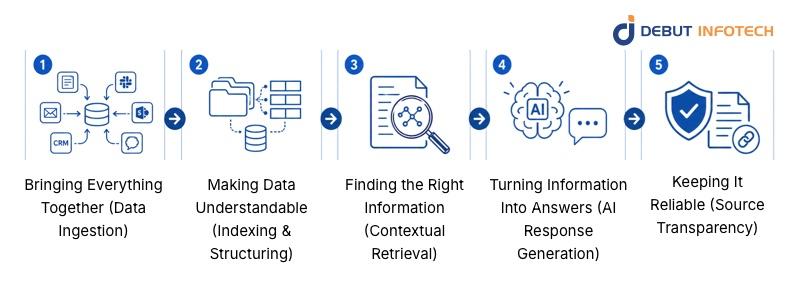
The first step is connecting all your knowledge sources.
This includes internal documents, CRM systems, communication tools like Slack, cloud storage like SharePoint, and even emails or support tickets. The system integrates all things into a single layer instead of employees having to switch platforms.
Here the point is completeness.
The more useful data the system can retrieve, the more helpful and accurate the answers will be.
Raw data in itself is not very useful to AI- it requires organization.
At this level, the system will divide information into small meaningful units and arrange them in a manner that will enable them to be retrieved quickly and efficiently. It also knows the relationships among ideas, topics and terms.
This is what allows the system to go beyond basic search and actually “understand” what’s stored.
Whenever a user poses a question, the system does not simply scan to find matching words, it searches the meaning.
It examines the purpose of the query and obtains the most meaningful bits of information of the indexed data. This ensures that the results are accurate, focused, and useful.
This step is crucial because poor retrieval leads to poor answers. Well-constructed systems are created to filter noise and bring out only what is important.
After getting the appropriate data, the AI system takes it and creates a definite answer.
Instead of presenting raw documents, it:
This is where the actual productivity increase occurs, employees no longer have to interpret various documents by themselves.
The enterprise setting requires accuracy and trust.
This is why in most cases the system will have references or links to the original sources that were employed to create the answer. This will enable the user to verify, check the context and use the output to make decisions.
This is very crucial in regulated industries where traceability is of importance.
What does this really look like within a business? The following are some real-world applications of a company making use of an enterprise AI knowledge assistant, which operates on large language models, to solve common problems.
No more searching through previous tickets and fragmented documentation by support teams. The AI has the ability to propose correct answers immediately by accessing previous conversations and internal knowledge bases. The outcome is faster resolutions, fewer multiple answers, and reduced work on the support agents, particularly in times of high volume.
In the case of new employees, onboarding usually involves hopping between various systems to locate simple information. With an AI assistant, they can just ask a question and get a clear and contextual answer within a matter of seconds. This does not only save time, but it makes employees feel confident and productive earlier.
Sales reps usually require fast access to case studies, product information or how to deal with objections. Rather than having to search manually, the AI will present the most relevant material immediately, based on what they are discussing. That translates to improved tunes, increased reaction and more knowledgeable decision-making in crucial situations.
Speed and accuracy are critical in a healthcare context. AI assistants can assist clinical staff in accessing protocols, guidelines, and patient-related procedures promptly. But this is accompanied by rigorous obligations, systems should be constructed to comply with data privacy and compliance requirements, and sensitive information must be kept securely at all times.
When properly implemented, AI integration doesn’t merely make everything faster, it transforms the way work is actually done within your organization. Here’s what that looks like in practice:
Most companies have delays in decision-making as people are waiting on information-searching through tools, consulting with colleagues, or data verification. Answers are provided immediately with AI integration, in most cases, with context and source information. This is because managers, support teams, and even the executives are able to make informed decisions in minutes rather than hours without having to second guess the information they are utilizing.
A lot of hidden costs in businesses come from time wasted on repetitive tasks, answering the same questions, searching for documents, or manually pulling data. AI makes this friction less, as it makes knowledge retrieval and routine responses automatic. In the long run, it results in a reduction in the number of support tickets, a decrease in reliance on manual processes, and utilization of current staff more effectively, allowing organizations to scale without the need to constantly raise costs.
Most organizations have valuable knowledge that is distributed in emails, documents, and various platforms, in most cases confined to certain teams or individuals. The integration of AI helps to bridge these sources and enable people to find information and provide it to everyone who requires it. The outcome is a more transparent and informed work environment in which employees can get what they need without having to go through gatekeepers.
Alternating between various tools, remembering the whereabouts of files, and reconstructing information can be mentally demanding. This reduces productivity and causes errors in the long run.
When AI is the one-point access, employees do not need to wander to find the information, they just need to ask and receive answers. This lessens the psychological burden and enables them to work on more meaningful, high-impact work.
Using outdated or inconsistent information is one of the largest risks of decision-making. Manual upgrades are often required to traditional systems and may create gaps.
The integration of AI is based on live and connected sources of data, and it assists in maintaining the presence of the latest information in responses. This improves accuracy, alignment across teams, and overall confidence in business decisions.
Not all AI tools are prepared to be used in real enterprise. When evaluating LLM knowledge assistants, the key is to look beyond surface-level capabilities and focus on features that directly impact security, accuracy, and day-to-day usability.
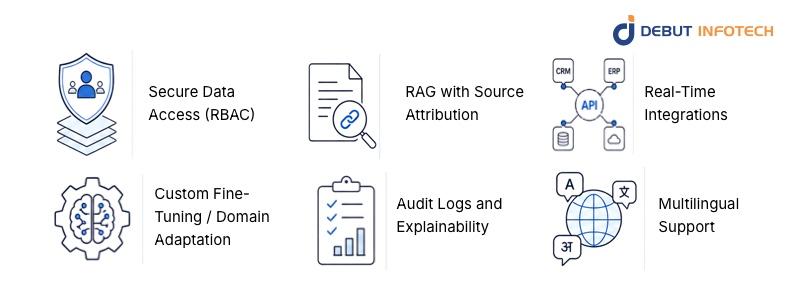
The following is what each critical feature really entails in practice:
Not everybody needs to see everything at the enterprise level and that is a good thing.
Role-Based Access Control (RBAC) is used to make sure that employees access only the information that is of interest to them in terms of role, department, or permission level. As an illustration, HR data remains accessible to HR only, whereas reports about finances are confined to finance teams.
This is not just safeguarding sensitive information but also establishing trust in the system. Employees are more confident with a tool that observes boundaries of data, and companies remain aligned with rigid data protection laws.
One of the biggest risks with AI is getting confident but incorrect answers.
That is where Retrieval-Augmented Generation (RAG) comes in. The system does not just rely on pre-trained knowledge but instead extracts information out of your company data sources and then comes up with a response.
Even more important is source attribution. The assistant must demonstrate the source of the answer, be it a policy document, knowledge base article or internal report.
This will enable users to:
The usefulness of an AI assistant is limited to the data that it has access to. This is why real-time integrations are needed.
An effective system links to tools such as:
This enables the assistant to provide live and context-based responses, including real-time sales data, customer history, or operational information, without the end-users needing to cross-platform.
Each organization has its processes and priorities. This context is usually overlooked by generic AI tools, resulting in vague or irrelevant answers.
This means it can:
The result is a system that feels less like a generic chatbot and more like an experienced team member.
Transparency is not a choice in an enterprise setting; it is mandatory.
Audit logs record the use of the system: by whom was requested, what data was accessed, and what responses were produced. This is necessary to track performance, maintain compliance and inquiry of problems in the event of occurrence.
Explainability goes a step further. It assists users to comprehend how the AI reached a certain solution. This is particularly significant in high stakes settings such as healthcare, finance or legal processes where one would be required to justify decisions taken.
Contemporary organizations are usually international and language can easily be an obstacle.
This is made possible with the multilingual support, whereby employees can still communicate with the assistant, using their language of choice, but still enjoy the same centralized knowledge base.
This improves:
It also ensures that valuable knowledge is not limited to a single language, making the system more inclusive and effective.
Comparing the traditional knowledge management system with a modern AI knowledge assistant, the difference will be immediately apparent, not only in the speed, but also in the way people are getting value out of information.
| Feature | Traditional KM | AI Knowledge Assistant |
| Search | Keyword-based (requires exact terms) | Semantic + contextual (understands intent) |
| Output | Static documents or links | Direct, synthesized answers |
| Speed | Slower, manual navigation | Instant, real-time responses |
| Intelligence | No reasoning capability | Reasoning-enabled (connects insights) |
Traditional systems are designed to store and access documents, so it often requires employees to devote some time to searching, opening files, and assembling information on their own.
An AI knowledge assistant, conversely, is not simply designed to provide information but answers. It interprets queries using simple language, retrieves corresponding information across various databases, and provides a comprehensible answer instantly.
In simple terms, one assists you to seek knowledge, and the other assists you utilize it productively.
When it comes to actual deployments, particularly in the case of using the ai development services, a few obstacles are likely to cause the process to drag. The good news? All of them can be solved with the right approach.
When your data is old, disjointed, or irregular, then your AI system will not provide accurate answers. Think of it in the following manner: the smartest system cannot correct disorganized inputs. The solution is to invest in effective data governance, cleaning, organizing, and updating your data on a regular basis, so that AI can work with something dependable.
This is among the biggest concerns of enterprises. The moment AI creates answers that are not based on actual data, trust is quickly lost. One known solution is Retrieval-Augmented Generation (RAG) with validation layers. This guarantees that responses are drawn out of authenticated internal sources and can be traced back, making outputs much more dependable.
The most successful AI system will not work when people do not use it. One of the misconceptions is that it is a distinct tool that employees need to go and examine. Alternatively, integrate the assistant with daily processes, such as Slack, Teams, or CRM systems, so that it becomes a part of work processes.
Once these issues are resolved early, AI is no longer a mere tool, it is something that a team can count on, and that is where the real value will be reflected.
The right solution is not a question of selecting the most popular tool, it is one that suits your business on the way it functions today and where it is going. When you want to hire AI developers or cooperate with a vendor, the following questions are the ones that matter:
Your AI solution is expected to connect to your existing systems, such as CRM or ERP, or your internal systems, without requiring a total upgrade. When integration is unpleasant, so will be adoption.
You’re dealing with sensitive business information. Find solid access controls, encryption, and transparent data governance. If a solution cannot provide a guarantee of securing your data, it is not enterprise-ready.
What works for one team today should still work when implemented across the entire organisation. An excellent solution is one that develops along with your needs, not contrary to them.
Your AI should give the source of its answer, and not just provide answers. This is essential in decision making, compliance and user confidence.
The most sophisticated option is not necessarily the best option at the end of the day, it’s the one that your team can truly depend on, easily access and can be scaled without difficulty.
Implementing enterprise AI knowledge assistant is not a mere technological upgrade, but a strategic change in the way organisations access, consume, and scale knowledge. However, what truly matters is the fact that you have a solution that is custom-made to your business, not the tool that fits all.
This is where we come in.
At Debut Infotech, we focus on creating bespoke AI systems that suit your individual workflows, data landscape, and business objectives. We don’t believe in generic solutions. Rather, we build enterprise AI knowledge assistants that are seamlessly integrated with your existing systems and provide accurate and explainable insights, as well as, satisfy rigorous security and compliance standards.
Whether it is selecting the appropriate architecture, or adding sophisticated features such as Retrieval-Augmented Generation (RAG), our methodology will make your AI solution not only powerful, but also practical and scalable. Whether it is pilot launch or cross-department deployment, we develop long term performance and flexibility.
Our goal is simple: to help you turn your internal knowledge into a true competitive advantage. If you’re looking for a partner that can build a solution around your needs, not force you into a template, we’re ready to help you get there.
A. An enterprise AI knowledge assistant is a secure, AI-powered tool that helps employees quickly find and use company information.
It works like a smart teammate. You ask questions in plain language, and it gives clear, direct answers.
Unlike basic chatbots, it doesn’t just return links. It pulls from your internal data, like documents, wikis, and business systems, to provide accurate, context-aware responses using technologies like Retrieval-Augmented Generation (RAG).
A. The cost varies depending on complexity and level of customization. Simpler systems, such as RAG-based solutions for internal documents, typically range from $30,000 to $80,000. More robust enterprise systems with integrations and advanced features usually cost between $50,000 and $300,000+. Highly customized, large-scale multi-agent systems can exceed $500,000.
In addition to the initial build, you should also expect ongoing costs for hosting, maintenance, updates, and AI model usage.
A. AI knowledge assistants combine Large Language Models (LLMs) with Retrieval-Augmented Generation (RAG) to deliver accurate, real-time answers from your enterprise data. They first search internal sources like documents, databases, and wikis to find relevant, up-to-date information. Then, the LLM uses that context to generate a clear and reliable response.
This approach ensures answers are based on your live data, not just the model’s pre-trained knowledge. It also allows secure integration with internal systems without the need to retrain the model, making deployment faster and more efficient.

Our Latest Insights
USA

2501 Chatham, Rd Suite R Springfield, IL 62704
+1-708-515-4004
info@debutinfotech.com
UK

7 Pound Close, Yarnton, Oxfordshire, OX51QG
+44-770-304-0079
info@debutinfotech.com
Canada

154 Eden Oak Trail, Kitchener, ON N2A 0H9
+1-708-515-4004
info@debutinfotech.com
INDIA

Sector 101-A, Plot No: I-42, IT City Rd, JLPL Industrial Area, Mohali, PB 140306
9888402396
info@debutinfotech.com

9001:2015
Quality Certified

ISO 27001
Security Certified

A+ Rating
Accredited Business

Certik
Security & Audit


Copyright © 2026, Debut Infotech. All rights reserved. | Privacy Policy