ON THIS PAGE
Progress0%






Our Global Presence :





Swift for Android App Development is gaining attention as teams look for practical ways to reduce duplicated effort across mobile platforms. Originally built for Apple ecosystems, Swift has evolved into an open-source language that now supports broader use cases, including Android through community-driven tools and integrations. This shift allows developers to reuse core logic while maintaining platform-specific flexibility.
Adoption trends support this direction. According to the Stack Overflow Developer Survey, Swift consistently ranks among the most loved programming languages, reflecting strong developer preference and reliability.
At the same time, cross-platform development continues to grow, with over 42% of developers globally using such approaches, according to Statista data.
This article breaks down how Swift fits into Android development, covering its benefits, tools, implementation methods, challenges, and best practices for building scalable, maintainable mobile applications.
Swift was originally designed for Apple platforms, but its open-source expansion has extended its reach into Android development through community-backed tools and custom toolchains. This makes it possible to reuse core application logic across platforms while maintaining native-level performance expectations.
Developers can integrate Swift into Android projects using bridging techniques, enabling shared business logic, consistent architecture, and reduced duplication. It also supports modern programming patterns that improve code reliability and long-term maintainability across mobile ecosystems.
Choosing Swift for Android development comes down to efficiency, consistency, and long-term maintainability. Here are practical reasons why teams adopt Swift for Android App Development:
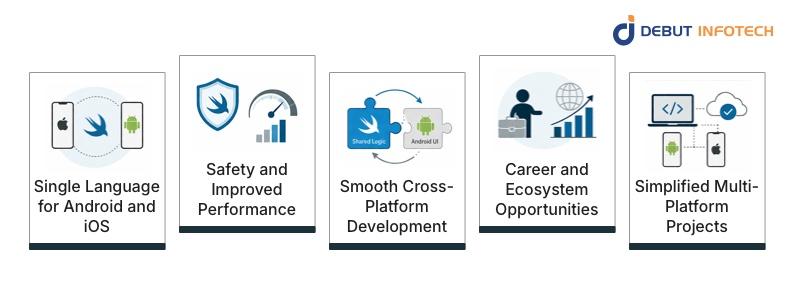
Using Swift across Android and iOS allows teams to standardize their development approach and reduce reliance on multiple programming languages. This simplifies onboarding, improves collaboration, and ensures consistent coding practices. It also reduces duplication of effort when implementing features, as shared logic can be reused across platforms without rewriting core functionality for each environment.
Swift is designed with strong type safety and memory management features that reduce runtime errors and improve application stability. Its compiled nature, combined with LLVM optimization, delivers efficient execution for performance-critical tasks. These capabilities make it suitable for handling complex logic on Android while maintaining predictable behavior and reducing the likelihood of crashes during runtime.
Swift supports a structured approach to cross-platform development by enabling shared logic while allowing platform-specific customization.
Developers can reuse core functionality without imposing a rigid UI layer, helping maintain native user experiences. This flexibility ensures that Android applications retain their expected look and feel while benefiting from shared backend logic written in Swift.
Adopting Swift for Android development places developers in a growing and specialized segment of the mobile ecosystem.
As cross-platform strategies continue to evolve, organizations increasingly value engineers who can work across environments. This expands career opportunities, supports involvement in diverse projects, and strengthens expertise in modern multi-platform development approaches that combine efficiency with technical depth.
Managing a unified codebase for core application logic simplifies development workflows. It reduces the mobile app development timeline and maintenance overhead.
Updates can be applied consistently across both Android and iOS platforms, minimizing discrepancies in functionality. This approach also streamlines testing and deployment processes, helping teams deliver features faster while maintaining alignment between applications built for different operating systems.
JNI enables Swift code to communicate directly with Java and Kotlin components within Android applications. This connection allows developers to access native Android APIs while still writing core logic in Swift.
It plays a critical role in bridging ecosystems, ensuring interoperability without sacrificing access to platform-specific capabilities or system-level features.
Swift’s compatibility with C and C++ allows developers to reuse existing native libraries within Android projects. This is particularly useful for performance-intensive modules such as graphics processing or low-level system operations.
It also supports gradual migration strategies, where legacy codebases can coexist with newer Swift-based implementations without disruption.
Swift Package Manager provides a structured way to handle dependencies, version control, and build configurations across projects. It simplifies the integration of external Android app libraries and ensures consistency across development environments.
For Android workflows, it helps maintain organized project structures and reduces manual configuration, enabling efficient, repeatable build processes.
The Swift Standard Library offers a consistent set of data types, collections, and utilities that behave predictably across platforms. This consistency ensures that shared logic written for iOS can function similarly on Android.
It reduces the need for platform-specific adjustments and supports reliable application behavior across different environments.
Debugging Swift applications on Android involves combining tools from both ecosystems, including Android Studio and external profilers. While not as seamless as native Android debugging, developers can still trace issues, monitor memory usage, and analyze performance.
Proper setup enables effective troubleshooting across integration layers and shared logic components.
Platform abstraction layers allow developers to separate shared logic from Android-specific implementations. This design ensures that core functionality remains reusable while handling platform differences independently.
It improves maintainability and scalability, making it easier to update or extend applications without introducing conflicts between shared and platform-specific code segments.
Swift supports modular architecture, enabling developers to divide applications into smaller, independent components. Each module can be developed, tested, and maintained separately, improving scalability and code organization. This structure is especially useful in Android projects where clear separation between shared logic and platform-specific layers enhances long-term maintainability.
Swift’s concurrency model introduces structured ways to handle asynchronous tasks using modern syntax. This improves readability and reduces errors in multi-threaded operations.
On Android, it helps manage background processes, such as network calls and data processing, ensuring smoother performance and responsiveness in applications that handle multiple tasks simultaneously.
Integration with Gradle and CMake allows Swift components to align with standard Android build systems.
Swift Android app developers can include Swift modules within existing Android pipelines, ensuring compatibility with established workflows. This support simplifies project setup and enables teams to adopt Swift without disrupting their existing Android development processes or tooling structures.
Swift’s open-source nature encourages continuous improvement and community-driven enhancements. Developers can contribute to its development, customize toolchains, and adapt it for Android use cases. This openness provides flexibility, transparency, and long-term viability, making Swift a practical option for teams exploring cross-platform mobile development strategies.
Swift relies on the LLVM compiler infrastructure, which delivers optimized machine code for efficient execution. This integration ensures strong performance across supported platforms, including Android. It also enables advanced optimizations during compilation, helping developers and Android app development companies achieve reliable, consistent performance for applications with demanding processing requirements.
There are multiple approaches to implementing Swift in Android projects, each with different levels of complexity and flexibility. Here are practical methods developers can use to develop Android apps with Swift:
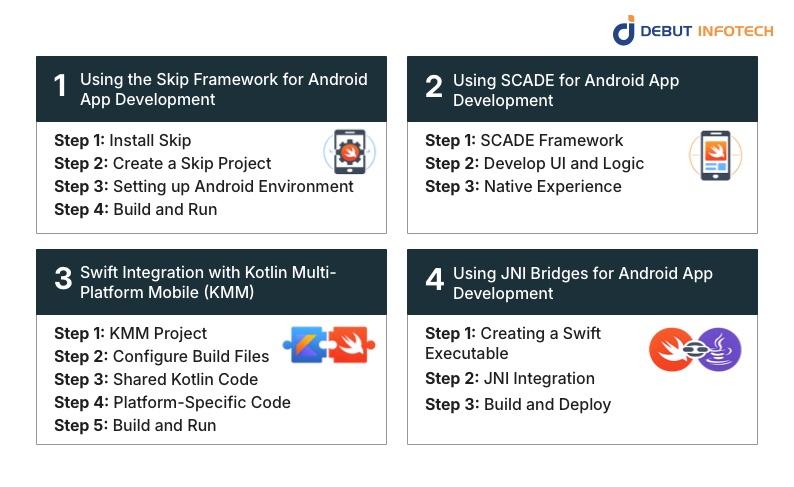
Skip provides a structured way to build an Android app for startups using Swift by translating code into platform-compatible output. It supports shared logic while maintaining Android-specific layers where needed.
Step 1: Install Skip
Download and install the Skip framework along with its required dependencies, including Swift toolchains and Android SDK components. Ensure your environment variables are properly configured so Skip can interact with both Swift and Android build systems without conflicts during compilation.
Step 2: Create a Skip Project
Initialize a new Skip project using the provided CLI tools. This sets up a structured project with predefined folders for shared Swift logic and platform-specific code. It also configures initial build scripts required for Android compatibility and cross-platform execution.
Step 3: Setting up Android Environment
Configure Android Studio, SDK paths, and emulators to work alongside Skip. This includes linking Gradle configurations and ensuring device testing is available. Proper setup ensures that Swift-generated outputs integrate smoothly into the Android runtime and build lifecycle.
Step 4: Build and Run
Compile the project using Skip’s build commands, which convert Swift code into Android-compatible binaries. Deploy the application to an emulator or a physical device to verify functionality, ensuring that both shared logic and Android-specific components function correctly.
SCADE enables developers to build apps using Swift while rendering native interfaces. It focuses on delivering a native-like experience without requiring Kotlin or Java for UI development.
Step 1: SCADE Framework
Install and configure the SCADE framework, which provides tools for building cross-platform apps using Swift. It includes a development environment, UI components, and runtime support that enable Swift applications to run on Android and iOS with minimal configuration effort.
Step 2: Develop UI and Logic
Design user interfaces and implement application logic using Swift within the SCADE environment. The framework provides tools for structuring layouts and managing interactions, enabling developers to build complete applications without relying on traditional Android languages such as Kotlin or Java.
Step 3: Native Experience
Compile and deploy the application using SCADE’s runtime engine, which translates Swift-based UI and logic into a native-like experience. Ensure performance and responsiveness meet Android standards by testing interactions, animations, and device compatibility across different screen sizes.
Combining Swift with KMM allows teams to use Kotlin for shared logic while integrating Swift for iOS-specific features. On Android, Kotlin remains the primary language, while Swift supports cross-platform coordination.
Step 1: KMM Project
Set up a Kotlin Multiplatform Mobile project that defines shared modules for business logic. Configure the project structure to support both Android and iOS targets, ensuring compatibility with Swift integration where needed for platform-specific extensions or coordination.
Step 2: Configure Build Files
Adjust Gradle build files to include dependencies and configurations required for both Kotlin and Swift interoperability. This ensures proper compilation and linking between shared modules and platform-specific layers, enabling seamless communication across different parts of the application.
Step 3: Shared Kotlin Code
Develop reusable business logic within Kotlin modules that can be accessed by both Android and iOS platforms. This shared layer reduces duplication while maintaining consistency. Swift can interact with these modules on iOS, while Android continues to use Kotlin directly.
Step 4: Platform-Specific Code
Implement platform-specific features separately for Android and iOS, using Kotlin for Android and Swift for iOS. This approach ensures that each platform retains its native capabilities while still benefiting from shared logic that drives core application functionality.
Step 5: Build and Run
Compile the project using configured build tools and run it on both Android and iOS devices. Validate that shared logic performs consistently across platforms while ensuring platform-specific features behave as expected within their respective environments.
Step 1: Creating a Swift Executable
Write and compile Swift code into a native executable or library that can be accessed externally. This involves configuring the Swift compiler for Android targets and ensuring that the output files are compatible with the Android runtime environment.
Step 2: JNI Integration
Use Java Native Interface to connect Swift binaries with Android’s Java or Kotlin code. Define native methods and map them correctly so Android components can call Swift functions, enabling communication between the two layers without breaking application flow.
Step 3: Build and Deploy
Integrate the compiled Swift library into the Android project and configure build scripts to include it during packaging. Deploy the application on devices or emulators, testing interactions between Swift and Android layers to ensure stability and expected performance.
The right tools are essential for building and managing Swift-based Android applications effectively. These tools support compilation, dependency management, and integration, helping developers maintain consistent workflows across cross-platform mobile development environments.
Skip is a framework that enables Swift-based development for Android by translating Swift code into platform-compatible output. It supports shared business logic while allowing Android-specific implementations. This approach reduces duplication and helps teams maintain consistency across platforms without abandoning native Android development workflows entirely.
The Swift Android SDK provides the necessary libraries and toolchains required to compile and run Swift code on Android devices. It acts as a bridge between Swift and the Android operating system, enabling developers to execute Swift-based logic while integrating with existing Android project structures and runtime environments.
Swift Package Manager simplifies dependency management by handling library integration, versioning, and build automation. In Android development, it ensures consistent project configuration and reduces manual setup. This improves development efficiency and helps teams maintain clean, organized codebases across multi-platform projects that rely on shared Swift components.
Working with Swift on Android requires combining development environments from both ecosystems. Here are the primary tools used to write, manage, and deploy Android applications:
Xcode remains the primary environment for writing and managing Swift code. Developers use it to build, test, and maintain shared logic before integrating it into Android projects. Its debugging tools and code management features support efficient Swift development, even when targeting platforms beyond Apple’s ecosystem.
Android Studio is used to manage Android-specific components, including UI design, testing, and deployment. When working with Swift, it handles integrating compiled modules into Android applications. Its tools for debugging, profiling, and device testing ensure that Swift-powered features function correctly within the Android environment.
While Swift offers clear advantages, it also introduces specific Android app development challenges when used. Here are the key limitations of Swift Android app development:
Swift is not officially recognized as a primary language for Android development, which limits direct support from Google. This results in fewer native tools, incomplete documentation, and reliance on third-party solutions. Developers often need to implement custom integrations, which can increase development time and introduce additional maintenance complexity.
Managing dependencies across Swift and Android ecosystems can become complicated, especially when combining Swift Package Manager with Gradle-based configurations. Version mismatches and compatibility issues may arise during updates. This requires careful coordination to ensure libraries function correctly across platforms without breaking builds or introducing unexpected behavior.
SwiftUI does not run natively on Android, which forces developers to adopt alternative UI strategies. This often means maintaining separate interface layers for Android and iOS. As a result, while business logic can be shared, UI duplication increases workload. It reduces the overall efficiency of a fully unified development approach.
Setting up a Swift development environment for Android involves configuring multiple toolchains, compilers, and build systems. This process can be time-consuming and requires a clear understanding of both Swift and Android ecosystems. Misconfigurations may lead to build failures, making onboarding and project setup more challenging for development teams.
Although Swift delivers a strong performance, optimizing it for Android requires additional effort. Developers must carefully manage memory, threading, and interactions between Swift and Java or Kotlin layers. Inefficient integration can introduce latency or overhead, making performance tuning a critical step in ensuring smooth application behavior.
The Swift-on-Android ecosystem is still developing, which means fewer tutorials, libraries, and community-driven solutions are available. Developers may face difficulties when troubleshooting issues or finding best practices. This can slow down development progress and require more independent problem-solving compared to more established Android technologies.
Debugging Swift applications on Android can be complex due to the involvement of multiple layers, including Swift, JNI, and Android runtime components. Identifying the root cause of issues may require switching between tools and environments, making the debugging process less straightforward and more time-intensive for developers.
Applying the right practices helps developers avoid common pitfalls and improve project outcomes. Here are recommendations that developers must follow for Android app development using Swift:
1. Use platform-specific APIs only when necessary to access Android-exclusive features, and isolate them clearly to avoid affecting shared Swift logic.
2. Structure your codebase so that core business logic is reusable across both iOS and Android, reducing duplication and simplifying long-term maintenance.
3. Manage dependencies with Swift Package Manager to maintain consistent builds, avoid version conflicts, and streamline integration across multiple development environments.
4. Continuously monitor application performance on Android devices to detect bottlenecks early and ensure stable, responsive behavior under different usage conditions.
5. Stay updated with new tools, libraries, and community contributions related to Swift on Android to improve workflows and adopt better development practices over time.
6. Test applications across a wide range of Android devices and OS versions to ensure compatibility, stability, and consistent performance in real-world usage scenarios.
7. Separate business logic from UI components to make the codebase more flexible, allowing easier updates to design without impacting core functionality.
8. Address Android-specific issues independently without modifying shared logic unnecessarily, preserving consistency across platforms and reducing the risk of introducing cross-platform bugs.
9. Maintain clear, detailed documentation of the project structure, integration steps, and workflows to support team collaboration and simplify onboarding for new developers.
10. Adopt a modular architecture that breaks the application into smaller, manageable components, improving scalability, testing efficiency, and overall maintainability as the project grows.
Swift for Android App Development offers a structured way to unify mobile development while maintaining platform flexibility. It supports shared logic, improves code consistency, and reduces duplication across projects. Despite tooling and ecosystem limitations, the approach remains practical for teams focused on long-term efficiency, maintainability, and scalable cross-platform application development.
Debut Infotech offers mobile app development services. We support businesses adopting Swift for Android App Development by delivering reliable Android solutions tailored to cross-platform needs. Our team combines technical expertise with practical execution, helping organizations build scalable apps, streamline development workflows, and maintain consistent performance across devices while aligning with evolving mobile development strategies.
A. Yes, Swift can be used for Android apps, though it’s not native to the platform. Developers rely on tools like Swift for Android toolchains or cross-compilation setups. Swift for Android App Development is gaining traction, but expect extra setup work compared to using Kotlin or Java directly.
A. It can work, but it’s not always the easiest route. Swift for Android App Development still lacks the deep ecosystem support you get with Kotlin. That said, teams already invested in Swift sometimes use it to share logic across platforms and reduce duplication.
A. Android app development time depends on the project scope. Still, Swift for Android App Development usually takes longer than native Android builds. There’s extra configuration, debugging, and testing involved. A simple app might take a few weeks, while more complex builds can stretch into several months without optimized workflows.
A. Costs vary based on complexity, but Swift for Android App Development can be slightly higher than standard Android development. Extra tooling, integration work, and fewer ready-made libraries add to development hours. Small apps may cost a few thousand dollars, while advanced apps can run significantly higher.
A. Some teams prefer Swift for Android App Development because they already use Swift for iOS. It helps them reuse business logic and keep a consistent codebase. It’s not always the fastest option, but it can make sense for companies aiming to streamline cross-platform development workflows.
A. Developers use tools like Swift toolchains for Android, Gradle integration, and sometimes frameworks like Kotlin interoperability layers. Swift for Android App Development is still evolving, so the tooling isn’t as polished. Expect some manual setup and experimentation, especially when dealing with UI and platform-specific features.

Our Latest Insights
USA
2501 Chatham, Rd Suite R Springfield, IL 62704
+1-708-515-4004
info@debutinfotech.com
UK
7 Pound Close, Yarnton, Oxfordshire, OX51QG
+44-770-304-0079
info@debutinfotech.com
Canada
154 Eden Oak Trail, Kitchener, ON N2A 0H9
+1-708-515-4004
info@debutinfotech.com
INDIA
Sector 101-A, Plot No: I-42, IT City Rd, JLPL Industrial Area, Mohali, PB 140306
9888402396
info@debutinfotech.com