ON THIS PAGE
Progress0%



Our Global Presence :


Explore Android app development, from planning and design to coding, testing, costs, and timelines. Learn the steps to build a successful Android application.



Android app development involves eight essential stages, from validating business requirements and selecting technologies to testing, deployment, and ongoing maintenance.
Kotlin, Android Studio, Jetpack Compose, and Android Jetpack are important technologies for developing modern native Android applications.
Android app development costs can range from approximately 10,000–30,000 for basic applications to $100,000 or more for complex enterprise solutions, depending on scope.
A focused Android MVP may take around 10–12 weeks, while applications with extensive integrations, advanced functionality, or regulatory requirements can require six months or longer.
Choosing between native and cross-platform development depends on performance requirements, device integrations, budget, target platforms, and long-term maintenance needs.
Following Android app development best practices for architecture, security, testing, and performance helps businesses reduce technical risks and manage future enhancements.
Building an Android application involves more than turning a business idea into a functional mobile interface. Companies must determine which features customers need, how the application will connect with existing systems, what technologies to use, and how much development and maintenance will cost.
Decisions made during planning can influence application performance, user experience, security, and the cost of future improvements.
This Android app development guide explains the complete journey from initial product planning to deployment and ongoing support. It covers development approaches, essential technologies, estimated costs, timelines, and practical considerations for building an application that meets business requirements.
Whether you are launching a new mobile product or extending an existing enterprise platform, understanding the development lifecycle can help you make informed technical and investment decisions.
Android app development for businesses can support customer engagement, operational efficiency, and new digital service opportunities. However, the value of an application depends on whether its features address a genuine user need or business requirement.
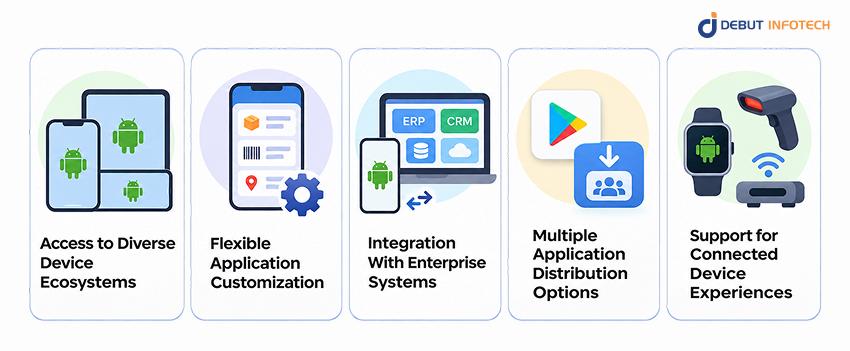
Here are five reasons organizations invest in Android applications.
Android applications can serve customers and employees using devices across different manufacturers, price categories, and screen sizes.
For businesses operating across multiple customer segments or geographic markets, this flexibility makes it possible to deliver mobile services without limiting accessibility to a single device manufacturer.
Organizations can develop Android applications around specific workflows, customer requirements, and business processes.
For example, a logistics company may require driver authentication, shipment tracking, barcode scanning, and proof-of-delivery functionality. A retail business may prioritize product browsing, digital payments, loyalty programs, and personalized notifications.
Custom development allows these capabilities to be designed around operational needs rather than forcing businesses to adapt to generic application features. Businesses can also evaluate mobile apps vs. mobile websites when determining which approach best supports their requirements.
Android applications can connect with CRM platforms, ERP software, payment gateways, inventory systems, and cloud databases through APIs.
These integrations help employees and customers interact with existing business systems without repeatedly switching between applications.
A field-service application, for instance, can retrieve customer information, display assigned work orders, and synchronize completed tasks with a centralized management platform.
Businesses can distribute customer-facing applications through Google Play or use suitable private distribution and managed deployment approaches for internal applications.
This flexibility supports organizations that need public mobile products as well as applications restricted to employees, business partners, or approved devices.
Distribution decisions should account for security controls, device management, and applicable platform policies.
Android supports applications that interact with compatible wearables, sensors, scanners, and connected equipment.
Businesses can use these capabilities to develop solutions for warehouse operations, healthcare monitoring, hospitality access, equipment management, and other specialized use cases. The potential benefits depend on hardware compatibility, connectivity requirements, and the reliability of the supporting infrastructure.
Businesses can develop different types of Android applications depending on their users, industry requirements, and technical objectives. Understanding these categories helps determine the appropriate functionality, development approach, and infrastructure.
Native Android applications are developed specifically for Android devices using technologies such as Kotlin, Java, and Android Jetpack.
They are suitable for products requiring direct access to Android APIs, advanced device functionality, or extensive platform-specific customization. Common examples include mobile banking applications, specialized consumer products, device-control applications, and performance-sensitive business tools.
Cross-platform applications use frameworks such as Flutter or React Native to share substantial portions of application code across Android and iOS.
This approach can reduce duplicated engineering effort for businesses targeting both operating systems.
It is commonly used for customer service platforms, appointment booking applications, e-commerce products, and other solutions with similar functionality across mobile platforms. Some platform-specific development may still be necessary for device integrations or advanced features.
Enterprise Android applications support internal workflows, employee productivity, and operational management.
Businesses can develop applications for field-service coordination, workforce scheduling, inventory management, sales operations, approvals, and internal communications. These applications frequently require role-based access, secure authentication, offline functionality, and integration with existing enterprise systems.
E-commerce applications provide mobile shopping experiences with product catalogs, search functionality, shopping carts, payment integration, and order tracking.
Additional features may include personalized recommendations, loyalty programs, promotional notifications, and customer support. The development scope depends on catalog complexity, transaction requirements, inventory synchronization, and third-party integrations.
Android IoT applications enable users to monitor, manage, or interact with connected equipment through mobile interfaces. Examples include industrial monitoring solutions, smart-building controls, remote equipment dashboards, and applications connected to Bluetooth-enabled devices.
Development requires careful planning around device communication, synchronization, connectivity, security, and hardware compatibility.
Wear OS applications extend suitable mobile functionality to compatible smartwatches, supporting activities such as notifications, fitness tracking, and quick interactions.
Android TV applications focus on larger-screen experiences, including media streaming, educational content, entertainment, and specialized business displays. Both categories require interfaces and interaction patterns designed for their respective devices rather than simply resizing a smartphone application.
Developing a successful Android application requires a structured process that connects business requirements with technical implementation.
The Android app development lifecycle typically involves eight major stages. Although the sequence provides a useful framework, development teams often revisit earlier decisions as testing and user feedback reveal new requirements.
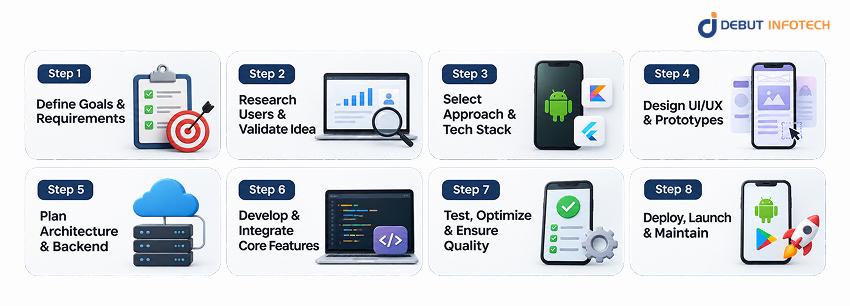
The first step is determining why the application is being developed and what it needs to accomplish.
Businesses should identify their intended users, operational challenges, essential features, and expected outcomes before selecting technologies or beginning design. For example, an organization developing a mobile customer portal may want to reduce support requests, improve account accessibility, and simplify service transactions.
The team should document functional requirements, including authentication, notifications, payments, and system integrations, as well as nonfunctional requirements such as security, accessibility, and performance.
Prioritizing features also helps distinguish the minimum viable product from enhancements that can be introduced after launch.
Key deliverables: Product requirements document, prioritized feature backlog, business objectives, and initial project scope.
Once the requirements are identified, the next stage is confirming whether the proposed application addresses a meaningful problem.
User research can involve interviews, surveys, competitor assessments, workflow observations, and prototype feedback. For consumer applications, businesses should investigate user expectations, competing products, and the features that may influence adoption.
Enterprise projects require additional attention to existing workflows, employee responsibilities, device environments, and potential integration constraints. A proof of concept may be useful when the application depends on unfamiliar technologies, complex integrations, or hardware capabilities that need early validation.
Validating assumptions before extensive development reduces the likelihood of investing in features that users do not need.
Key deliverables: Validated requirements, user personas, feasibility findings, and refined MVP priorities.
The next decision involves choosing how the Android application will be built.
Native development using Kotlin is often appropriate when an Android-focused application requires extensive access to platform capabilities. Cross-platform frameworks such as Flutter and React Native may be more suitable when a business plans to release similar functionality on Android and iOS, as discussed in our React Native app development guide.
The team should also evaluate backend technologies, database requirements, cloud infrastructure, third-party services, and existing organizational systems.
Technology selection should consider developer expertise, implementation complexity, maintenance requirements, and the application’s expected evolution. For organizations already operating enterprise software, compatibility with existing APIs and security infrastructure can be as important as the mobile framework itself.
Key deliverables: Technology stack, development approach, integration plan, and initial technical specifications.
Android application design determines how users navigate the product, complete tasks, and interact with its features. The process usually begins with user flows and wireframes that define screen layouts, navigation paths, and key interactions.
Designers then develop visual interfaces and interactive prototypes to validate the proposed experience before full implementation.
Effective Android app UI/UX design should consider accessibility, readable typography, responsive layouts, touch target sizes, and various device configurations. Google’s Material Design guidance can provide useful patterns for navigation, components, and visual consistency.
For enterprise applications, usability testing should also reflect the environment in which employees use the product, including field operations and situations with limited connectivity.
Key deliverables: User journeys, wireframes, interactive prototypes, and approved interface designs.
Before implementing core functionality, developers need to establish how the application’s components will communicate and manage information. A well-planned Android app architecture separates user-interface logic, business rules, and data operations into clearly defined responsibilities.
Google’s recommended architecture guidance emphasizes separation of concerns, maintainable components, and predictable data flow. For applications with complex requirements, teams may use a layered approach involving a UI layer, data layer, and optional domain layer.
Backend planning covers API design, authentication, database selection, data synchronization, and integration with external systems.
Businesses should also determine whether the application needs offline functionality, encrypted local storage, background synchronization, or support for multiple user roles. These decisions influence testing complexity, long-term maintainability, and the effort required to introduce new features.
Key deliverables: Architecture documentation, API specifications, database design, and security requirements.
Once the architecture and designs are approved, developers begin implementing the application’s functionality. The team creates screens, navigation flows, business logic, and integrations using the selected Android app development technologies. For native applications, this commonly involves Kotlin, Android Studio, Android Jetpack libraries, and platform APIs.
Backend engineers develop or configure the services responsible for authentication, data processing, transactions, and communication with enterprise systems. Development typically proceeds in iterations, allowing stakeholders to review completed features and provide feedback.
A structured coding approach should include source control, peer reviews, dependency management, and automated build processes. Applications that require payments, location tracking, push notifications, or external hardware should also be tested against actual integration environments.
Key deliverables: Functional application modules, connected backend services, integration builds, and reviewed source code.
Testing verifies whether the application performs as expected under different conditions before users receive it.
Android application testing should cover core functionality, usability, accessibility, compatibility, security, and performance.
Unit tests help validate individual functions and application components. Integration tests examine communication between modules and external services, while UI tests verify user journeys. The team should evaluate the application across representative Android versions, screen sizes, and device capabilities.
Android app performance optimization may include reducing unnecessary network requests, optimizing images, controlling background activity, managing memory usage, and improving application startup behavior. Security reviews should verify authentication, authorization, sensitive data handling, API protection, and secure storage.
Testing should also consider unreliable network connections, interrupted sessions, and changes in device configuration. For regulated applications, relevant compliance requirements must be incorporated into the testing plan.
Key deliverables: Test reports, resolved defects, performance findings, security assessment results, and release approval.
The final stage involves preparing the application for deployment and establishing ongoing operational support.
For public distribution through Google Play, developers prepare a signed Android App Bundle, configure the application listing, complete applicable policy declarations, and submit the release through the Google Play Console.
Internal, closed, or open testing tracks can help organizations validate applications before wider distribution. Once published, teams should monitor crashes, application performance, user feedback, and backend service reliability.
Android app maintenance and updates include resolving defects, updating dependencies, addressing vulnerabilities, maintaining compatibility with supported Android versions, and introducing approved enhancements.
Enterprise applications may also require ongoing monitoring of API connections, authentication systems, and device-management policies. A post-launch roadmap helps businesses prioritize improvements based on product performance and changing user requirements.
Key deliverables: Production release, monitoring configuration, maintenance plan, and improvement backlog.
Although development requirements vary, several practices are applicable throughout the project:
Organizations facing specialized engineering requirements can explore our guide to overcoming Android app development challenges for additional considerations around compatibility, performance, and security.
Selecting appropriate development tools influences implementation efficiency, application quality, and long-term maintenance. The technologies used for Android app development vary according to the type of application, platform requirements, and backend infrastructure.
Below are the main technology categories businesses should understand.
Kotlin: Kotlin is Google’s recommended language for modern Android development. It supports concise syntax, null-safety features, coroutines, and interoperability with Java. It is widely used for building native Android applications.
Java: Java remains supported for Android development and is especially relevant to existing applications and codebases. Businesses may continue using Java where maintaining established components is more practical than undertaking an immediate migration.
The choice between Kotlin and Java should account for existing code, developer expertise, and future development requirements.
Android Studio: Google’s official integrated development environment provides tools for writing code, debugging applications, managing project builds, and testing against Android emulators or connected devices.
Android SDK: The Android Software Development Kit provides platform APIs, build tools, debugging utilities, and other resources required to develop Android applications.
Gradle: Gradle manages project builds, dependencies, configurations, and release-related tasks.
These tools provide the foundation for native Android application development.
Jetpack Compose: A modern declarative UI toolkit for building native Android interfaces. Developers describe how interface elements should appear based on application state.
Android Views: The established UI system remains relevant for existing applications and projects with specific compatibility or migration requirements.
Android Jetpack: A collection of libraries that help developers manage application architecture, navigation, lifecycle behavior, data persistence, and other recurring development requirements.
Common components include ViewModel, Navigation, Room, and WorkManager. These technologies support maintainable Android application architecture and reduce the need to create custom solutions for routine platform concerns.
Android applications often depend on backend services to manage accounts, transactions, business rules, and information shared between devices.
Common options include:
| Technology | Common purpose |
| Firebase | Authentication, analytics, messaging, and selected backend services |
| Node.js | Backend APIs and application services |
| Spring Boot | Java-based enterprise backend development |
| PostgreSQL | Structured data storage |
| Room | Local data persistence on Android |
| AWS and Google Cloud | Hosting, infrastructure, and managed cloud services |
| REST and GraphQL APIs | Communication between applications and backend systems |
Technology selection should depend on the application’s data requirements, existing infrastructure, operational needs, and integration complexity.
Quality assurance and deployment tools help development teams identify defects and manage releases consistently.
| Tool | Primary application |
| JUnit | Unit testing |
| Espresso | Automated Android UI testing |
| UI Automator | Device-level and cross-application UI testing |
| Firebase Test Lab | Testing across physical and virtual devices |
| Firebase Crashlytics | Crash reporting and stability monitoring |
| Android Profiler | Performance and resource analysis |
| GitHub Actions | Automated build, test, and deployment workflows |
| Android Debug Bridge | Device communication and debugging |
Organizations developing applications for both Android and iOS may also evaluate Flutter or React Native. These frameworks support cross-platform development but involve different technical trade-offs from native Android development.
For a detailed comparison of implementation considerations, read our React Native app development guide.
Android app development costs and timelines depend on application complexity, required features, UI/UX design, backend integrations, and security requirements. A basic application with limited functionality requires less development effort than an enterprise solution involving multiple user roles, complex workflows, and third-party integrations.
The following estimates provide a general overview of development budgets and delivery timelines based on project complexity.
| Application Complexity | Estimated Cost (USD) | Estimated Timeline | Typical Scope |
| Basic Android Application | 10,000–30,000 | 2–3 months | Simple interfaces, limited features, minimal integrations |
| Focused Android MVP | Based on project scope | 10–12 weeks | Essential features, core user journeys, basic integrations |
| Medium-Complexity Application | 30,000–80,000 | 3–6 months | Authentication, APIs, payments, custom workflows, admin functionality |
| Complex Enterprise Application | $100,000+ | 6–12 months or longer | Advanced integrations, multiple user roles, complex business logic, extensive security requirements |
These figures are indicative estimates, not fixed quotations. The medium-complexity cost range is a planning estimate, while final pricing and schedules depend on project requirements, technical dependencies, and delivery scope.
Beyond application complexity, several factors influence how much businesses invest and how quickly an Android application can be delivered.
Understanding the major Android app development cost factors helps businesses plan realistic budgets, anticipate dependencies, and avoid unexpected delays.
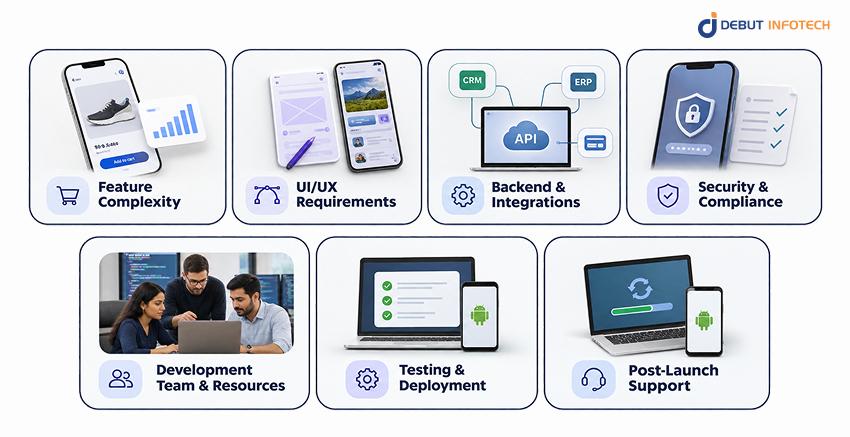
1. Feature Complexity: Applications requiring real-time communication, payments, advanced analytics, or custom workflows generally need more development and testing than products with basic functionality.
2. UI/UX Requirements: Custom interfaces, interactive elements, accessibility considerations, and support for multiple screen sizes can increase design effort and implementation time.
3. Backend and Integrations: Connecting an application with ERP, CRM, payment gateways, or legacy systems may require additional API development, data mapping, and integration testing.
4. Security and Compliance: Applications handling sensitive information may require advanced authentication, encryption, security assessments, and industry-specific compliance measures.
5. Development Team and Resources: Team size, technical expertise, geographic location, and engagement model affect project costs and the pace of development.
6. Testing and Deployment: Device compatibility testing, defect resolution, performance validation, third-party approvals, and deployment requirements can influence release schedules.
7. Post-Launch Support: Hosting, monitoring, security updates, compatibility maintenance, and future enhancements contribute to the application’s total cost of ownership.
For additional budgeting insights, explore our mobile app development cost guide.
Businesses can control development expenses and reduce avoidable delays by making informed decisions during planning and implementation.
Cost and timeline optimization should not compromise application security, performance, or quality assurance. A well-defined development scope, realistic delivery plan, and structured testing process help businesses manage their investment while preparing the application for future growth.
Selecting between native and cross-platform mobile app development is an important decision for businesses planning a new mobile application. Native Android development uses platform-specific languages and tools. Cross-platform development uses frameworks that allow developers to share significant portions of code between Android and iOS.
Neither approach is universally better. The right choice depends on product requirements, target users, device capabilities, and long-term engineering priorities.
| Factor | Native Android Development | Cross-Platform Development |
| Technologies | Kotlin, Java, Android SDK | Flutter, React Native |
| Target Platforms | Android-specific | Android and iOS |
| Code Reusability | Primarily Android-specific | Shared code across platforms |
| Device Integration | Direct platform API access | Framework APIs, plugins, or native modules |
| Performance | Extensive platform-specific optimization options | Suitable performance for many business applications |
| UI Development | Android-native components and patterns | Shared UI framework with platform adaptations |
| Development Cost | Depends on Android-specific scope | May reduce duplicated work across platforms |
| Maintenance | Dedicated Android codebase | Shared updates plus platform-specific maintenance |
| Best Fit | Android-focused or highly specialized applications | Products targeting Android and iOS with similar requirements |
Native development is often appropriate when an application needs:
It also makes sense when Android is the primary or exclusive target platform.
Cross-platform development may be suitable when businesses want to:
However, framework compatibility, platform-specific requirements, and dependency maintenance should still be evaluated.
Businesses exploring this approach can review our Flutter app development cost guide to understand how shared-code development influences project budgeting.
The practical decision: Select native development when Android-specific requirements justify a dedicated implementation. Consider cross-platform development when supporting multiple operating systems provides greater business value and the selected framework can meet the application’s technical needs.
Selecting an Android development partner requires more than comparing hourly rates or reviewing a list of available technologies.
A suitable partner should understand the business problem, identify technical risks, and explain how the application will be delivered, tested, and supported.
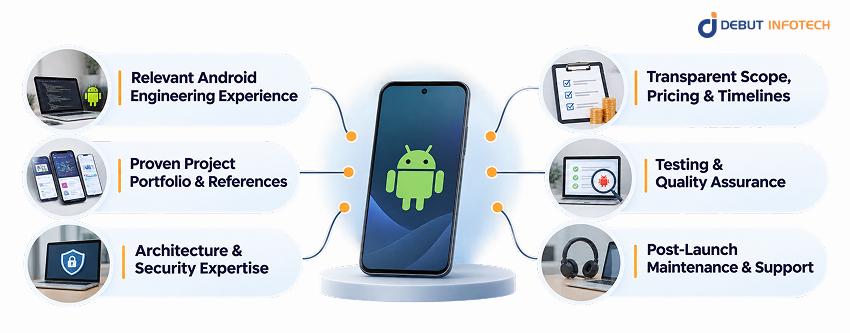
The following criteria can help businesses evaluate potential development companies:
Review whether the company has experience delivering applications with requirements similar to yours.
Experience with enterprise integrations, connected devices, transactional applications, or regulated industries may be particularly important for specialized projects.
Examine completed projects to understand the company’s role, implementation approach, and demonstrated outcomes.
Customer references and verified reviews can provide additional insight into communication, delivery reliability, and post-launch support.
A development partner should be able to explain its approach to application architecture, authentication, data security, API integration, and performance.
Ask how the team handles technical dependencies, compatibility requirements, security testing, and changes in application scope.
Development estimates should identify deliverables, assumptions, dependencies, milestones, and exclusions.
A clear proposal helps businesses understand what is included in the initial release and which changes may affect costs or schedules.
Assess how the company performs functional testing, automated testing, security validation, and compatibility checks.
Development partners should also explain how defects are tracked, resolved, and verified before deployment.
Application development does not end when the product becomes available to users.
Businesses should establish expectations for security updates, bug fixes, compatibility maintenance, monitoring, and future feature development.
Debut Infotech provides Android app development services covering native Android applications, enterprise mobility, connected-device integrations, testing, deployment, and maintenance.
Our mobile app development portfolio spans industries such as hospitality, healthcare, food and beverage, and entertainment. Projects including OpenKey, WellPop, Friendspire, and KFC demonstrate our experience delivering mobile solutions for diverse business requirements, from contactless hotel access and connected healthcare to personalized entertainment recommendations and digital food ordering.
For example, the OpenKey hospitality application uses Kotlin as part of its mobile technology stack and connects smartphone-based guest access with hotel systems. Our work on WellPop and Friendspire further reflects our experience developing connected healthcare platforms and personalized digital experiences tailored to specific user needs.
For organizations planning products across multiple operating systems, our broader Mobile App Development Services also cover iOS, cross-platform applications, mobile MVPs, and legacy application modernization.
We work with businesses to define requirements, assess technical feasibility, and establish practical implementation plans aligned with project objectives.
Developing an Android application requires coordinated decisions about product scope, user experience, technologies, architecture, security, and long-term maintenance.
Businesses that establish clear requirements, validate important assumptions, and follow a structured development process are better positioned to manage costs, reduce implementation risks, and deliver useful mobile experiences.
The most suitable development approach depends on the application’s intended users, platform requirements, technical complexity, and business objectives. Planning for testing, system integrations, and future updates from the beginning can also reduce avoidable problems after launch.
Whether you are developing an Android MVP, an enterprise mobility solution, or a customer-facing application, Debut Infotech can help you evaluate requirements and define a practical delivery roadmap.
Android app development costs typically start at $15,000–$30,000 USD for a focused MVP. Standard custom applications may cost $30,000–$60,000 USD, while advanced applications range from $60,000–$100,000 USD. Complex enterprise applications may require $100,000–$150,000 USD or more. The final cost depends on features, integrations, security requirements, development complexity, and ongoing maintenance needs.
A basic Android application may take approximately 6–10 weeks, while a focused MVP can often be developed in 10–12 weeks. Medium-complexity applications commonly require three to six months, and enterprise systems may take six to twelve months or longer. Actual timelines depend on project scope, design requirements, backend integrations, stakeholder approvals, testing complexity, and deployment readiness.
Kotlin is generally recommended for new native Android applications because of its modern language features, concise syntax, null-safety support, and integration with Android development libraries. Java remains a supported option, particularly for existing applications with established Java codebases. Kotlin and Java can also work together within the same project, allowing businesses to modernize applications incrementally instead of replacing all existing code.
Native Android development commonly uses Android Studio, the Android SDK, Kotlin, Gradle, and Android Jetpack libraries. Developers may use Jetpack Compose for interfaces and Room for local data storage. Additional tools support backend integration, testing, debugging, and monitoring. The exact technology stack depends on application features, existing systems, team expertise, and operational requirements rather than a fixed list of mandatory tools.
Yes. Businesses can develop Android and iOS applications using cross-platform frameworks such as Flutter or React Native. These frameworks allow significant portions of application code and functionality to be shared across both platforms. However, some features may still require platform-specific implementation. The decision should consider user experience, device capabilities, project budget, development timelines, and long-term maintenance requirements.
Secure and scalable Android applications require careful planning from the beginning. Businesses should implement strong authentication, role-based authorization, encrypted data transmission, secure storage, API protection, and regular dependency updates. Scalability depends on maintainable application architecture, efficient backend services, and appropriate infrastructure. Automated testing, performance monitoring, security reviews, and capacity planning help applications remain reliable as functionality and usage increase.
A development company can be valuable when an application requires specialized engineering skills, enterprise integrations, security controls, or a dedicated delivery team. Experienced partners can support planning, UI/UX design, development, testing, deployment, and maintenance. Businesses with capable internal engineering teams may build applications independently, but external expertise can help address skill gaps, manage complex requirements, and accelerate defined development initiatives.


USA
2501 Chatham, Rd Suite R Springfield, IL 62704
+1-708-515-4004
info@debutinfotech.com
UK
7 Pound Close, Yarnton, Oxfordshire, OX51QG
+44-770-304-0079
info@debutinfotech.com
Canada
154 Eden Oak Trail, Kitchener, ON N2A 0H9
+1-708-515-4004
info@debutinfotech.com
INDIA
Sector 101-A, Plot No: I-42, IT City Rd, JLPL Industrial Area, Mohali, PB 140306
9888402396
info@debutinfotech.com