ON THIS PAGE
Progress0%






Our Global Presence :






SaaS Integration platforms connect cloud applications, enabling seamless data flow and workflow automation across tools used in sales, support, finance, and operations. As businesses adopt more SaaS apps, integration complexity rises; companies now use an average of 80 SaaS applications, up from five times since 2021, driving demand for centralized integration solutions, according to reports.
Integrations also impact product success: 92% of B2B SaaS leaders say customers with integrations are less likely to churn, emphasizing the strategic value of connected ecosystems.
This guide explains how SaaS integration platforms work, why they’re needed, their core capabilities, and how to evaluate and choose the right platform. You’ll also find top SaaS integration platforms in 2026.
A SaaS integration platform connects cloud applications so data and actions move seamlessly between them. It acts as a central layer that manages workflows, data synchronization, and event triggers across tools used by different teams. Instead of building fragile one-off connections, organizations use custom SaaS solutions to standardize integrations, reduce maintenance effort, and ensure systems stay aligned as software stacks grow and change over time and at scale.
Related Read: What is Saas Development– A Complete Guide
A SaaS integration platform works by connecting applications through APIs, webhooks, and event triggers. When an action occurs in one system, the platform captures the data, applies logic or transformations, and delivers it to another system. It manages authentication, retries, error handling, and monitoring centrally, allowing integrations to run reliably without constant engineering intervention as workflows scale across complex environments and growing application ecosystems over time.
Disconnected systems create friction across the business. Integration platforms exist to remove that friction and keep operations moving smoothly.
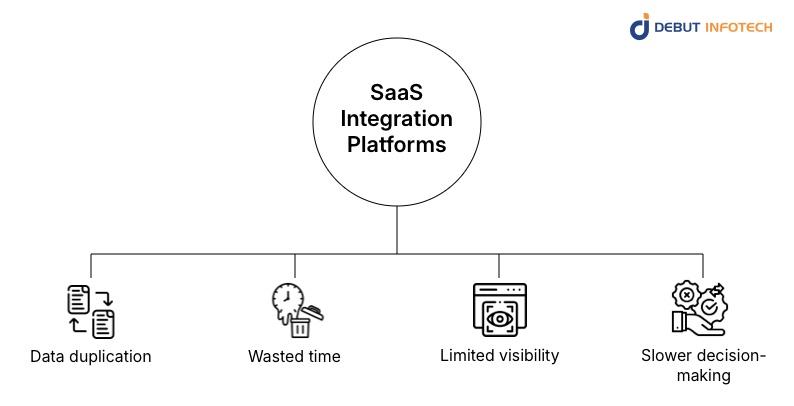
Without integrations, teams enter the same data across multiple tools, creating conflicting records and version mismatches. This duplication increases reconciliation work, undermines reporting accuracy, and forces employees to waste time verifying which system contains the most reliable information.
Manual exports, imports, and spreadsheet workarounds consume hours every week. Employees spend time moving data rather than using it, slowing execution across departments and delaying outcomes that should occur automatically when systems communicate in real time.
When data lives in silos, leaders lose a unified view of operations, customers, and performance. Reporting becomes fragmented, dashboards lose credibility, and teams make decisions based on partial signals rather than consistent, cross-functional information sources.
Delayed or inconsistent data slows planning and response times. Teams wait for manual reports, approvals, or clarifications, which limits agility and makes it harder to react quickly to customer needs, operational issues, or market changes.
Pre-built connectors provide ready-made integrations with popular SaaS platform development tools, handling authentication, data mapping, and API quirks. They reduce setup time, lower maintenance effort, and enable teams to quickly launch reliable integrations without starting from scratch.
Visual workflow builders let users design integrations using drag-and-drop logic instead of code. Teams can define triggers, conditions, and actions clearly, making complex processes easier to understand, modify, and maintain over time. This lowers reliance on engineering.
An easy-to-use interface simplifies integration management through clear dashboards, logs, and alerts. Users can monitor performance, identify failures quickly, and troubleshoot issues without digging through code or relying heavily on technical teams for daily operations.
API management capabilities handle authentication, rate limits, retries, and version changes centrally. This protects connected systems from breaking changes, improves reliability, and ensures integrations continue working even as third-party APIs evolve over time reliably and safely.
Data transformation tools clean, map, and restructure information as it moves between systems. They resolve format mismatches, standardize fields, and ensure that downstream applications receive data in the structures they expect for consistent, accurate processing across platforms.
Strong configuration options allow teams to adjust workflows, rules, and mappings without rebuilding integrations. This flexibility supports changing business processes, evolving tools, and new requirements without slowing delivery or increasing technical debt over time significantly.
Security and compliance features protect sensitive data through encryption, access controls, and audit logs, even during SaaS application development. They help organizations meet regulatory requirements, manage permissions safely, and maintain trust when integrations move data across multiple systems securely at scale.
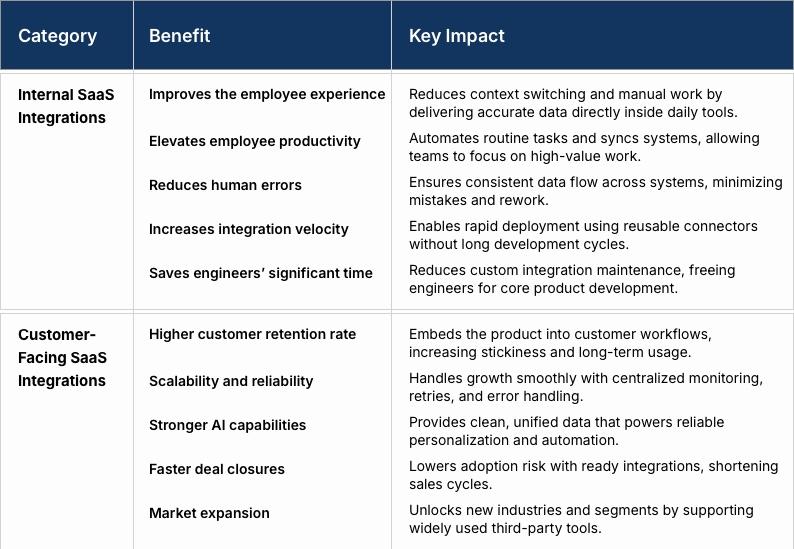
The benefits of SaaS integration platforms can be divided into internal advantages, improving employee workflows and productivity, and customer-facing gains, enhancing adoption, retention, and product value.
Internal SaaS integrations remove friction from daily work by reducing context switching and manual data entry. Employees can access accurate information where they already work, complete tasks faster, and rely less on workarounds, leading to smoother workflows, fewer interruptions, and more consistent day-to-day experiences across teams, roles, and systems.
By automating repetitive processes and keeping systems synchronized, internal integrations let employees focus on meaningful work instead of administrative tasks. Workflows move faster, handoffs become cleaner, and teams spend less time fixing errors or tracking down missing information across disconnected tools during everyday operational and cross-team activities.
Manual data handling increases the risk of typos, missed updates, and inconsistent records. Internal SaaS integrations enforce consistent data flows between systems, ensuring changes propagate automatically and accurately, reducing rework, improving data trust, and minimizing downstream issues caused by simple human mistakes in core business operations.
With standardized connectors and reusable workflows, internal integrations can be deployed much faster than custom-built solutions. Teams respond quickly to new tools, process changes, or business needs without waiting for long development cycles or dedicating engineering resources to every integration request across departments, systems, and evolving workflows continuously.
Internal SaaS integrations reduce the burden on engineering teams by eliminating one-off scripts and brittle custom connections. Engineers spend less time maintaining integrations and more time building core product features, improving system reliability while lowering long-term technical maintenance costs across growing platforms, teams, and product roadmaps sustainably.
Customer-facing integrations make products easier to adopt by fitting naturally into existing workflows. When customers can connect familiar tools without friction, switching costs increase, product value becomes clearer, and long-term retention improves because the software becomes embedded in daily operations rather than used in isolation.
Customer-facing integrations built on dedicated platforms scale more predictably as usage grows. Centralized error handling, retries, and monitoring improve uptime and consistency, ensuring integrations continue working reliably even as customer volumes, data loads, and connected systems increase over time.
Well-integrated systems provide cleaner, more consistent data for AI-driven features. This enables more accurate personalization, automation, and recommendations while reducing model errors caused by missing or outdated inputs, allowing AI capabilities to deliver practical value across real customer workflows.
Sales cycles shorten when prospects see ready-made integrations with tools they already use. Integration availability reduces perceived risk, lowers implementation concerns, and positions the product as easier to adopt, helping sales teams convert deals faster and with fewer technical objections.
Customer-facing integrations open access to new industries and segments that rely on specific tools. Supporting widely used platforms removes adoption barriers, allowing products to enter new markets more confidently without building entirely separate solutions for each vertical or regional technology stack.
iPaaS platforms focus on internal business workflows, connecting systems across departments like sales, finance, and operations. They provide centralized control, automation, and monitoring, making them suitable for organizations managing many integrations while prioritizing reliability, governance, and operational efficiency at scale.
Embedded iPaaS platforms are designed for SaaS products that offer integrations to customers. They provide reusable integration infrastructure within the product, allowing teams to ship and manage customer-facing integrations faster while maintaining consistent performance, security, and monitoring, without having to rebuild integration logic repeatedly.
RPA platforms automate workflows by mimicking human actions in user interfaces when APIs are unavailable or limited. They are useful for legacy systems but require careful monitoring, as interface changes can break automations and increase long-term maintenance compared to API-based integrations.
Unified API platforms provide a single normalized API to access multiple third-party services within a category. They simplify Enterprise software development by reducing integration complexity, enabling teams to support multiple tools through a single interface while handling authentication, data mapping, and schema differences centrally.
AI tool-calling platforms enable AI systems to dynamically invoke APIs and tools during execution. They support intelligent workflows where models decide which tools to use, making them suitable for AI-driven products that require flexible, real-time integration across multiple services and data sources.
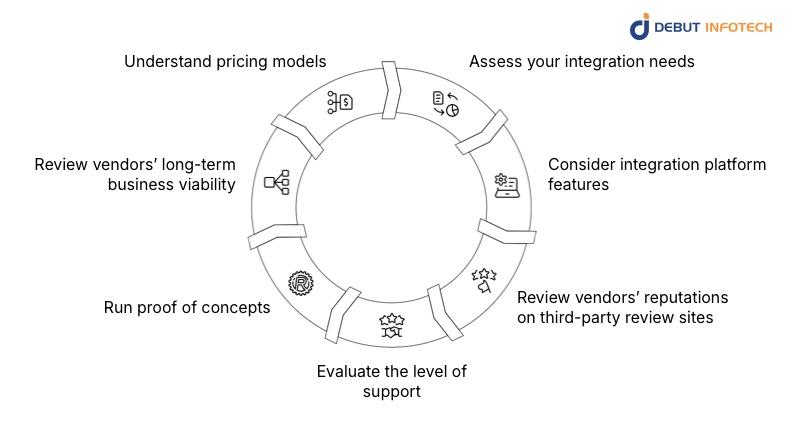
Step 1: Assess your integration needs
Start by mapping which systems need to connect, what data must flow between them, and how often updates occur. Separate internal workflows from customer-facing integrations to avoid choosing a platform that fits one use case but struggles with the other.
Evaluate features based on real operational needs, SaaS Metrics, not marketing lists. Focus on connector coverage, workflow flexibility, monitoring, error handling, and scalability to ensure the platform can support current requirements and adapt as processes, tools, and data volumes evolve.
Third-party reviews reveal how platforms perform outside sales demos. Look for patterns around reliability, support responsiveness, learning curve, and hidden limitations. Consistent feedback across multiple sources usually reflects real-world experience more accurately than testimonials.
Strong support reduces long-term risk. When you hire Saas developers, assess documentation quality, onboarding assistance, response times, and access to technical experts. Platforms that provide proactive guidance and clear troubleshooting resources help teams resolve issues quickly and avoid prolonged integration downtime.
Proof of concepts expose real constraints early. Test complex workflows, edge cases, and performance under load. This step helps validate both the platform’s technical fit and the vendor’s ability to support your dedicated software development team during implementation and beyond.
Assess the vendor’s financial stability, customer base, and product roadmap. A platform deeply embedded in your operations should have a clear long-term vision, ongoing investment, and a track record of adapting to changes in the SaaS ecosystem.
Study pricing beyond entry tiers. Consider usage-based costs, connector limits, execution volume, and scaling fees. A platform that looks affordable initially may become expensive as integrations grow, data volumes increase, and customer-facing use cases expand.
These platforms focus on automating internal operations, connecting core systems across departments with reliability, governance, and scalability as primary priorities.
a) Zapier
Zapier is well-suited for simple internal automations across common SaaS tools. It enables fast setup with minimal technical effort, making it ideal for teams prioritizing speed and accessibility over complex logic or enterprise-grade governance requirements.
b) Make (formerly Integromat)
Make offers advanced workflow customization with visual logic, branching, and data handling. It suits teams that need more control than basic automation tools, while still avoiding heavy engineering involvement in moderately complex internal integration scenarios.
c) Workato
Workato targets large organizations with complex internal workflows. It provides strong governance, role-based access, advanced monitoring, and scalability, making it suitable for enterprises that require reliability, compliance controls, and cross-department automation at scale.
These platforms help SaaS companies deliver and manage customer-facing integrations directly within their products without building integration infrastructure from scratch.
a) Prismatic
Prismatic provides a developer-focused embedded integration framework. It supports complex configurations, reusable components, and versioning, making it a strong choice for SaaS development companies offering sophisticated integrations to technical or enterprise customers.
b) Paragon
Paragon emphasizes speed and simplicity for shipping customer-facing integrations. It allows product teams to launch integrations quickly with minimal engineering overhead while maintaining monitoring, authentication, and lifecycle management within the SaaS product environment.
c) Pandium
Pandium focuses on B2B SaaS integrations with robust orchestration and scalability. It supports complex workflows, robust error handling, and partner-facing integrations, making it suitable for products with demanding enterprise integration requirements.
Unified API platforms reduce integration complexity by offering a single standardized API across multiple third-party services within a specific software category.
a) Merge
Merge provides unified APIs for categories like HR, accounting, and CRM. It simplifies multi-tool support by normalizing data models, handling authentication, and reducing the engineering effort required to maintain dozens of individual integrations.
b) Finch
Finch specializes in payroll and employment data integrations. It provides standardized access to fragmented payroll systems, enabling companies to retrieve consistent workforce data while handling authentication, permissions, and provider-specific complexities through a single interface.
c) Apideck
Apideck covers multiple business software categories through a unified API layer. It focuses on developer experience, data normalization, and connector breadth, making it suitable for teams seeking broad integration coverage with reduced implementation complexity.
These platforms focus on moving and synchronizing large volumes of data reliably between systems, often supporting analytics, reporting, and operational consistency use cases.
a) Airbyte
Airbyte is an open-source data integration platform designed for analytics pipelines. It supports extensive connector customization, self-hosting options, and scalability, making it suitable for teams with strong data engineering requirements and control preferences.
b) Whalesync
Whalesync specializes in real-time, two-way data synchronization. It enables operational tools to remain continuously aligned without manual updates, supporting use cases where system-wide consistency matters more than batch-based data movement.
Debut Infotech helps businesses design, build, and scale SaaS applications that connect cleanly with the rest of their software ecosystem. As a top SaaS development company, our team focuses on practical SaaS integrations that reduce operational friction, improve data flow, and support long-term growth.
Our experience spans internal workflow automation, customer-facing integrations, and API-driven architectures, enabling companies to deploy reliable SaaS systems that stay flexible as tools, teams, and business requirements evolve over time.
SaaS integration platforms are essential for modern businesses navigating a growing stack of cloud applications. They eliminate data silos, streamline workflows, and enhance visibility across systems. By choosing the right platform, organizations improve internal operations and deliver richer customer experiences.
Whether you need enterprise automation, embedded product integrations, or unified API layers, aligning platform capabilities to your requirements ensures better performance, faster decision-making, and scalable growth. SaaS integration platforms transform isolated tools into connected, efficient ecosystems.
A. Yes, many SaaS Integration platforms are built with small businesses in mind. They offer low-code or no-code setups, affordable pricing tiers, and ready-made connectors. This allows small teams to automate workflows and scale operations without hiring dedicated integration specialists.
A. Look at supported apps, ease of setup, scalability, security features, and pricing. Strong monitoring, error handling, and customization options matter too. The platform should match your workflow complexity today and still handle growth without constant rework later.
A. eputable SaaS Integration platforms use encryption, role-based access controls, audit logs, and compliance standards like SOC 2 or ISO 27001. Security still depends on proper configuration. Poor permissions or weak API keys can create risks, even on secure platforms.
A. Most SaaS Integration platforms support CRMs, ERPs, accounting tools, marketing platforms, HR systems, and customer support software. Popular examples include Salesforce, HubSpot, QuickBooks, NetSuite, Slack, and Shopify. Coverage depends on available connectors and custom API support.
A. The cost of SaaS Integration platforms usually ranges from $50 to $500 per month for small to mid-sized businesses, depending on features and usage. Enterprise plans often start at around $1,000 per month. Pricing is influenced by integrations, data volume, automation complexity, and support level.

Our Latest Insights
USA
2501 Chatham, Rd Suite R Springfield, IL 62704
+1-708-515-4004
info@debutinfotech.com
UK
7 Pound Close, Yarnton, Oxfordshire, OX51QG
+44-770-304-0079
info@debutinfotech.com
Canada
154 Eden Oak Trail, Kitchener, ON N2A 0H9
+1-708-515-4004
info@debutinfotech.com
INDIA
Sector 101-A, Plot No: I-42, IT City Rd, JLPL Industrial Area, Mohali, PB 140306
9888402396
info@debutinfotech.com