ON THIS PAGE
Progress0%






Our Global Presence :



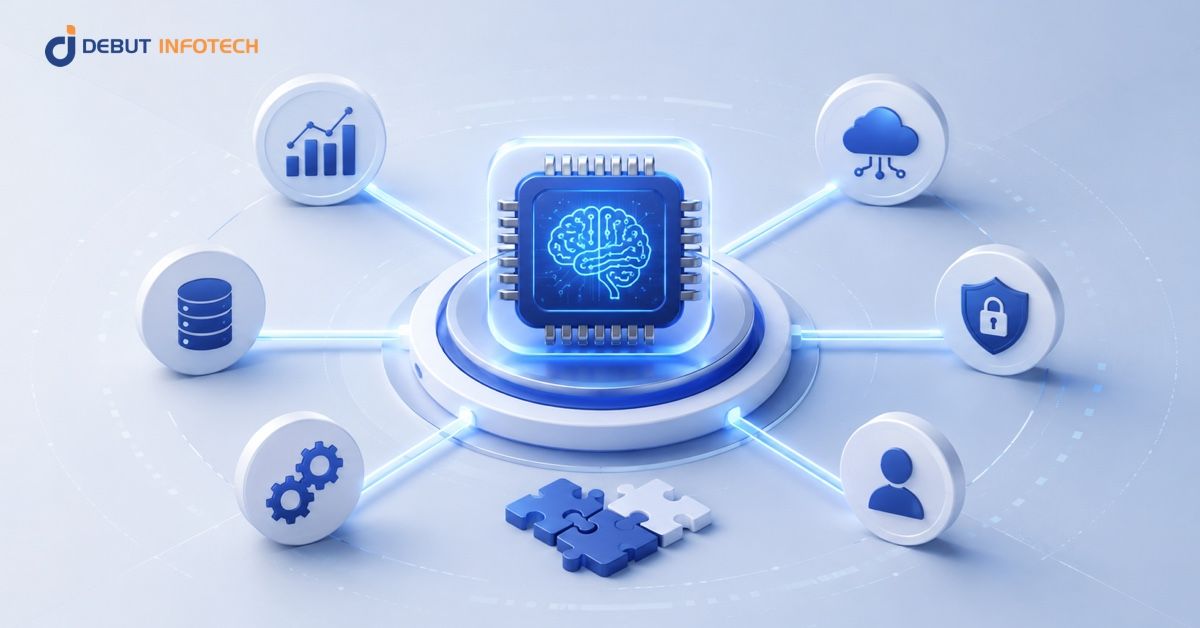


Enterprise AI integration succeeds when workflows, data sources, governance, and business systems are designed alongside the AI model not after deployment.
Choosing the right integration pattern Direct API, RAG, Event Driven AI, or Agentic AI depends on workflow complexity, latency requirements, system access, and risk tolerance.
Data quality, security controls, fallback mechanisms, and monitoring are often bigger determinants of success than model performance alone.
Production-ready AI requires controls such as RBAC, audit logs, queue management, retrieval validation, and human review for sensitive actions.
A phased implementation roadmap helps reduce deployment risk by validating architecture, data readiness, performance, and governance before scaling.
Enterprise AI costs and timelines are heavily influenced by integration complexity, legacy system dependencies, compliance requirements, and operational readiness.
Enterprise AI does not usually break when the model is being tested. It breaks when the model has to operate inside a messy business process.
In the pilot, everything is controlled. The data is selected, the workflow is narrow, and the success criteria are easy to measure. But production is different. The AI must extract data from legacy systems, adhere to access controls, manage missing or incomplete data, meet response time requirements, and return data to systems such as CRM, ERP, ticketing, or case management.
This is where the vulnerability is likely to come in. A model can create a helpful customer risk summary but if the workflow pulls old account data, doesn’t perform compliance checks, or doesn’t notify the relationship manager, the business outcome will be the same. It’s not just about how well the models perform. It is the under engineered integration layer over the model.
For enterprise architects, CTOs, and digital transformation leads, it’s a production architecture problem that must be solved upon embarking on AI workflow automation.
This article outlines four practical integration patterns for production AI workflows, the common pitfalls that can occur in each pattern, and how to create a phased implementation path for 2026. It also contains a readiness checklist for teams to determine if their data, systems, controls and operating model are ready for AI at scale.
It’s rare for an organisation to select the wrong model for an enterprise AI project. Most frequently, they fail as a result of the model being used as a strategy.
AI can seem easy because of proof of concept. A team is able to provide a model that is connected to a clean data set, a useful output and get early stakeholder excitement. But production is different, though. In production, AI must navigate through a complex enterprise system with messy data, stringent security regulations, real users, business rules, latency constraints, and operational risks.
It is at this point that too many enterprise AI implementation projects fail.
The issue here is that many organisations develop an AI capability before they develop an AI integration strategy. They look at what the model can do, but not enough on how it will reliably work throughout the business.
Most teams spend more time fine-tuning models, writing prompts, formulating outputs, and testing the performance of AI models individually. Integration comes later as if it’s just a technical connection.
In enterprise settings, this is risky.
AI needs to interact with systems of record, workflow platforms, data pipelines, APIs, user permissions, audit logs, and approval processes. It is very likely that if those connections are not designed early, the AI solution will work in the demo stage and not work in the real operating environment.
The integration layer is a critical first-step in any strong AI deployment strategy. It describes the process by which data is fed into the AI system, how the system’s output is confirmed, where the decisions are saved, how the system updates other systems, and who is responsible for the results it produces when it affects a business process.
If it is not built on that foundation, then the model becomes another isolated tool, instead of an integral part of the enterprise architecture.
The majority of AI pilots are created from cleaner data than reality.
The sample data set can be described as well-labeled, consistent, complete, and well prepared. However, production data is usually not that clean. It can contain duplicate customer records, missing fields, mismatching names for customers, unstructured notes, outdated documents and conflicting data on various systems.
As soon as the AI system is put to the test with real production data, its performance suffers. It’s not always the model that’s the problem. Often, the model was never tested with real data conditions that it would be confronted with in production.
That is why data readiness is an integral stage in implementing AI from the outset. To scale enterprise AI integration, teams must consider which source systems to integrate, the quality of the data they are connecting, access restrictions, ownership, metadata, and governance.
A clean PoC is useful. But it should never be confused with production readiness.
AI introduces new timing constraints into enterprise workflows.
LLM calls, retrieval steps, orchestration layers, security checks, and third-party API dependencies can all add latency. In some cases, this may only be a few hundred milliseconds. In others, it can add several seconds to a process.
That matters.
What might be fine for a back office review process may not be fine for a customer-facing application, sales platform, claims process or real time support experience. When teams are not setting latency budgets in the early stages, they often find out about the issue when load testing or when users start reporting issues.
A practical AI integration roadmap should define those workflows that must respond quickly, those that can be done in an asynchronous manner and those that are best suited for human scrutiny. It should also establish patterns like caching, queue-based processing, streaming, smaller models, fallback rules, or pre-generated outputs where applicable.
AI workflow automation only works when the workflow still feels usable.
AI systems do not always return the right answer. Sometimes they fail. Sometimes they time out. Sometimes they return a low-confidence result. Sometimes they produce an output that looks plausible but should not trigger an automated action.
In many failed projects, this is not planned for.
A chatbot can immediately and safely reply with, “I’m not sure,” or escalate to a human agent. However, a finance, CRM, HR, procurement or compliance workflow requires a much more controlled back-up. The system needs to know what to do when it is not possible to trust the output of the AI.
This could be sending the task to a human for review or using a rule-based alternative, retrying the request, queuing the record, or taking an action only after it is approved.
This is a key part of any enterprise AI strategy. The goal is not to make AI appear perfect. The goal is to make sure the business process remains safe, traceable, and reliable when AI is uncertain.
AI production deployment is not complete when the model goes live.
Unlike traditional software, AI performance can change over time. Data patterns shift. Users behave differently.
A model that was successful during testing can gradually lose its accuracy, relevance and usefulness to the business.
When monitoring isn’t included from the outset, the organisation can only learn of the problem when it impacts the customer experience, employee productivity, compliance or revenue.
Enterprise AI implementation should include monitoring for both system performance and AI output quality. This includes determining latency, errors, usage, confidence score, exceptions, user feedback, drift and downstream business impacts.
Monitoring is more than just a technical need. It’s the way leaders determine if AI is still adding value.
The vast majority of AI integration failures are due to seeing AI as a tool which needs to be integrated rather than as an operating capability.
The model is important, but it is just a component of a system. For businesses to thrive, they must have an AI integration framework that connects models to data, workflows, applications, governance, security, monitoring and human accountability.
For enterprise architects, CTOs and digital transformation leaders the takeaway is to never begin with the model alone. Start with the operating environment the model must survive in.
That is the difference between an impressive AI pilot and a production AI system the business can actually depend on.
Not every enterprise AI use case needs the same architecture. Some workflows only need a simple model call. Others require some enterprise knowledge, background processing or controlled access to enterprise systems.
This option is important for AI copilot development as it influences the user experience, cost structure, safety paradigm, and degree of control needed during operations.
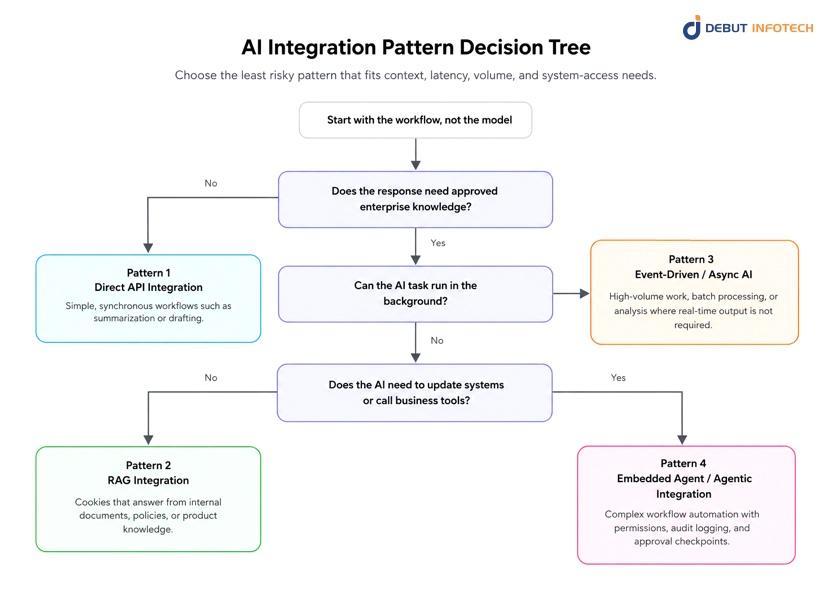
A simple way to think about the decision is described in the diagram below:
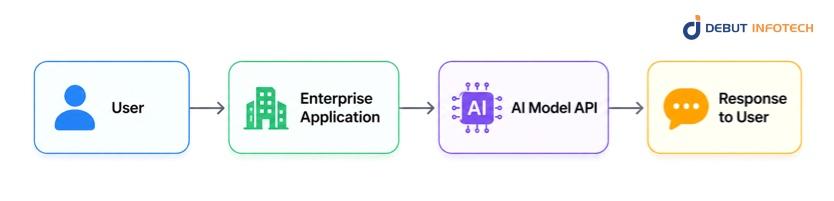
Direct API integration is the simplest pattern. The application sends a user request directly to an AI model API and returns the model’s response inside the same user flow.
This works well when the model does not need much internal business context. For example, a development team may add a feature that summarises uploaded meeting notes, rewrites a support response, or reviews a short code snippet.
Apply this pattern for simple low-complexity tasks like document summarisation, document generation, code review, content classification or just early proof of concept.
The main risk is limited control. The application will greatly rely on the AI provider’s latency, model behaviour, pricing and update cycle. When usage increases rapidly, costs and response time variability can be hard to manage.
The workflow is simple, the volume is manageable, and the business can tolerate occasional latency variation.
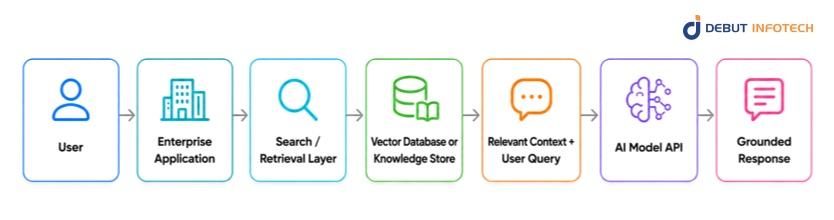
Retrieval-Augmented Generation, or RAG, is a technique that links the AI model with enterprise knowledge. Prior to when the model answers, the application pulls information from a knowledge store and incorporates that context into the prompt.
This pattern is appropriate when the AI is required to respond from a set of approved, up-to-date, or proprietary data. For instance, instead of handling the general knowledge of the model, a customer support copilot should utilize product manuals, policy documents, troubleshooting guides, and records from individual customers.
Use this pattern for internal knowledge assistants, policy Q&A, customer support copilots, legal document search, HR helpdesks, and technical documentation assistants.
The model is only as useful as the retrieved context. If documents are not well chunked, metadata is weak, permissions are neglected, or that the content is outdated, the AI can deliver a well-refined, but wrong answer.
Answer quality depends on enterprise knowledge, internal documents, or controlled information sources.
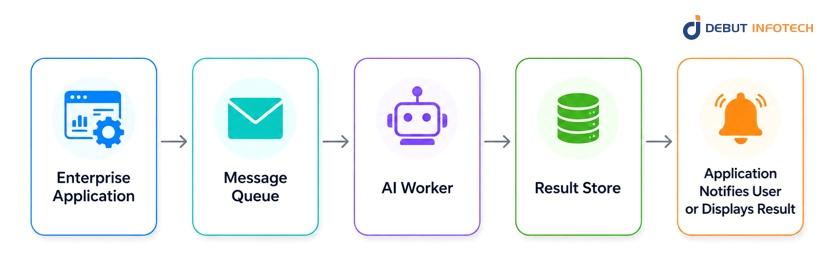
Event driven AI integration moves AI processing away from the real-time user request. The application doesn’t wait for the user, instead, it puts the task in a queue. It is then processed in the background by an AI worker which saves the result.
This pattern works well for tasks that are significant but don’t have to occur immediately. For instance, a bank could scan thousands of loan applications overnight, fill in important data points, highlight errors, and then create cases for its approval process the following morning.
Use this pattern for batch processing, document extraction, compliance checks, email triage, invoice review, report generation, and high-volume background analysis.
The main risk is operational visibility. If queues get long, workers crash or retries are not dealt with correctly, the business might not realize the issue until users begin to ask why they don’t have their results. There should be a clear way of tracking the status of this pattern, retry rules, alerts on failure, and service level expectations.
The workflow is high-volume, the task can run in the background, and immediate user response is not required.
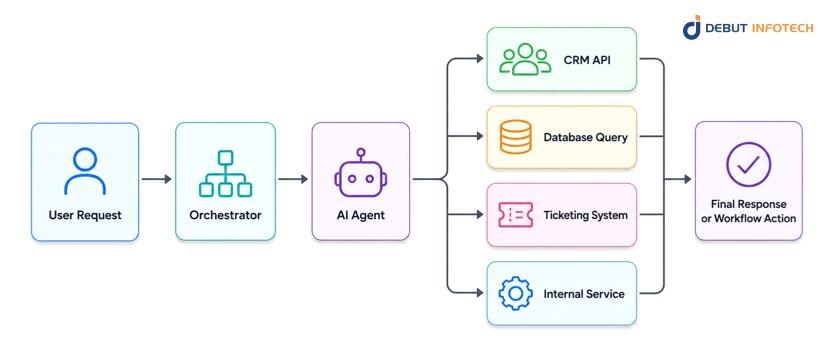
Agentic integration gives an AI system controlled access to tools, APIs, databases, and enterprise applications. The AI does not only respond with text. It can decide which tool to call, gather information, perform steps, and return an outcome.
It is the most effective pattern and most sensitive one as well. For example, an AI sales copilot can review account history, compose a follow-up email, fill in a CRM field, and suggest the next steps. That’s helpful, but once the AI can update business records, there must be robust controls.
Use this pattern for multi-step workflow automation, enterprise copilots with tool access, CRM updates, data enrichment, operational assistants, and workflows that require action across several systems.
The main risk is unintended action. A wrong tool call, incorrect update, or poorly constrained workflow can create business and compliance problems. This pattern needs role-based permissions, human approval for sensitive actions, audit logs, system boundaries, monitoring, and rollback processes.
The AI must take action across enterprise systems, not just generate an answer.
The best integration pattern depends on four questions:
| Decision Question | Best Pattern |
| Does the workflow need a simple AI response inside the application? | Direct API Integration |
| Does the AI need approved internal knowledge before answering? | RAG Integration |
| Can the task run in the background instead of in real time? | Event-Driven / Async AI Integration |
| Does the AI need to call tools or update enterprise systems? | Embedded Agent / Agentic Integration |
The usual way to do this is to begin with the least risky pattern that can achieve the business outcome.
Consider Direct API Integration for low-volume and simple tasks. Use RAG Integration when the answer needs to be based on enterprise knowledge. Consider Event-Driven AI Integration if the task is of large volume and doesn’t require immediate response. Use Embedded Agent Integration when the business needs AI workflow automation with system access.
In mature enterprise environments, these patterns often work together. A support copilot may use RAG to retrieve policy documents, async processing to analyse uploaded files, and an agentic layer to create a ticket or update a CRM record. The real architecture decision is not “Which AI model should we use?” It is “What level of context, latency, control, and risk does this workflow require?”
The safest way to move AI into production is to control the risks that come with each integration pattern. A simple API call, a RAG system, an async pipeline, and an agentic workflow can all fail in different ways. So the controls should not be generic. They should match how the AI system actually works.
This is an important part of enterprise AI implementation, because many projects do not fail because the model is weak. They fail because the surrounding system is not ready for real users, real data, and real exceptions.
Direct API integration is usually the easiest pattern to start with, but it still needs strong guardrails. Teams should set timeout limits based on the user experience they want to protect. If the AI response takes too long, the application needs a clear fallback.
Retry logic should use exponential backoff so temporary provider issues do not break the workflow. For stable inputs, caching can reduce response time and cost. If the provider allows this, the version of the model should be fixed, so that changes in the model’s behaviour do not silently affect the production.
All API calls should also be monitored for latency, error rates, token count, cost and output quality.
RAG systems depend on the quality of retrieval. If the system retrieves weak or irrelevant documents, the model may still produce a confident answer. That is the risk.
Before launch, teams should test retrieval against real user questions. Precision@k and recall@k targets help confirm whether the right documents are being found. Chunking, metadata, embeddings, and ranking should be tested together, not separately.
A confidence threshold is also important. When the retrieved content is not reliable enough, the system should say it cannot answer safely instead of guessing.
Async workflows are useful for tasks like document review, classification, summarisation, and enrichment. The primary concern is failures can accumulate without anyone noticing.
Teams must set up dead-letter queues for failed jobs, provide a maximum retry counter, create a result expiry rule, and track the size of queues. For example, after a provider slowdown, if thousands of jobs are queued up and waiting to be processed, the queue-depth alerts must inform the team before users feel the delay.
Agents need tighter controls because they can call tools and take actions. Early pilots should run in read-only mode. All high-risk write activities, such as updating a record or sending a message, should be approved by humans.
Tool permissions should be limited to only what the agent needs. Every tool call should be logged with the input, output, timestamp, and result. A circuit breaker should pause execution when error rates or unusual behaviour cross an agreed threshold.
Across all AI integration patterns, teams should also apply PII redaction, output validation, structured logging, quality monitoring, and alerts for cost, latency, or safety issues.
Weak models do not necessarily result in enterprise AI’s failure. A huge number of projects fall through because of the fact that the integration is not ready for production. The AI may work in a demo, but struggle when it meets real data, legacy systems, security rules, latency limits, and business exceptions.
This risk should be mitigated in steps with a practical roadmap for integrating AI. Each phase should yield something concrete and there should be a clear decision point prior to the team spending more time, money, or trust.
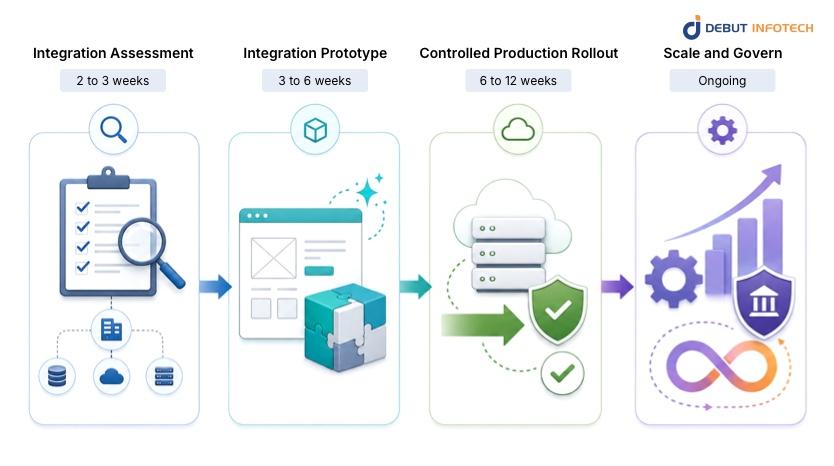
This step verifies if the intended use case of the AI system is able to securely and reliably interact with systems it relies on. The team discusses the sources of information, availability of APIs, access restrictions, compliance requirements, latency, and transaction size.
The result will be a signed Architecture Decision Record and a data readiness report. The documents validate the selected approach, such as retrieval, API orchestration, workflow automation or human review.
The prototype should use real enterprise data and real system connections. This is where the team tests whether the design works outside a controlled demo. Key checks include response time, retrieval accuracy, output consistency, security enforcement, and failure behaviour.
For example, an AI assistant for customer support should be tested with actual ticket histories, knowledge base content, escalation rules, and permission boundaries.
The output is a working prototype with benchmark results and documented fallback paths.
Deploy the solution to a small user group or limited production traffic through feature flags. Add monitoring for quality, cost, errors, latency, user feedback, and system exceptions. Human review should guide prompt changes, retrieval tuning, and guardrail improvements.
The output is a monitored production release and the first quality review report.
Once the integration is stable, scale gradually. Add regression testing, model refresh rules, cost alerts, audit logs, and periodic architecture reviews. This is also where AI integration services can help keep production AI workflows aligned with changing systems, data, and business needs.
AI pilots often look promising because they operate in controlled conditions. Production is different. Before committing engineering time, use this checklist to confirm whether your enterprise AI integration plan is ready for real business systems, real users, and real risk.
Have you identified the systems that the AI solution will work with, such as CRM, ERP, data warehouse, ticketing tools, document repository, etc.? Ensure that the data can be accessed via APIs, queries, or approved connectors. Also validate quality, freshness, ownership, and privacy rules before the AI layer is designed.
Define performance expectations early.
What is the maximum time for an AI-assisted workflow? What happens if the model provider is slow, unavailable, or over budget? Rate limits, cost controls, fallback paths, and monitoring dashboards should be planned before development begins.
AI components should not receive unlimited access to enterprise systems. Define RBAC, redact sensitive data before external model calls, test user-input flows for prompt injection risk, and maintain audit logs for AI-generated actions.
Identify owners of model quality, cycles, escalating error, monitoring cost, decisions for retraining. For instance, the AI claims processing assistant can make recommendations, but highly valued or rare claims must be reviewed by humans.
If there are more than four checklist items unclear or incomplete, the project is not ready for production. Talk to Debut Infotech’s AI integration team before starting the build.
A. An enterprise AI integration strategy is the set of technical and organisational decisions that determine how AI components connect to existing systems, data sources, and workflows – and how they behave reliably in production. It is distinct from a general AI strategy (which covers use case selection and governance) and focuses specifically on the integration layer: which pattern to use, how to handle failures, how to monitor output quality, and how to scale without destabilising existing systems.
A. The four main enterprise AI integration patterns are: Direct API Integration (synchronous LLM API calls within the request flow, suitable for low-volume or latency-tolerant workflows), RAG Integration (retrieval-augmented generation connecting the LLM to an enterprise knowledge store, suitable for knowledge-intensive applications), Event-Driven Async Integration (AI processing decoupled from the user request via a message queue, suitable for high-volume batch workflows), and Agentic Integration (an AI agent with tool-calling access to enterprise systems, suitable for multi-step workflow automation). Each pattern has distinct latency, cost, and risk profiles.
A. The five most common production failure modes are: data quality issues that were not present in the PoC dataset but appear in production data; latency spikes from synchronous LLM API calls that breach the application latency budget; retrieval quality failures in RAG pipelines that produce confidently wrong answers; missing fallback design when the AI component returns an error or low-confidence output; and absence of output monitoring, which allows model performance drift to go undetected for weeks or months.
A. A phased enterprise AI integration runs 11-21 weeks end-to-end: Integration Assessment (2-3 weeks), Prototype (3-6 weeks), Controlled Production Rollout (6-12 weeks), followed by ongoing governance. The largest variable is the Assessment phase – organisations with poorly documented data sources or legacy systems without APIs consistently spend more time here than anticipated.
A. Use the four-category readiness checklist in this article covering Data Readiness, Infrastructure Readiness, Security Readiness, and Governance Readiness. If more than four items are unchecked across all categories, the integration project carries elevated production risk. The most common gaps are in Data Readiness (undocumented PII constraints) and Governance Readiness (no model output review process).

Our Latest Insights

USA
2501 Chatham, Rd Suite R Springfield, IL 62704
+1-708-515-4004
info@debutinfotech.com
UK
7 Pound Close, Yarnton, Oxfordshire, OX51QG
+44-770-304-0079
info@debutinfotech.com
Canada
154 Eden Oak Trail, Kitchener, ON N2A 0H9
+1-708-515-4004
info@debutinfotech.com
INDIA
Sector 101-A, Plot No: I-42, IT City Rd, JLPL Industrial Area, Mohali, PB 140306
9888402396
info@debutinfotech.com