ON THIS PAGE
Progress0%






Our Global Presence :


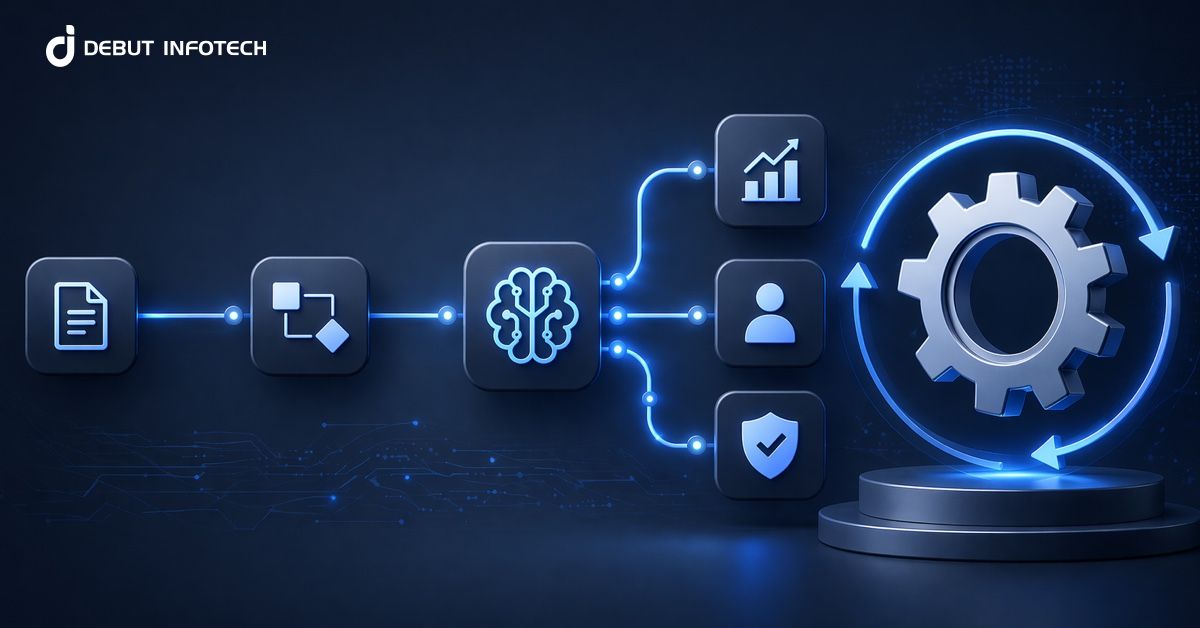


AI workflow automation is reshaping how organizations design and execute business processes by combining data, intelligence, and system-level orchestration. Instead of relying on static, rule-based automation, AI introduces adaptive decision-making that continuously improves outcomes.
Adoption is accelerating rapidly, with 88% of organizations already using AI in at least one business function, per a McKinsey & Company report. At the same time, impact is becoming measurable, as 86% of companies report productivity gains from AI adoption, according to TechRadar.
As enterprises move beyond experimentation, AI workflow automation is becoming central to operations across sales, customer service, finance, and IT. It enables real-time processing, reduces manual effort, and improves decision accuracy at scale. However, many organizations are still in early stages of implementation, focusing on pilots before full deployment. This makes understanding architecture, use cases, benefits, and challenges essential for building systems that deliver consistent and scalable business value.
AI workflow automation refers to the use of artificial intelligence to design, execute, and continuously improve business processes with minimal manual involvement. It combines machine learning, natural language processing, and data analytics to handle tasks that typically require human judgment. These systems can interpret inputs, make context-aware decisions, and trigger actions across connected tools.
Over time, they learn from outcomes and refine their behavior, enabling workflows to become more accurate, efficient, and adaptable to changing business conditions without constant reprogramming.
A well-structured AI workflow automation architecture relies on clearly defined layers that handle data, intelligence, decisions, execution, and performance tracking. Each component plays a specific role in ensuring reliable and scalable automation.
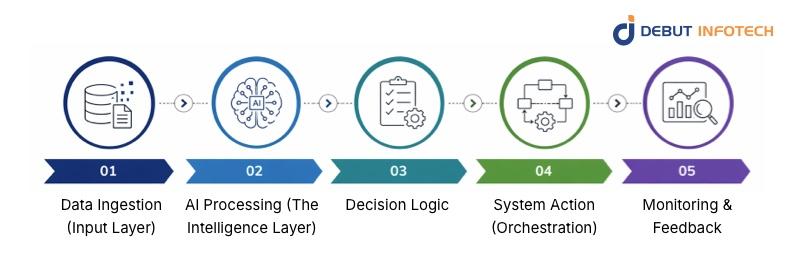
The data ingestion layer collects information from multiple sources, including APIs, databases, documents, sensors, and user interactions. It ensures that incoming data is properly formatted, cleaned, and standardized before processing. This stage often includes validation checks and transformation pipelines, which help maintain data consistency and reliability for downstream AI systems.
This layer serves as the workflow’s analytical engine, where machine learning models and AI algorithms process incoming data. It performs tasks such as classification, prediction, and pattern recognition. By interpreting structured and unstructured data, this layer generates actionable insights that guide automated decisions and improve workflow outcomes over time.
Decision logic defines how insights from the AI layer translate into actions. It combines predefined business rules with model outputs to determine the most appropriate next step. This layer ensures decisions remain aligned with operational goals, compliance standards, and risk policies while maintaining consistency across automated workflows.
The AI workflow orchestration layer manages how tasks are executed across different systems and applications. It coordinates APIs, triggers automated actions, and ensures workflows follow the correct sequence. This layer connects various enterprise platforms, enabling smooth communication and execution without manual intervention, even in complex, multi-step processes.
Monitoring and feedback systems track workflow performance, detect errors, and evaluate outcomes in real time. They provide insights into system efficiency and accuracy while identifying areas for improvement. Feedback loops allow AI models to be retrained and refined, ensuring continuous optimization and better long-term performance of automated workflows.
AI workflow automation reduces processing time by handling repetitive, rule-based, and data-heavy tasks without human intervention. It eliminates bottlenecks, improves turnaround times, and ensures consistency across operations. Teams can redirect their focus to strategic work, while automated systems maintain continuous execution, even outside standard working hours, improving overall productivity.
AI-powered workflows enable faster and more accurate customer interactions through intelligent routing, chatbots, and contextual responses. Queries are analyzed and assigned to the right channels instantly, reducing delays. This leads to quicker resolutions, personalized support, and improved customer satisfaction, especially in high-volume service environments where speed and accuracy are critical.
Automation minimizes reliance on manual labor for routine processes, reducing staffing costs and limiting errors that lead to financial losses. It also lowers operational overhead by streamlining workflows and reducing duplication of effort. Over time, organizations benefit from improved cost control and more efficient resource allocation across departments.
AI systems analyze large datasets to uncover patterns and trends that may not be visible through manual analysis. This enables more consistent and data-driven decision-making across workflows. By reducing human bias and error, organizations can improve the quality of their decisions, particularly in risk assessment, forecasting, and customer insights.
Workflow automation with AI allows organizations to scale operations without a proportional increase in workforce or infrastructure. Systems can handle growing volumes of data and transactions efficiently. This flexibility supports business expansion, seasonal demand spikes, and increased customer activity while maintaining consistent performance and service quality.
AI-driven workflows process data as it is received, allowing organizations to act immediately on new information. This capability supports faster responses to customer needs, operational issues, and market changes. Real-time processing improves agility and ensures that decisions are based on the most current data available.
AI-driven workflows can be applied across multiple business functions, helping organizations automate repetitive tasks, improve consistency, and enhance decision-making in areas that rely heavily on data and structured processes.
AI-driven workflows can automate lead generation, scoring, and nurturing by analyzing customer behavior and engagement patterns. Marketing campaigns can be personalized at scale, with automated content delivery based on user preferences. Sales teams benefit from predictive insights that highlight high-value prospects, improving conversion rates and reducing the time spent on manual prospecting and follow-ups.
Customer support workflows can be automated using AI chatbots, ticket classification systems, and sentiment analysis tools. Incoming queries are categorized and routed to the appropriate agents or resolved automatically when possible. This reduces response times and ensures consistent service quality, even during peak periods, while allowing human agents to focus on complex or sensitive issues.
AI workflows in IT and operations can automate system monitoring, incident detection, and resolution processes. Predictive analytics helps identify potential failures before they occur, enabling proactive maintenance. Routine administrative tasks such as software updates and system checks are handled automatically, improving system reliability and reducing downtime across critical infrastructure.
In finance, AI workflows automate processes such as invoice processing, expense tracking, fraud detection, and financial reporting. Data is extracted, validated, and processed with minimal manual input, improving accuracy and compliance. These intelligent workflow systems also provide real-time financial insights, enabling better budgeting, forecasting, and decision-making across financial operations.
AI-driven operational workflows streamline recruitment, onboarding, and employee management processes. Resume screening, candidate shortlisting, and interview scheduling can be automated using predefined criteria and predictive models. HR teams can also automate performance tracking and employee engagement analysis, ensuring consistent evaluation while improving overall workforce management efficiency and decision-making.
A structured implementation approach ensures enterprise workflow automation AI delivers consistent results. Clear planning, strong data preparation, and continuous improvement help organizations move from initial deployment to long-term operational success.
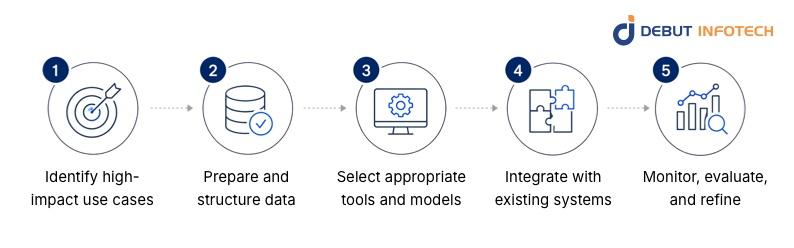
Begin by identifying processes that are repetitive, time-consuming, and heavily data-dependent. These areas often deliver the fastest and most measurable improvements when automated.
Prioritize workflows with clear inefficiencies or bottlenecks, and assess their potential impact on cost, speed, and accuracy to ensure the initiative delivers tangible business value.
Strong data foundations are critical for effective AI operations automation. Ensure that data is clean, consistent, and properly labeled before feeding it into AI systems. This includes removing duplicates, resolving inconsistencies, and standardizing formats.
Well-prepared data improves model accuracy, reduces errors, and supports reliable decision-making across automated processes.
Choose AI tools and models that align with your operational requirements and long-term business goals. Evaluate platforms based on scalability, integration capabilities, and ease of maintenance.
Selecting the right technology stack ensures smoother deployment, reduces technical friction, and supports future expansion without requiring major system overhauls.
Integration ensures that AI workflows operate seamlessly within existing enterprise environments. Connect automation tools with current software, databases, and APIs to enable smooth data exchange and execution.
Proper integration minimizes disruption, preserves existing investments, and allows workflows to function as part of a unified system rather than isolated processes.
Continuous monitoring helps track performance, detect issues, and identify areas for improvement. Establish feedback loops to evaluate outcomes and retrain models where necessary.
Regular refinement ensures workflows remain aligned with business objectives and adapt to evolving data patterns, improving accuracy and efficiency over time.
Introducing AI business process automation often raises concerns among employees about job security and shifting responsibilities. Resistance can slow adoption and reduce effectiveness. Organizations need clear communication, training programs, and involvement strategies to build trust, demonstrate value, and ensure teams understand how automation supports rather than replaces their roles.
AI systems rely heavily on high-quality data to perform accurately. Inconsistent, incomplete, or poorly structured data can lead to unreliable outcomes and flawed decisions. Establishing strong data governance practices, including standardization, validation, and regular audits, is necessary to maintain data integrity and ensure consistent performance across automated workflows.
Many organizations operate with legacy systems that may not easily integrate with modern AI technologies. This creates technical challenges and may require additional Enterprise AI development effort or middleware solutions. Careful planning and phased integration strategies are needed to ensure compatibility while maintaining system stability and minimizing operational disruption.
Implementing AI workflows requires investment in technology, infrastructure, and skilled personnel. Measuring return on investment can be complex, especially in the early stages, when benefits may not be immediately visible.
Clear performance metrics and realistic timelines are necessary to evaluate success and justify ongoing investment in automation initiatives.
AI workflows often handle sensitive and regulated data, making security a critical concern. Organizations must implement strict access controls, encryption standards, and compliance measures to protect information.
Adhering to regulatory requirements while maintaining system efficiency requires careful planning, ongoing monitoring, and regular updates to security protocols.
Following proven best practices helps organizations maximize the value of AI workflow automation. A disciplined approach to deployment, training, and performance tracking ensures that enterprise process automation AI systems remain effective and aligned with business goals.
Begin with a focused pilot project targeting a specific workflow with clear objectives and measurable outcomes. This approach allows teams to validate assumptions, identify technical gaps, and refine processes before wider deployment. Gradual scaling reduces risk, improves confidence, and ensures lessons learned are applied effectively across larger implementations.
Equip employees with the knowledge and tools required to work alongside AI systems effectively. Training should cover both technical usage and practical application within daily workflows. Ongoing support, including documentation and help resources, ensures users remain confident, reduces resistance, and improves overall adoption and productivity across the organization.
AI workflow automation requires adaptability as business needs and data conditions evolve. Maintain flexibility in system design, tool selection, and process adjustments. This allows organizations to respond to performance insights, changing requirements, and emerging opportunities without disrupting operations or requiring complete system overhauls.
Clear communication ensures that all stakeholders understand the purpose, benefits, and impact of AI automation initiatives. Structured change management strategies help address concerns, align expectations, and encourage collaboration. When employees are informed and involved, adoption improves, and transitions to automated workflows become more efficient and less disruptive.
Define key performance indicators that align with business objectives, such as efficiency gains, cost reduction, accuracy improvements, and user satisfaction. Tracking these metrics provides visibility into system performance and value delivered. Measurable outcomes also support informed decision-making and continuous improvement across AI workflow automation initiatives.
AI workflow automation continues to evolve as new technologies and approaches emerge. Tracking key trends helps organizations stay competitive and adopt innovations that improve automation capabilities and long-term efficiency.
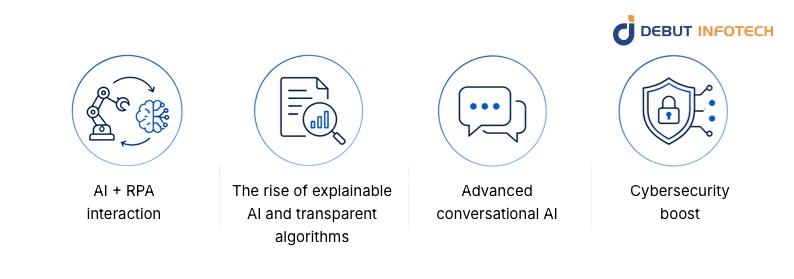
The integration of AI with robotic process automation is enabling more advanced automation capabilities. While RPA handles structured, rule-based tasks, AI introduces intelligence for unstructured data processing and decision-making. This combination allows organizations to automate complex workflows that previously required human intervention, improving efficiency and expanding automation use cases.
Organizations are placing greater emphasis on understanding how AI systems make decisions. Explainable AI provides visibility into model behavior, helping teams validate outcomes and ensure regulatory compliance. Transparent algorithms build trust among stakeholders and support responsible AI adoption, especially in industries where accountability and auditability are critical.
Conversational AI systems are becoming more capable of understanding context, intent, and complex queries. These systems go beyond basic chatbots, enabling more natural and effective interactions across customer service and internal workflows. Improved language models and integration capabilities are driving broader adoption in both customer-facing and operational environments.
AI is playing an increasing role in strengthening cybersecurity within automated workflows. It can detect anomalies, identify potential threats, and respond to security incidents in real time. This proactive approach enhances system resilience, reduces response times, and helps organizations maintain secure operations while scaling their automation capabilities.
AI workflow automation is redefining how businesses operate by connecting data, intelligence, and execution into streamlined systems. It improves efficiency, supports faster decisions, and scales operations without increasing complexity. With the right architecture, strategy, and governance, organizations can automate critical processes while maintaining control, accuracy, and adaptability in changing environments.
If you’re looking to implement AI workflow automation effectively, partnering with experts can make the difference. With over ten years of experience, Debut Infotech offers reliable Generative AI development services. We help businesses design, build, and scale intelligent workflows tailored to real operational needs. Their approach focuses on practical deployment, seamless integration, and measurable outcomes, ensuring your automation journey delivers long-term value and performance.
A. AI automates workflows by handling repetitive tasks, making data-driven decisions, and triggering actions without human input. It reads documents, routes requests, predicts outcomes, and flags issues early. Basically, it cuts manual effort, speeds things up, and keeps operations running with fewer bottlenecks and less back-and-forth.
A. They plug into existing systems through APIs, connectors, or middleware. So your CRM, ERP, or helpdesk tools don’t need to be replaced. AI sits on top of or alongside them, pulling data, pushing updates, and triggering actions. It’s more like adding a smart layer than starting from scratch.
A. They usually start small, prove it works, then expand. Standardizing processes, using shared data pipelines, and setting clear rules go a long way. Teams reuse models and workflows across departments instead of rebuilding everything. Good governance matters too, so things don’t get messy as adoption grows.
A. AI workflow automation covers repetitive, rule-based tasks across teams. Think approvals, data entry, report generation, email routing, lead scoring, and compliance checks. It also handles more dynamic tasks, such as customer queries and fraud alerts, by learning patterns rather than just following fixed rules, making it more flexible over time.
A. Costs vary a lot. Small setups might cost a few thousand dollars, while enterprise deployments can run into the six figures. Pricing depends on tools, data volume, integrations, and customization. There’s also ongoing spend for maintenance, updates, and cloud usage, so it’s not just a one-time bill.
A. Most companies see ROI through time savings, fewer errors, and lower operational costs. Some report cutting process times by 30–70%. It also frees teams to focus on higher-value work, which adds indirect returns. The real payoff shows when automation scales across multiple workflows, not just one.
A. Simple workflows can go live in a few weeks. More complex setups, especially with heavy integrations or custom models, can take a few months. A phased rollout is common. Start small, test, tweak, then expand. Rushing it usually leads to messy processes and poor adoption.
A. Common tools include platforms like UiPath, Automation Anywhere, and Microsoft Power Automate. Add AI layers, such as OpenAI or Google Cloud AI, for decision-making. You’ll also see APIs, data pipelines, and integration tools like Zapier or MuleSoft tying everything together behind the scenes.

Our Latest Insights

USA

2501 Chatham, Rd Suite R Springfield, IL 62704
+1-708-515-4004
info@debutinfotech.com
UK

7 Pound Close, Yarnton, Oxfordshire, OX51QG
+44-770-304-0079
info@debutinfotech.com
Canada

154 Eden Oak Trail, Kitchener, ON N2A 0H9
+1-708-515-4004
info@debutinfotech.com
INDIA

Sector 101-A, Plot No: I-42, IT City Rd, JLPL Industrial Area, Mohali, PB 140306
9888402396
info@debutinfotech.com

9001:2015
Quality Certified

ISO 27001
Security Certified

A+ Rating
Accredited Business

Certik
Security & Audit


Copyright © 2026, Debut Infotech. All rights reserved. | Privacy Policy