ON THIS PAGE
Progress0%






Our Global Presence :





Truth be told, the majority of Node.js apps are not hacked because of sophisticated attacks. They are compromised due to mere security vulnerabilities such as unverified input, weak authentication or revealed secrets.
That is why Node.js security is not only a best practice, but a must.
This guide contains useful copy and paste fragments of code that ensure that you protect your backend without complicating matters. No theory overload, just what works in real projects.
Here’s what we’ll cover:
We’ll also highlight real security incidents and the lessons developers learned the hard way, so you don’t have to.
If you want to build Node.js applications that are not just functional but secure by design, this is a solid place to start.
It is easy to think that your app is safe until you read about how even secure systems are exposed by minor security lapses.
In early 2024, the Node.js team announced various high severity security defects (such as HTTP request smuggling bugs) that can provide attackers with an opportunity to interfere with how servers handle requests. Practically, this implies that a malicious attacker may be able to slip unscrupulous requests under your defenses even when your application logic does seem correct on the surface.
This is a reminder that the security of Node.js is not necessarily only about your code, but also about the very manner of how your system is set up and performs under the real traffic conditions.
The strength of Node.Js Architecture, its asynchronous, non-blocking nature, is also where risk can creep in:
The combination of the two makes Node.js fast and scalable, though it also implies that even minor gaps may easily turn into significant vulnerabilities.
In real life projects, the following issues are recurrent:
Attackers are able to tamper with backend logic or database queries when they are not validated.
As an illustration, allowing unreliable tokens or not verifying them appropriately can allow the attackers to log in as any user.
Lack of security headers or wrong request parsing can make your app vulnerable to such attacks as request smuggling or data leakage.
Here’s the honest truth:
Most security problems in Node.js apps don’t come from advanced hacking,they come from everyday shortcuts and assumptions.
Sadly enough, attackers take advantage of the very assumptions.
This is why security should not be an accidental part of the process, but a sensible approach to creating a reliable and production-ready application that will not crumble when you put it to the test.
In the case of creating a Node.js secure api, security is not about employing dozens of tools, it is about getting the basic right. These are the actual trends that experienced developers use in practical projects regardless of whether the project is based on a modern Node.js framework or from scratch.
Let’s walk through the essentials you should never skip.
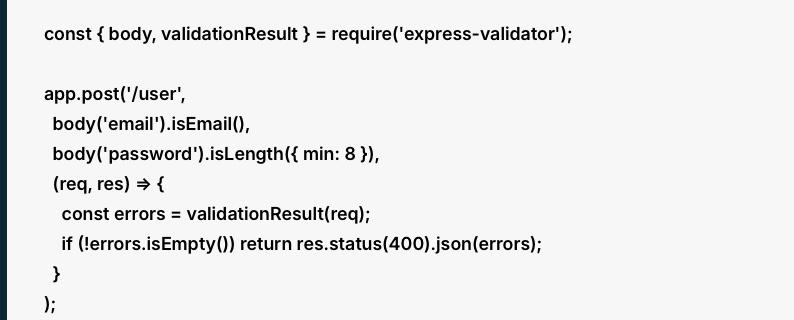
const { body, validationResult } = require(‘express-validator’);
app.post(‘/user’,
body(’email’).isEmail(),
body(‘password’).isLength({ min: 8 }),
(req, res) => {
const errors = validationResult(req);
if (!errors.isEmpty()) return res.status(400).json(errors);
}
);
What this does
This validates the request which comes in and before the application process is carried out. In this example:
Why it matters
Any request that comes to your API must be considered untrusted. Attackers make unpredictable/malicious input in an attempt to:
The first checkpoint is the validation. It minimizes risk before the data hits on your controllers, services and your database.
Practical takeaway
A good validation enhances security as well as reliability. It is not only able to block attacks, but it ensures that your app does not process bad data later on which would create bugs.

const bcrypt = require(‘bcrypt’);
const hashedPassword = await bcrypt.hash(password, 12);
What this does
Instead of storing the original password, this converts it into a hashed version. A hash is a one-way conversion which implies that you do not keep the actual password in your database.
The 12 is the salt rounds value. The amount of work done by bcrypt to create the hash is controlled by it.
Why it matters
In the event that your database gets exposed, plain-text passwords would automatically expose users to danger. Hashing makes stolen password information much more useless to attackers.
There is also automatic addition of salt in bcrypt, which functions to prevent rainbow table attacks as well as to ensure that similar passwords produce different hashes.
Practical takeaway
Hashing is not optional for user passwords. Storing passwords in plain text and using weak hash functions is one of the most harmful mistakes in real systems, and bcrypt can be considered a trusted and well-utilized solution.
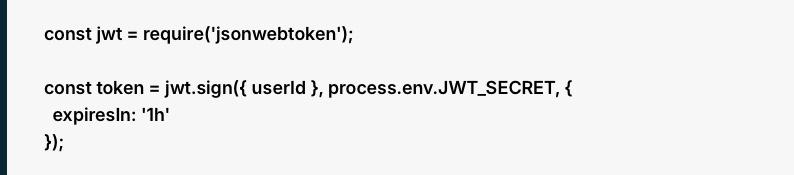
const jwt = require(‘jsonwebtoken’);
const token = jwt.sign({ userId }, process.env.JWT_SECRET, {
expiresIn: ‘1h’
});
What this does
This generates a JSON Web token of the user. The token includes:
The future requests can then be authenticated with the help of the token.
Why it matters
JWTs are extensively used since they render the process of authentication to be scalable and versatile. However, they may be risky when managed improperly.
When a token does not have an expiration date, any person that steals it can have access without limit. This is the reason why expiresIn: ‘1h’ is significant. It restricts the harm in case a token is breached.
Practical takeaway
JWTs are useful, but they are not secure by default. You still need to:
This constitutes a large portion of learning to secure api in Node.js in actual deployments.

const helmet = require(‘helmet’);
app.use(helmet());
What this does
Helmet is a middleware which automatically appends a number of security related HTTP headers to your responses. These headers help protect against issues such as:
Why it matters
Browsers do not display content, they understand it. In the absence of protective headers, an attacker can take advantage of the way a browser manages the response of your application.
Helmet provides a good default setup which does not require writing every header manually.
Practical takeaway
This is among the simplest yet proven security enhancements that you can be able to add to an Express app. It is less complicated, easy to use, and provides significant protection without configuration.
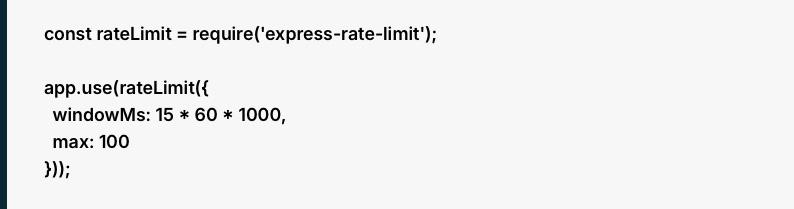
const rateLimit = require(‘express-rate-limit’);
app.use(rateLimit({
windowMs: 15 * 60 * 1000,
max: 100
}));
What this does
This restricts the number of requests that a client could make within a time window.
In this example:
When a user surpasses such a limit, the server will drop subsequent requests until the time window restarts.
Why it matters
Rate limiting is used to curb abuse. Particularly it is helpful in the protection of:
Without rate limiting, attackers will be able to hit your endpoints as many times as they can and flood your service or guess credentials.
Practical takeaway
The rate limit should not be the same on all routes. General read-only endpoints can have significantly less restrictive limits than login, password reset, OTP and signup endpoints.

const xss = require(‘xss’);
const clean = xss(req.body.comment);
What this does
This eliminates or disarms potentially harmful HTML or scripting messages posted by users.
When somebody posts some malicious JavaScript in a comment box, the process of sanitizing prevents the subsequent presentation and execution of that script in a web browser.
Why it matters
Sanitization and validation are not similar.
As an example, a comment can be a valid text but include malicious script tags. Sanitization assists in addressing that danger.
Practical takeaway
This is particularly necessary with the kind of content generated by users themselves, including:
When your app receives text which might be later posted or shown elsewhere, then sanitization needs to be a part of your process.

# .env
DB_PASSWORD=supersecret

What this does
Instead of hardcoding credentials directly in your source code, this stores them in environment variables and loads them into your application.
Examples of secrets include:
Why it matters
One of the most popular security errors in the domain of backend development is hardcoded secrets. When code is uploaded to some public repository or shared in some irresponsible manner, such secrets can be revealed instantly.
Isolating secrets from the code ensures that deployment is more secure and adaptable to environments such as development, staging and production.
Practical takeaway
In mature custom software development environments, teams sometimes go to the next stage and use special secret managers rather than just using .env files. Nevertheless, environment variables remain a significant minimum requirement.

db.query(‘SELECT * FROM users WHERE email = ?’, [email]);
What this does
This transmits the query and the input individually, rather than putting them in a single raw string.
The input is accepted by the database as data and not as a runnable SQL code.
Why it matters
SQL injection occurs when the input that is controlled by the attacker is directly inserted into a query and it modifies its meaning.
An example of this is that, when you construct queries by concatenation of strings, a malicious user can inject SQL commands that:
That is avoided by parameterized queries which maintain structure and data apart.
Practical takeaway
You must know this principle even when you are using an ORM. A significant number of security problems occur when developers leave ORM protection or craft raw queries in an irresponsible way. This belongs in every secure tech stack for web development.

const cors = require(‘cors’);
app.use(cors({
origin: ‘https://yourdomain.com’
}));
What this does
CORS is used to determine the external sources that may make requests to your API using a browser.
In this example, only requests coming from https://yourdomain.com are allowed.
Why it matters
When CORS is excessive, other websites could be able to communicate with your API in an unintended way. This may cause a higher risk, particularly where credentials or endpoints of sensitivity are at stake.
One of the weak setups that is commonly used is to allow all origins with an * even during production.
Practical takeaway
CORS is not a substitute for authentication but it is a significant browser level protection. It must be set in a controlled manner depending on which frontend domains you actually have trust in.

const winston = require(‘winston’);
What this does
Mechanisms such as Winston assist you record application activity, errors, warnings, and suspicious events. This can include:
Why it matters
Security is not merely a matter of prevention. You also need visibility. A lot of teams find out about an incident too late because they did not document the warning signs in a manner that is understandable. Good logging helps you:
Practical takeaway
Logs must be practical, designed and safe. Logging sensitive data such as raw passwords, tokens and secret keys should be avoided.
The development of a secure backend is not only a matter of having the appropriate tools or libraries, but also using them in a proper manner and in a unified way throughout your whole system.
This is in fact where numerous teams fail. Security is typically relegated to the later development stages, when addressing the problem becomes more costly, time-intensive, and threatening.
Debut Infotech is a reliable Node.js development company with a different approach.
We do not consider security as an afterthought; we make it part of any given application. Security decisions are made early when they are needed the most, such as authentication and API design, data handling and deployment.
The difference is our practical experience.
We have experienced how vulnerabilities in the real-world manifest in the production environment be it weak validation, bad token management and poorly configured APIs. That experience enables us to come up with systems that avoid issues before they happen rather than the ability to respond to such issues later.
Maintainability is another aspect that is important.
Security must not slow your team or introduce a complexity. Debut Infotech specializes in developing solutions that are secure and practical, so that your developers can work effectively and, at the same time, maintain high standards of security.
At the end of the day, secure applications don’t happen by accident.
They are the outcome of deliberate choices at the very beginning and throughout the course of time. Having collaborators is the key to the enhanced level of reliability and trust of your Node.js applications, and partnering with a team that values security throughout your development lifecycle can be a decisive factor.
A. Node.js is a secure platform, but it isn’t “locked down” by default. Although the basic system is secure, its actual vulnerabilities typically lie in the way a developer constructs the application and the third-party npm packages that they opt to use.
To ensure that an application is safe, you need to take proactive measures to manage it. This implies routinely auditing dependencies on vulnerabilities, purifying all user data to prevent injections, and not using root privileges to minimize the possible harm. Finally, Node.js offers a good base, yet its real security will rely on the standard best practices in its implementation.
A. Yes, Node.js applications can be hacked.
Node.js is typically secure itself, although the vulnerabilities are typically related to the construction and maintenance of applications. Most security problems are due to either insecure coding or a high degree of dependency on third parties or improperly configured servers and APIs.
In simple terms, Node.js is not a problem, how it is used today is what makes your application secure.

Our Latest Insights
USA
2501 Chatham, Rd Suite R Springfield, IL 62704
+1-708-515-4004
info@debutinfotech.com
UK
7 Pound Close, Yarnton, Oxfordshire, OX51QG
+44-770-304-0079
info@debutinfotech.com
Canada
154 Eden Oak Trail, Kitchener, ON N2A 0H9
+1-708-515-4004
info@debutinfotech.com
INDIA
Sector 101-A, Plot No: I-42, IT City Rd, JLPL Industrial Area, Mohali, PB 140306
9888402396
info@debutinfotech.com