ON THIS PAGE
Progress0%






Our Global Presence :



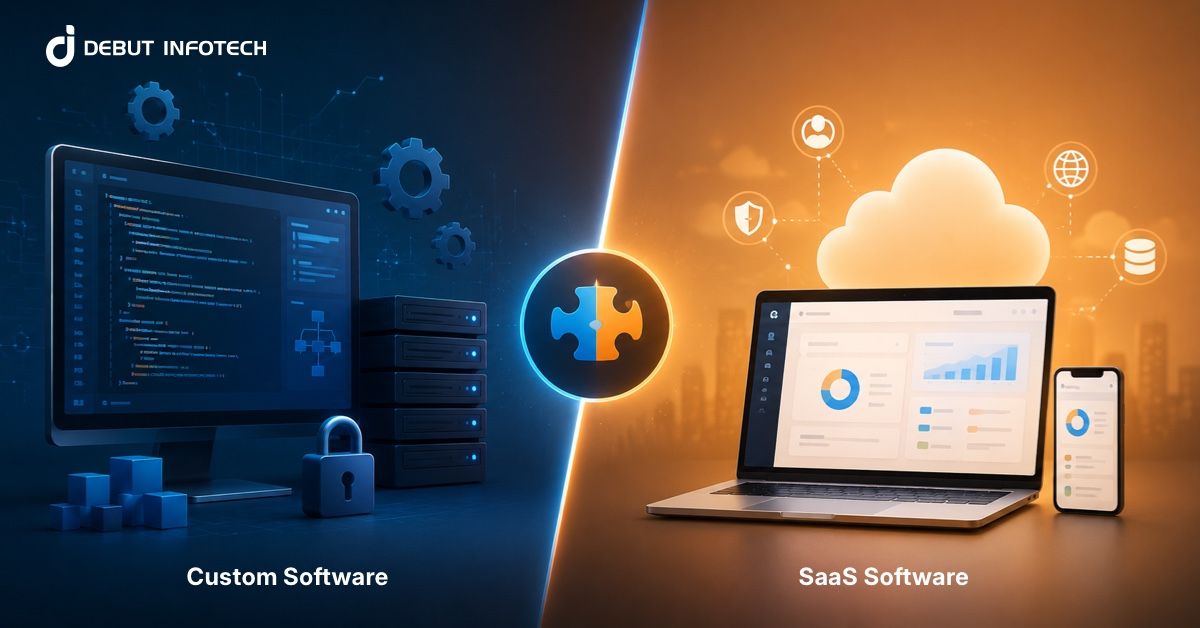


Businesses weighing custom vs SaaS are dealing with a real shift in how software is built, bought, and scaled.
SaaS adoption is already widespread, with over 82% of enterprises running at least one SaaS solution, while the global SaaS market generated around $250 billion in revenue in 2024. That scale explains why SaaS dominates early-stage decisions.
Furthermore, many organizations are moving beyond off-the-shelf tools as operations grow more complex. Custom software offers deeper control, tighter integration, and long-term efficiency, especially for core systems. The decision is no longer binary. It comes down to how critical the software is to your business, how fast you need it, and how much control you are willing to trade for convenience.
In this piece, we will discuss in detail the differences between build vs SaaS software, their definitions, benefits, and limitations. We will also cover the differences between the two, when to choose one over the other, and a decision framework to help you choose.
Software as a Service (SaaS) is a cloud-based delivery model in which applications are hosted by a vendor and accessed via a web browser. Instead of installing and maintaining software locally, organizations subscribe to a service that is centrally managed, updated, and secured. This model shifts responsibility for infrastructure, uptime, and maintenance away from internal IT teams, allowing businesses to focus on usage rather than ownership.
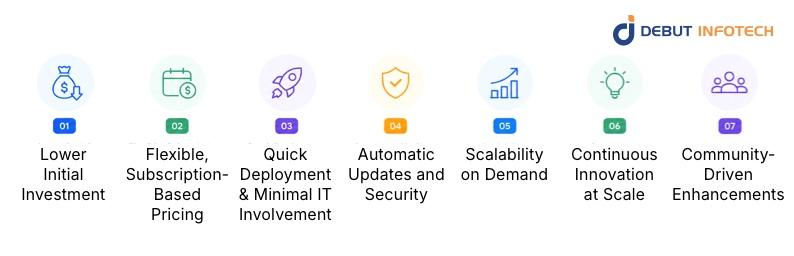
SaaS platforms offer practical advantages that make them attractive for businesses of all sizes. These benefits focus on cost efficiency, ease of use, and the ability to scale without heavy technical investment.
SaaS removes the need for upfront infrastructure spending. There is no hardware procurement, no bulk licensing fees, and no internal setup costs. This makes it easier for organizations to get started without tying up capital, especially when testing new tools or entering new markets.
Most SaaS platforms operate on monthly or annual subscription models. Businesses can align costs with usage, scale plans up or down, and avoid long-term financial commitments. This flexibility supports better financial planning and reduces the risks associated with large, one-time investments.
SaaS applications are ready to use almost immediately after sign-up. There is little need for complex installations or dedicated infrastructure setup. Teams can onboard quickly, often without heavy IT involvement or the need to hire SaaS development companies, thereby speeding adoption and reducing operational friction across departments.
Vendors handle software updates, patches, and security improvements. This ensures users always have access to the latest features and protections without manual intervention. It also reduces the burden on internal teams to monitor vulnerabilities or manage version control.
SaaS integration platforms are designed to scale with business needs. Whether adding new users, increasing storage, or expanding features, scaling typically involves upgrading to a higher subscription tier. This makes it easier to support growth without re-architecting systems.
SaaS vendors continuously improve their products in response to market demand and technological advances. Customers benefit from new features, performance improvements, and integrations without needing to invest in development themselves.
Many SaaS products evolve based on feedback from a broad user base. This leads to features that address common business needs, improving usability and functionality over time while aligning with industry practices.
Despite its advantages, SaaS presents certain limitations that can affect enterprise operations. These challenges often relate to control, flexibility, and long-term cost considerations, especially for complex or highly regulated environments.
SaaS platforms are designed for broad usability, which limits the extent of customization. Enterprises with layered workflows, niche requirements, or industry-specific processes often face constraints. Extensive modifications may require workarounds, third-party tools, or process compromises, which can reduce efficiency and create operational inconsistencies over time.
Data in SaaS environments is stored and managed by the vendor, raising concerns about control, access, and compliance.
Enterprises operating under strict regulations may struggle with data residency requirements, audit limitations, and unclear ownership terms, especially when migrating, extracting, or managing sensitive business-critical information.
While SaaS reduces upfront expenses, long-term subscription fees can accumulate significantly. As organizations scale users, features, and storage, costs increase steadily. Over time, this can surpass the investment required for custom software, particularly when paying for bundled features that are not fully utilized across the business.
SaaS users depend entirely on vendor decisions, including pricing updates, feature rollouts, and service availability.
Sudden changes can disrupt workflows or increase costs, with little flexibility. If a vendor discontinues a feature or changes direction, enterprises may face migration challenges or operational setbacks.
Custom software is a purpose-built solution designed to meet an organization’s exact operational needs. It is developed either in-house or through a dedicated partner, with full control over features, architecture, and integrations. This approach allows businesses to align technology with their workflows, support complex requirements, and maintain ownership of data, systems, and intellectual property while adapting the software as needs evolve.
Custom software provides distinct advantages for organizations that require precision, control, and scalability. Custom software benefits often support long-term efficiency and differentiation, particularly for businesses operating in competitive or complex environments.
Custom software often requires a higher upfront investment, but it eliminates recurring subscription fees associated with SaaS platforms. Over time, this leads to more predictable costs, especially for large organizations. Businesses also avoid paying for unnecessary features, ensuring that spending aligns directly with actual usage and operational priorities.
Custom solutions are built to match exact business workflows, not generic use cases. This allows organizations to design processes without compromise, improving productivity and reducing inefficiencies. Teams can continuously refine features based on real operational feedback, ensuring the system evolves alongside business needs without external constraints.
With custom software, organizations retain complete ownership of their systems and data. This enables stricter governance, better regulatory compliance, and greater control over how information is stored and accessed. It also ensures intellectual property remains internal, reducing dependency on external vendors.
Custom software allows businesses to build capabilities that directly support their competitive positioning. Instead of relying on widely available tools, organizations can develop unique features that reflect their strategy. This creates opportunities for innovation, improves customer experience, and strengthens long-term market differentiation.
While custom software offers flexibility and control, it also comes with notable challenges. These drawbacks typically involve higher costs, longer timelines, and the need for continuous technical involvement and resource commitment.
Custom enterprise software development requires significant upfront investment in planning, design, engineering, and testing. Costs extend beyond coding to include infrastructure setup, project management, and quality assurance.
For many organizations, this financial commitment can strain budgets, especially when returns are realized only after full deployment and adoption.
Building custom software is time-intensive, often requiring months of structured development before deployment. Requirements gathering, prototyping, testing, and iteration all take time. This extended timeline can delay business initiatives, particularly when compared to SaaS solutions that are ready to use almost immediately after onboarding and configuration.
Custom software requires ongoing maintenance, including updates, bug fixes, performance optimization, and security management. Organizations must allocate dedicated technical resources or rely on external partners to keep systems running efficiently. This continuous commitment increases operational complexity and requires long-term planning to ensure reliability and scalability.
Comparing SaaS and custom-built solutions highlights how each approach performs across cost, flexibility, and long-term value. These differences help organizations determine which option aligns better with their operational and strategic priorities.
Here’s a clear comparison table based on the key differences for SaaS vs custom development:
| Criteria | SaaS (Software as a Service) | Custom-Built software |
| Cost | Low upfront cost with subscription-based pricing that increases over time as usage scales. | High initial investment, but no recurring subscription fees; more cost-efficient long term. |
| Time to Market | Quick deployment with minimal setup; ready to use almost immediately after onboarding. | Longer development cycle involving planning, design, testing, and deployment. |
| Customization & Flexibility | Limited customization; businesses often adapt processes to fit the software. | Fully customizable to match exact workflows, processes, and evolving business needs. |
| Maintenance & Deployment | Vendor handles updates, security, and infrastructure; minimal internal involvement required. | Requires dedicated resources for maintenance, updates, and infrastructure management. |
| Data Ownership | Data is stored and managed by the vendor, with limited control over access and policies. | Full ownership and control over data, storage, and access policies. |
| Long-Term ROI | Faster short-term returns, but long-term costs can accumulate due to subscriptions. | Strong long-term ROI through efficiency, ownership, and elimination of recurring fees. |
| Security & Compliance | Standardized security measures provided by the vendor; may not meet all regulatory needs. | Tailored security and compliance frameworks designed to meet specific industry requirements. |
SaaS
SaaS typically involves low upfront costs, with pricing structured around monthly or annual subscriptions. This makes it easier to start without heavy capital investment. However, as usage grows across teams, features, and storage, recurring costs increase steadily, which can become significant over extended periods of continuous use.
Custom-Built
Custom software requires a substantial initial investment covering development, infrastructure, and deployment. While custom software development cost can be high at the beginning, it removes recurring subscription fees. Over time, especially at scale, businesses may achieve better cost efficiency by paying only for what they build and maintain.
SaaS
SaaS solutions are ready for immediate use, allowing organizations to deploy quickly with minimal setup. This is particularly useful for businesses that need rapid implementation or want to test new ideas without delay. Configuration usually replaces development, significantly shortening the time to becoming operational.
Custom-Built
Custom software requires a structured development lifecycle that includes planning, design, coding, and testing. This process can take several months, depending on complexity. While slower to launch, it ensures the final product is aligned with exact requirements, reducing the need for adjustments after deployment.
SaaS
SaaS platforms offer configuration options such as settings, plugins, or limited extensions. However, deeper customization is restricted by the vendor’s architecture. Businesses often need to adapt their workflows to fit the system, which can introduce inefficiencies when handling specialized or non-standard processes.
Custom-Built
Custom software is developed specifically around business requirements, offering full flexibility in features, workflows, and integrations. Organizations can continuously refine the system based on operational feedback. This level of control ensures that the software evolves alongside the business without being constrained by external limitations.
SaaS
SaaS vendors handle all aspects of maintenance, including updates, bug fixes, and infrastructure management. Deployment is managed centrally, ensuring users always access the latest version. This reduces the burden on internal IT teams and ensures consistent performance without requiring direct involvement in technical operations.
Custom-Built
With custom software, organizations are responsible for deployment, updates, and ongoing maintenance. This includes managing infrastructure, monitoring performance, and addressing issues as they arise. While this provides full control, it also requires dedicated resources and structured processes to maintain system stability and security.
SaaS
In SaaS environments, data is stored on vendor-managed servers, which limits direct control. The provider defines access, portability, and usage policies. This can create challenges for organizations that require strict governance, especially when handling sensitive data or meeting regulatory compliance requirements.
Custom-Built
Custom software allows organizations to own and control their data fully. They can determine where it is stored, how it is accessed, and how it is secured. This level of ownership supports compliance efforts and provides greater confidence when managing sensitive or business-critical information.
SaaS
SaaS delivers quick returns by enabling fast deployment and immediate productivity gains. However, long-term ROI can be affected by recurring subscription costs and limited customization. As businesses grow, these factors may reduce overall efficiency and increase total spending compared to alternative approaches.
Custom-Built
Custom software can deliver stronger long-term returns by closely aligning with business operations. It eliminates ongoing subscription fees and improves efficiency through tailored functionality. Over time, the ability to optimize processes and maintain full control often leads to greater value despite higher initial investment.
SaaS
SaaS providers implement standardized security measures, including encryption, access controls, and regular updates. While these SaaS frameworks are sufficient for many use cases, they may not meet the specific compliance requirements of certain industries. Organizations must rely on vendor certifications and policies to ensure regulatory alignment.
Custom-Built
Custom software enables organizations to design security frameworks tailored to their exact needs. This includes implementing specific compliance protocols, access controls, and monitoring systems. Such control is particularly important for industries with strict regulatory standards, where generic security models may not be adequate.
SaaS is not always the right fit, but it works well in specific situations. Identifying these scenarios helps organizations make faster decisions when speed, cost, and simplicity are key considerations.
SaaS is well-suited for situations where deployment speed is critical. Organizations can onboard teams, configure basic settings, and begin operations within hours or days. This makes it ideal for time-sensitive projects, pilot programs, or businesses that need immediate functionality without waiting for development cycles or infrastructure setup.
When business processes align with standard industry practices, SaaS platforms provide sufficient functionality without the need for customization. These solutions are designed to address common use cases, enabling organizations to adopt proven workflows quickly while avoiding the cost and complexity of building tailored systems from scratch.
SaaS offers a cost-effective entry point for organizations with budget constraints. The subscription model spreads expenses over time, eliminating the need for large upfront investments. This allows businesses to access enterprise-grade tools and capabilities while maintaining financial flexibility and allocating resources to other strategic priorities.
SaaS platforms reduce the burden of ongoing system maintenance by handling updates, security patches, and infrastructure management. This is particularly beneficial for organizations without dedicated IT teams, as it ensures consistent performance and reliability without requiring internal resources to manage technical operations or troubleshoot system issues.
Certain business conditions make custom software a more suitable choice than SaaS. These typically involve complexity, scale, and the need for tighter control over systems, data, and overall operational performance.
Enterprises with complex, highly specific workflows benefit from custom software that aligns precisely with their operations. SaaS platforms may force compromises or inefficient workarounds. Custom solutions allow organizations to design processes that reflect how they actually operate, improving efficiency, accuracy, and overall productivity across teams.
When SaaS platforms cannot scale effectively with growing data volumes, user demands, or performance requirements, custom software becomes a stronger option. Enterprises can design systems that handle increased workloads without constraints, ensuring consistent performance and avoiding the limitations that often come with predefined SaaS architectures and pricing tiers.
Organizations operating in regulated industries often require strict control over data handling, storage, and access. Custom software enables them to implement specific security protocols and compliance measures. This level of control reduces risk, supports audits, and ensures alignment with regulatory standards that SaaS platforms may not fully accommodate.
Enterprises relying on multiple systems often need seamless integration across platforms. Custom software allows direct integration with internal tools, legacy systems, and third-party services. This ensures consistent data flow, reduces duplication, and improves operational efficiency, which can be difficult to achieve with standard SaaS integration capabilities.
Many organizations adopt a hybrid approach to balance flexibility and efficiency. This enterprise software strategy combines SaaS and custom solutions, allowing businesses to optimize costs while maintaining control over critical operations.
SaaS works well for foundational business functions that follow standard processes, such as finance, HR, or customer management. These areas rarely require deep customization, making SaaS a practical choice.
It reduces setup time, lowers operational overhead, and ensures consistent updates, allowing teams to focus on execution rather than managing infrastructure or maintaining internal systems.
Core operations that directly impact revenue, efficiency, or competitive positioning benefit from custom development. These processes often involve unique workflows that SaaS cannot fully support.
Building tailored solutions ensures precise alignment with business needs, improves performance, and gives organizations the control needed to adapt quickly as operational demands evolve.
A hybrid model depends on strong integration between SaaS platforms and custom-built systems. Data must flow seamlessly across tools to avoid silos and inconsistencies. This requires well-planned APIs, middleware, and data governance strategies. Careful integration ensures systems work as a unified environment, supporting accurate reporting, streamlined operations, and better decision-making across the organization.
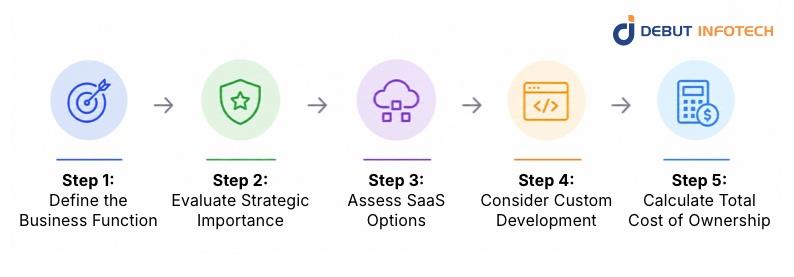
Choosing between custom vs SaaS software requires a structured evaluation process. A clear framework helps organizations assess needs, costs, and long-term impact, ensuring that decisions align with business objectives and operational realities.
Start by clearly identifying the business function the software will support. Outline its purpose, the processes it handles, and how it connects to other systems. Consider user groups, expected outcomes, and operational dependencies. This clarity ensures decisions are based on real needs rather than assumptions and helps avoid misalignment between technology choices and business priorities.
Assess how critical the function is to your business performance and differentiation. The more strategic it is, the stronger the case for control and customization through custom development rather than relying fully on standardized SaaS tools.
Functions widely used across industries with no competitive impact. Standard SaaS solutions typically meet requirements without customization, making them cost-effective and easy to implement.
Processes are largely standard but require slight adjustments to fit internal workflows. SaaS platforms with configuration options may suffice, though some limitations could still require minor workarounds.
Functions that influence competitive positioning and operational efficiency. These often require tailored capabilities, making custom development a better fit to support unique processes and strategic goals.
Core business functions that define how the organization operates or competes. These demand full control, making custom-built solutions essential to protecting intellectual property and maintaining a long-term advantage.
Evaluate whether existing SaaS products can realistically support your needs without introducing inefficiencies. Focus on flexibility, integration capability, scalability, and long-term reliability before committing to a vendor.
Determine whether the platform aligns with your processes or forces adjustments. Frequent workarounds can reduce productivity, increase errors, and create long-term operational inefficiencies.
Check compatibility with existing tools, databases, and platforms. Poor integration can lead to data silos, manual processes, and reduced visibility across business operations.
Evaluate how pricing evolves as the user base, data, and features grow. Costs may rise significantly over time, affecting overall return on investment and budget planning.
Assess risks associated with vendor dependency, including pricing changes, feature removals, and shutdowns. Consider data portability, exit strategies, and the effort required to migrate systems if needed.
Analyze whether building a tailored solution delivers measurable value in terms of control, efficiency, and long-term scalability. This step requires balancing cost, timelines, and internal capabilities.
Estimate total expenses, including development, infrastructure, updates, and staffing. This helps determine whether the investment is sustainable compared to ongoing SaaS subscription costs.
Assess development timelines based on complexity, resources, and scope. Longer timelines may delay benefits, so align expectations with business priorities and operational urgency.
Evaluate whether internal teams or external partners can handle maintenance, updates, and troubleshooting. Reliable support is essential to ensure system performance and long-term stability.
Consider benefits such as flexibility, data ownership, and independence from vendors. These factors often contribute to stronger efficiency, better compliance, and improved adaptability over time.
Take a comprehensive view of all direct and indirect costs associated with both SaaS and custom solutions. This ensures that your enterprise software decision framework is based on full financial impact rather than initial pricing alone.
Include setup, configuration, development, and deployment expenses. These upfront costs form the baseline for evaluating total investment and comparing different solution approaches effectively.
Account for recurring SaaS fees or the cost of maintaining custom systems. These expenses accumulate over time and significantly influence long-term affordability.
Consider the effort required to connect systems and tailor functionality. These costs can increase quickly, especially when working with complex or incompatible platforms.
Factor in the time and cost of onboarding users, adapting workflows, and managing transitions. Poor adoption can reduce the effectiveness of any solution.
Identify hidden costs caused by system limitations, such as manual processes or inefficiencies. These can impact productivity and reduce the overall value of the chosen solution.
Choosing between custom vs SaaS comes down to priorities. SaaS delivers speed, simplicity, and lower entry costs, while custom software offers control, flexibility, and long-term value. Many enterprises settle on a hybrid model, using SaaS where standardization works and custom solutions where differentiation matters.
The right decision between SaaS vs in-house software depends on your workflows, growth plans, and how much control your business needs over its technology stack.
Debut Infotech supports both sides of the equation. As a SaaS and custom software development company, we help businesses evaluate needs, design scalable solutions, and build systems that align with long-term goals, whether that means optimizing SaaS adoption or developing tailored platforms from the ground up.
A. Budget, timeline, and how unique your workflows are are some factors that drive the SaaS vs in-house software choice. If your processes are standard, SaaS usually fits. If they’re complex or give you an edge, custom starts to make sense. Data control, compliance needs, and integration requirements also weigh heavily in that call.
A. Enterprises look past subscription fees and check the full picture: scaling costs, vendor lock-in, customization limits, and ongoing licensing. With custom builds, they factor in upfront development, maintenance, and upgrades. Over time, SaaS can get expensive at scale, while custom solutions can pay off as usage and complexity grow.
A. It usually comes down to urgency versus control. SaaS gets you up and running quickly, which matters when time is more important than tailoring every detail. Custom takes longer, but you shape it around your exact needs. Teams weigh how quickly they need results against how much control they want later.
A. There’s no universal winner here. SaaS works well when you want something quick, reliable, and already tested. Custom wins when your business has unique workflows or needs tighter control. It usually comes down to how standard your operations are and how much customization you can’t live without.
A. xSaaS looks cheaper upfront because you’re paying for subscriptions rather than building from scratch. But over time, those fees stack up, especially as your team grows. Custom costs more at the start, no doubt, but long-term expenses can level out or even drop if you avoid recurring licensing costs.
A. SaaS fits everyday business needs like CRM, accounting, or project management, where standard features do the job. Custom solutions step in when your processes are unique, like specialized workflows, industry-specific platforms, or products that need to stand out. That’s where off-the-shelf tools usually fall short.
A. SaaS delivers faster ROI since you can start using it almost immediately with minimal setup. Custom solutions take longer to pay off due to development time and costs. But if it improves efficiency, reduces manual work, or better supports growth, the long-term returns can outweigh the slower start.
A. SaaS platforms are built to scale easily so that you can add users or features with minimal effort. That said, you’re limited to what the provider allows. Custom solutions can scale exactly as you want, but it takes planning and resources to do so as demand grows.

Our Latest Insights
USA
2501 Chatham, Rd Suite R Springfield, IL 62704
+1-708-515-4004
info@debutinfotech.com
UK
7 Pound Close, Yarnton, Oxfordshire, OX51QG
+44-770-304-0079
info@debutinfotech.com
Canada
154 Eden Oak Trail, Kitchener, ON N2A 0H9
+1-708-515-4004
info@debutinfotech.com
INDIA
Sector 101-A, Plot No: I-42, IT City Rd, JLPL Industrial Area, Mohali, PB 140306
9888402396
info@debutinfotech.com