ON THIS PAGE
Progress0%






Our Global Presence :





Currency converter app development helps businesses build digital tools that make currency calculations easier for travelers, shoppers, traders, and finance teams. Depending on the business model, these apps can display exchange rates, track currency movements, support multi-currency accounts, or connect users with international payment services.
Demand for reliable currency information is supported by the scale of global foreign exchange activity. According to the Bank for International Settlements (BIS), foreign exchange trading reached $9.6 trillion per day in April 2025, a 28% increase from 2022. The World Bank’s Remittance Prices Worldwide database also reported that sending remittances cost an average of 6.36% of the amount transferred in its 2025 reporting.
For businesses, these figures highlight the importance of transparent exchange rates and clear pricing when serving international customers.
This guide explains app types, essential features, exchange rate APIs, technology choices, development steps, security requirements, cost estimates, monetization models, and how to choose a development company.
A currency converter app retrieves exchange rates from financial data providers, banks, or rate aggregators. These sources supply rates for currency pairs such as USD/EUR and GBP/USD. Aggregators combine data from multiple sources to provide consistent reference rates. The rate available depends on the provider, currency pair, and update schedule.
Most converter apps display mid-market rates, which represent the midpoint between buying and selling prices. These rates work well for estimates and comparisons. Banks, payment providers, and money transfer services may apply a markup or additional fees, so the final transaction amount may differ from the displayed estimate.
The conversion flow starts when a user enters an amount and selects two currencies. The app checks its local or server cache for a recent rate. If the rate is missing or expired, the backend requests updated data from the API. It then calculates the converted amount and displays the result with the rate’s timestamp.
Refresh intervals depend on the app’s purpose. A travel converter may refresh hourly or daily, while a business dashboard may need more frequent updates. Forex products require specialized forex market data integration feeds. Caching reduces API requests, lowers operating costs, and helps the app remain usable when connectivity is weak.
Currency converter apps serve different needs. Their features, costs, development timelines, and regulatory obligations depend on whether they display exchange rates or handle financial transactions.
| App type | Main users and purpose | Estimated cost | Timeline | Licensing |
| Travel converter | Tourists checking local prices | 8,000–20,000 | 4–8 weeks | Usually not required for display-only conversion |
| Business converter | Finance teams calculating invoices and expenses | 20,000–45,000 | 8–14 weeks | Usually not required for display-only tools |
| Forex trading app | Traders monitoring rates and executing trades | 50,000–120,000+ | 4–9 months | Depends on trading and brokerage activities |
| Multi-currency wallet | Users holding and exchanging balances | 45,000–100,000+ | 4–8 months | May require financial authorization |
| Cross-border payments app | Individuals and businesses sending money internationally | 60,000–150,000+ | 5–10 months | Often requires payment or money-transfer authorization |
These are preliminary multi-currency app development estimates in USD, not vendor quotations. Licensing depends on the operating model and jurisdictions served.
A travel converter suits businesses that need a straightforward product with a limited feature set. E-commerce companies and finance departments may prefer business converters with historical rates, reporting, and bulk calculations. Both can start with a relatively small minimum viable product (MVP).
Wallets and cross-border payment apps require more planning because they may handle customer funds, identity verification, transaction monitoring, and payment integrations. Forex trading products also need suitable market data and trading infrastructure. These requirements increase development costs and can extend launch timelines.
Choose your app type by defining the main user problem first. If customers only need quick estimates, build a converter. If they need to hold balances, execute trades, or transfer money, map the financial services and licensing requirements before finalizing the feature list.
Currency converter app development helps businesses serve customers who buy, travel, or work across borders. Its value depends on how well conversion features fit existing products and customer needs.
For travel companies and e-commerce stores, showing prices in a customer’s preferred currency makes costs easier to understand. Local-currency displays can reduce confusion during checkout and support purchase decisions. Businesses should clarify whether displayed prices are estimates or final charges, particularly when payment providers apply their own exchange rates or fees.
Fintech companies and banks can add conversion features to existing apps, giving users a convenient way to compare currencies before making international transactions. Rate alerts, saved currency pairs, and conversion history can encourage repeat use. These features also create opportunities to introduce related services, provided the business explains applicable charges clearly.
Startups can launch a standalone converter without initially handling customer funds. A focused MVP can test demand before the business invests in premium features, advertising, subscriptions, or referral partnerships. This approach limits early development commitments while giving the team real user feedback to guide future improvements.
Corporate finance teams benefit from faster multi-currency calculations for budgeting, expense reviews, and management reports. A well-designed tool can reduce spreadsheet errors and apply consistent rate sources across departments. However, financial reporting must use the appropriate accounting rates and dates rather than assuming that a consumer-facing converter rate is suitable for all reporting purposes.
The strongest business case comes from solving a specific problem, measuring usage, and expanding based on evidence. Set targets for conversion accuracy, repeat usage, processing time, or checkout completion before development begins.
A currency converter app should make conversions quick, accurate, and easy to understand. Start with the features users need most, then add advanced capabilities based on customer feedback and business goals.
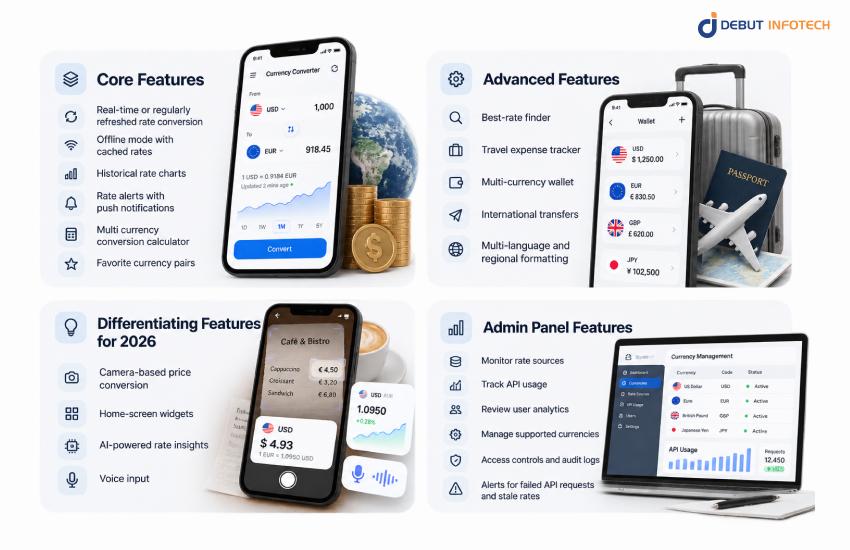
Currency converter app development for fintech startups should include real-time or regularly refreshed rate conversion, offline mode with cached rates, historical rate charts, rate alerts with push notifications, a multi currency conversion calculator, and favorite currency pairs. Show the last update time and flag outdated data. Offline conversions should clearly state that saved rates may no longer reflect current market conditions.
Advanced features help the app serve more specific needs and create additional revenue opportunities.
In currency converter app development for international businesses, new interaction options can make conversions easier, but each should solve a clear user problem.
Administrators need tools to monitor rate sources, track API usage, review user analytics, manage supported currencies, and update app content. Access controls and audit logs help prevent unauthorized changes. Alerts for failed API requests and stale rates allow the team to respond before users experience widespread problems.
Build core conversion features first. Add wallets, transfers, camera recognition, or AI analysis only when the target audience needs them. This keeps the initial release manageable and makes it easier to test whether each feature justifies its development and maintenance costs.
An exchange rate API supplies the data that powers currency conversions. Compare providers by pricing, supported currencies, update frequency, request limits, access to historical data, and commercial usage rights. The following comparison uses published plan information available in October 2026 where accessible. Prices and limits can change.
| Provider | Indicative pricing | Update frequency | Currency coverage | Free access |
| Open Exchange Rates | $12/month for Developer | Hourly on Developer | 200+ | 1,000 requests/month; USD base |
| Fixer | $14.99/month for Basic | Hourly on Basic | 170+ | 100 requests/month |
| ExchangeRate-API | $10/month for Pro | Hourly on Pro | Around 165 | 1,500 requests/month |
| XE Currency Data API | $799/year for Lite | Daily on Lite | 170+ currencies and precious metals | Free trial with 5,000 requests |
| CurrencyStack | $9/month advertised early-access pricing | Hourly on the listed plan | Verify required currency coverage | Up to 2,000 requests/month |
REST APIs suit most converters because the app can request rates when needed or at scheduled intervals. WebSocket feeds maintain a live connection and push updates, making them more suitable for trading interfaces that need continuous market data. For ordinary travel and shopping conversions, WebSockets may add unnecessary complexity.
Use a backup provider when availability is important. Validate incoming rates, monitor timestamps, and switch to the backup if the primary source fails. Cache shared rates on the backend instead of sending a separate provider request for every user interaction.
Before selecting a plan, review historical data access, rate redistribution rules, commercial-use permissions, request limits, support response times, and uptime guarantees. Some indicative rate feeds are unsuitable for trading or settlement. Choose a provider whose data rights match the app’s intended use.
Currency converter apps commonly use Flutter or React Native for cross-platform development, Node.js for backend services, PostgreSQL for rate history, and Redis for caching. Firebase Cloud Messaging can handle notifications, while AWS, Google Cloud, or Azure provides hosting, monitoring, and infrastructure management.
The right technology stack depends on the app’s complexity, target platforms, expected traffic, and need for real-time data. A basic converter requires less infrastructure than a wallet or trading product, so select tools based on actual requirements.
| Layer | Recommended technology | Purpose |
| Frontend | React Native or Flutter | Builds cross-platform mobile interfaces |
| Native frontend | Swift for iOS, Kotlin for Android | Supports platform-specific features |
| Backend | Node.js | Handles API requests, conversion logic, and user services |
| Database | PostgreSQL | Stores users, settings, and historical rates |
| Caching | Redis | Keeps frequently requested rates available with low latency |
| Notifications | Firebase Cloud Messaging | Delivers rate alerts and reminders |
| Cloud hosting | AWS, Google Cloud, or Azure | Runs backend services and supports scaling |
React Native and Flutter can reduce duplicated development work when launching on iOS and Android. Native Swift or Kotlin development offers greater platform-specific control, which may matter for complex background processing or specialized device integrations. The best choice depends on the team’s skills, performance needs, and maintenance budget.
Node.js works well for API-driven applications because it handles many concurrent network requests efficiently. PostgreSQL provides structured storage for rate history and user records, while Redis reduces the need for repeated API calls. Cloud services supply monitoring, backups, access controls, and scaling options.
Keep conversion calculations consistent across platforms by implementing shared, tested logic where practical. Use decimal-safe arithmetic for financial values rather than relying on unrestricted floating-point calculations. Separate rate retrieval, calculation, and presentation so each component can be tested and maintained independently.
Building a currency exchange app starts with market research and feature planning. The process then moves through UI/UX design, platform selection, API integration, frontend and backend development, security implementation, testing, and launch. Each stage helps ensure the app works reliably and meets user needs.
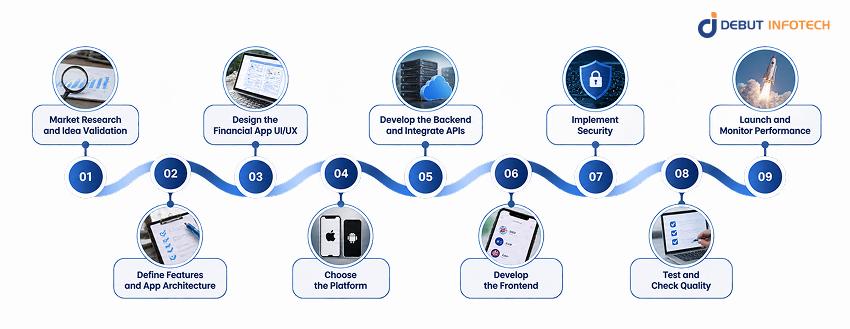
Identify your target users, such as travelers, online shoppers, traders, or finance teams. Review competing apps, user reviews, pricing, and missing features. Define the main problem your product will solve, then select a small set of MVP features to test demand without unnecessary development.
Document the conversion flow, supported currencies, rate refresh intervals, and data sources. Choose an API based on its coverage, reliability, licensing terms, and request limits. Map how data moves between the mobile app, backend, cache, database, and external provider before development begins.
Create wireframes for currency selection, amount entry, converted results, charts, and settings. Build a clickable prototype and test it with representative users. Make exchange rates, timestamps, and any applicable fees easy to understand. Simple screens help users complete conversions without confusion.
Decide whether to launch on iOS, Android, both, or the web. Cross-platform development can reduce duplicated work, while native development gives teams more platform-specific control. Base this decision on your audience, budget, required device features, and release plans.
Build services that fetch rates, validate responses, cache results, and manage user settings. Add authentication if the app needs accounts or synchronized preferences. Handle timeouts, rate limits, and provider failures so temporary outages do not break the entire conversion experience.
Implement the conversion screen, currency search, favorite pairs, historical charts, offline mode, and alert settings. Ensure the interface updates correctly when users change currencies or amounts. Show when cached rates are being used, and avoid presenting outdated figures as current market data.
Protect network traffic with HTTPS and encrypt sensitive stored information. Use secure authentication, restrict administrative access, and keep API credentials on the backend rather than embedding secret keys in the mobile app. Collect only the personal data the product needs.
Test conversion formulas, decimal precision, rounding, unusual currency values, and supported currency codes. Simulate API failures, slow connections, and heavy traffic. Beta testing helps identify usability problems before release. Verify that alerts, cached rates, and currency formatting behave consistently across supported devices.
Prepare store listings, privacy disclosures, and release builds. After launch, monitor crashes, API response times, stale-rate incidents, user retention, and conversion activity. Use this data to prioritize fixes and improvements. Schedule regular dependency updates and security reviews to keep the app reliable.
Development should proceed through defined milestones, with acceptance criteria for each stage. A focused converter can launch relatively quickly, while wallets and payment apps need additional testing, integrations, and regulatory preparation. Plan post-launch maintenance before release rather than treating it as an optional expense.
Security and compliance requirements depend on the data the app collects and the financial services it provides. A display-only converter generally faces fewer regulatory obligations than a product that stores customer funds, executes trades, or transfers money across borders.
Use HTTPS to protect data in transit and encryption for sensitive information stored in databases and backups. Apply secure authentication, role-based access controls, audit logging, and regular security testing.
Under the GDPR, where applicable, businesses must establish a lawful basis for processing personal data, explain their practices, respect users’ rights, and comply with applicable data retention requirements.
A standalone tool that displays indicative exchange rates and performs calculations will generally not need a financial-services license solely for those functions. However, adding payment execution, customer balances, foreign exchange dealing, or other regulated services can change that position.
In the United States, money transmission rules vary by activity and jurisdiction, and federal requirements may also apply. In the UK, issuing electronic money generally requires authorization or registration unless an exemption applies. EU payment and e-money activities are also subject to applicable authorization rules.
Licensing timelines vary by jurisdiction, business model, and application completeness. Start regulatory assessment during discovery, before committing to launch dates. Some businesses can work with licensed banking or payment partners, but this arrangement does not automatically eliminate all compliance obligations. Seek qualified legal advice before handling funds.
Currency converter app development typically costs between $8,000 and $20,000 for a basic app, while advanced solutions can cost $45,000 or more. The final cost to develop a currency converter app depends on features, platform choice, API subscriptions, security requirements, integrations, and development team rates.
The table below provides an initial budgeting guide, including currency converter app development cost and timeline, for a custom-built product.
Cost by App Type
| App type | Estimated cost | Timeline |
| Basic currency converter | 8,000–20,000 | 1–2 months |
| Full-featured converter | 20,000–45,000 | 2–4 months |
| Multi-currency wallet | 45,000–100,000+ | 4–8 months |
| Forex trading app | 50,000–120,000+ | 4–9 months |
These ranges assume different levels of functionality and integration work. Wallets and trading apps cost more because they may require identity verification, transaction processing, specialist market data, and stronger security controls. Licensing, banking partnerships, and regulatory reviews can add separate costs.
| Phase | Estimated cost |
| Discovery and planning | 1,000–4,000 |
| UI/UX design | 1,500–5,000 |
| Development and integrations | 5,000–25,000 |
| Testing and quality assurance | 1,000–5,000 |
| Launch and deployment | 500–2,000 |
| Feature | Estimated cost |
| Basic currency conversion | 2,000–5,000 |
| Historical charts | 1,000–3,000 |
| Rate alerts and notifications | 1,000–3,000 |
| Offline conversion | 800–2,000 |
| Expense tracker | 2,000–5,000 |
| AI-powered rate insights | 3,000–10,000+ |
| Multi-currency wallet | 10,000–30,000+ |
These are indicative component estimates. They may overlap with phase-based costs and should not be added mechanically to the app-type ranges.
Several decisions influence the final cost to develop a custom currency converter app :
| Team location | Indicative hourly rate |
| North America | 80–150 |
| Western Europe | 60–120 |
| Eastern Europe | 35–80 |
| South Asia | 20–60 |
| Africa | 20–50 |
Rates vary by provider, seniority, and project scope. Compare teams on relevant experience, deliverables, communication, and quality assurance, rather than choosing solely by hourly price.
Budget separately for API subscriptions, cloud hosting, monitoring, maintenance, security patches, and operating system updates. A small converter may have modest recurring expenses, while a wallet or trading app can incur substantial infrastructure and compliance costs. Request a breakdown of both initial development and annual operating expenses before approving the project.
Currency converter apps can generate revenue through subscriptions, advertising, referrals, transaction margins, licensing, or business-focused software plans. The right model depends on the audience and the value the app provides.
Choose a model that matches user intent. Test pricing and retention before adding multiple revenue streams, and explain fees before users commit to a paid service or financial transaction.
Several avoidable mistakes in currency exchange app development can affect conversion accuracy, user trust, and operating costs. Address these risks during planning and testing rather than waiting until users report problems.
Include these checks in the real-time currency converter app development plan and release criteria. A small amount of early testing can prevent costly corrections and help protect user confidence after launch.
Choose a development partner with proven experience in financial applications, external API integrations, security, and ongoing software maintenance. The team should understand your business model and explain how its technical choices affect cost, delivery time, and future expansion.
Use this weighted scorecard to compare shortlisted providers. Rate each company from 1 to 5, then multiply its rating by the category weight.
| Evaluation criterion | Weight |
| Fintech development experience | 25% |
| API integration expertise | 20% |
| Security and compliance practices | 25% |
| Post-launch support | 15% |
| Pricing clarity and communication | 15% |
| Total | 100% |
Before hiring any fintech app development company, ask for examples of similar projects, the proposed technology stack, the approach to API outages, and the testing process. Request a breakdown of deliverables, milestones, ownership rights, and ongoing currency converter app maintenance costs.
Watch for vague estimates, no relevant portfolio, unrealistic delivery promises, or a refusal to discuss compliance. A fixed-price engagement can suit a clearly defined MVP, while a dedicated team offers more flexibility for products with changing requirements.
Select a partner that can explain its decisions clearly and support the app after release. Debut Infotech is one option to evaluate for custom app development, currency conversion API integration, and ongoing technical support. Compare its proposal with other qualified providers before making your decision.
Building a currency converter app requires accurate exchange rate integration, secure data handling, and a user-friendly interface. Debut Infotech, a leading mobile app development services provider, helps businesses develop custom currency conversion apps featuring real-time rate updates, historical charts, rate alerts, and multi-currency support.
Our team handles UI/UX design, backend development, API integration, testing, and post-launch maintenance. Whether you’re building a basic converter or a feature-rich financial application, we can help you develop a solution that meets your business requirements and supports future growth.
Developing a currency converter app typically takes 2–4 months for a basic version and 4–8 months for a more advanced app. The timeline depends on features, API integration, design, and testing. Apps with offline conversion, multiple data sources, and real-time exchange rates may take longer to process.
Currency conversion apps should use HTTPS encryption, secure API connections, and reliable authentication if users have accounts. API keys must stay protected, and user data should be stored securely. If the app processes payments or collects personal information, additional privacy controls and relevant regulatory requirements may apply.
Yes, you can build a currency converter app using a free exchange rate API. Services such as Frankfurter and ExchangeRate-API offer options for accessing currency data. However, free plans may limit the number of requests, the supported currencies, or the update frequency. Check the provider’s terms before choosing an API for your app.
A currency converter calculates how much money is worth in another currency using exchange rates. A forex trading app lets users buy and sell currency pairs to profit from price movements. Trading apps need additional features, such as charts, order execution, and risk controls, and may require financial licenses.
You generally don’t need a financial license for a basic currency converter that only displays exchange rates and calculates conversions. However, requirements change if your app handles payments, exchanges money, or offers forex trading. Check applicable federal and state regulations in the United States before launching regulated financial services.

Our Latest Insights

USA
2501 Chatham, Rd Suite R Springfield, IL 62704
+1-708-515-4004
info@debutinfotech.com
UK
7 Pound Close, Yarnton, Oxfordshire, OX51QG
+44-770-304-0079
info@debutinfotech.com
Canada
154 Eden Oak Trail, Kitchener, ON N2A 0H9
+1-708-515-4004
info@debutinfotech.com
INDIA
Sector 101-A, Plot No: I-42, IT City Rd, JLPL Industrial Area, Mohali, PB 140306
9888402396
info@debutinfotech.com