ON THIS PAGE
Progress0%






Our Global Presence :





The SaaS market is no longer just about features and pricing; it’s also about saving time and improving the user experience. Platforms and firms like Debut Infotech are helping integrate AI Copilot SaaS, which is becoming a necessity. Products with well-integrated AI co-pilots are gaining a competitive advantage, and those who treat AI as a checkbox are falling behind.
This guide is written for SaaS founders, product managers, and engineering leads. And we will answer each of those queries with the specificity they deserve, using practical operational patterns, not theoretical frameworks.
It is an assistant that is aware of the context and exists within the product interface, as opposed to a chatbot or a search bar. It knows the context of the user and proposes or takes action directly in the product.
Examples across verticals make this concrete:
The primary distinction between this and other AI chat tools is the level of integration, which enables the copilot to view user information, understand operations, and perform more than just typing text.
AI copilot development isn’t cheap. Product teams need a clear-eyed view of the return before committing. The business case is based on three pillars.
Retention and Stickiness: The costs of switching increase dramatically when customers create routines around an AI assistant and lose a trained, context-aware tool. This is particularly true for enterprise AI solutions designed for a team’s needs. Therefore, users who use AI features are more likely to renew, thereby strengthening the competitive advantage.
Feature Compression: A copilot can reduce complexity, the learning curve, and support costs by using a natural language query interface instead of multiple reporting filters, reducing the number of UI elements.
Expansion Revenue: SaaS may justify a premium price with AI features that save the customer time in their workflow. The tangible usefulness of those capabilities translates into increased upsell conversions on premium tiers for firms that offer AI implementation services.
| Metric | Reported Range | Most Common Driver |
| User time-on-task reduction | 20% – 45% | Automation of repetitive workflows |
| Support ticket volume | 15% – 35% decrease | In-app copilot answers common questions |
| Feature adoption rate | 2x – 3x increase | Copilot surfaces features contextually |
| Premium tier conversion | 10% – 30% lift | AI features justify a higher price point |
| Onboarding time to value | 30% – 50% faster | Guided copilot walkthroughs replace docs |
Following approval of the business case, this is the practical question that most teams face. The answer depends on which layer of the stack you are creating at and how much control you need over the model’s behavior.
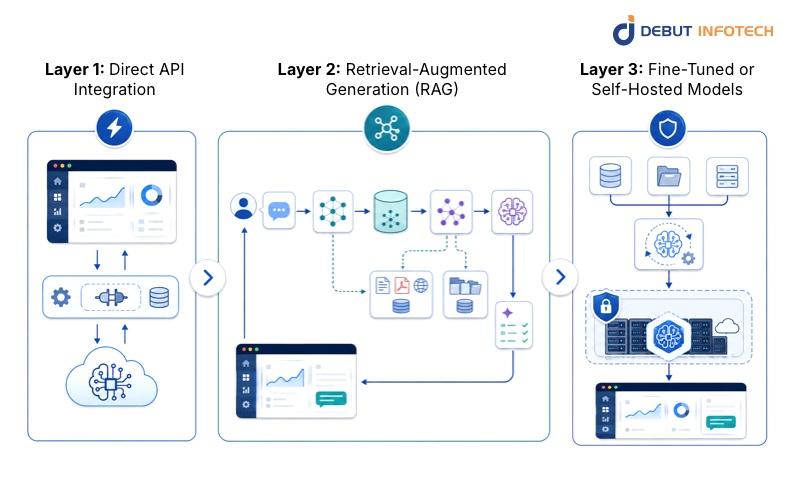
The quickest option to implement a copilot is to use a commercial LLM vendor like OpenAI or Google Gemini via API. Your SaaS backend delivers user-context cues and displays responses in the UI, supporting early versions and teams less familiar with AI.
However, this comes at the cost of dependence on third-party uptime and pricing, limited control over model behavior, and potential data exposure, which is a concern for companies with rigorous controls.
Most production AI copilot SaaS employs a RAG architecture. RAG improves LLMs by giving appropriate context from a product’s data repositories, eliminating hallucinations. User inquiry -> Vector embedding -> Retrieval from vector DB -> Context injection -> LLM call -> Response formatting -> UI rendering. Most of the engineering effort in production builds goes into optimizing this process.
For SaaS applications in regulated industries, it is critical to fine-tune on proprietary data or host open-source models like Llama 3 or Mistral on private infrastructure. This means you have to invest more upfront in the AI architecture design, but you get better domain accuracy, complete control over your data, and you don’t have to pay for every token on the API, which can be a lot at scale.
| Approach | Setup Complexity | Cost Model | Data Privacy | Best For |
| Direct LLM API | Low | Per token, variable | Data leaves your infrastructure | MVPs, early products |
| RAG Pipeline | Medium | API + vector DB hosting | Partial control | Most production SaaS |
| Fine-tuned model | High | One-time training + hosting | Full control | Regulated industries |
| Self-hosted open-source | Very High | Infra costs, no API fees | Full control | High-volume, privacy-first |
There is a difference between a copilot that works in a demo and one that works in production with hundreds or thousands of renter accounts, real user data that changes, and real load. The overall AI architecture design for a production SaaS copilot will often include the following components.
The copilot needs to understand where the user is, what the user is doing, and what data is relevant. This requires a context assembly service that gathers signals and packages them for quick insertion. This layer is typically overlooked in early planning and is a constant source of quality problems when it is ignored or handled as an afterthought.
As the copilot gets smarter, it gets harder to keep track of dozens of prompt templates, tool descriptions, and thought chains. Scheduling, tool calling, memory management, and fallback logic are all handled by orchestration systems such as LangChain, LlamaIndex, or custom solutions.
A text-only copilot is a limited copilot. The true value is in function calling, which is the ability of the LLM to call defined operations in your product’s API. The model can call these actions tools to create a job, update a record, send a notification, or run a report. The results are then fed back into the conversation. One such area where the close collaboration of AI and product engineering teams is crucial, and working with professional AI development services pays off most visibly, is developing a clean tool layer.
Users want copilots to recall context within a session and increasingly between sessions. Short-term memory is stored in the conversation history pane. Long-term memory requires external storage (user choice stores, summarized interaction histories) that is retrieved and injected at session start. One area where AI systems integraton with your existing user data architecture makes a big difference is here.
When AI systems are used in production, they need more than just normal application logging to be monitored. You must monitor response quality, latency, token usage, successful tool calls, and user feedback indicators. This is when platforms like LangSmith, Weights & Biases, or custom observability pipelines come into play. Debugging quality regressions in production with them is a shot in the dark.
The most obvious outcome of a well-built copilot is improved user experience, but this is not automatic. These improvements stem from design choices made throughout execution.
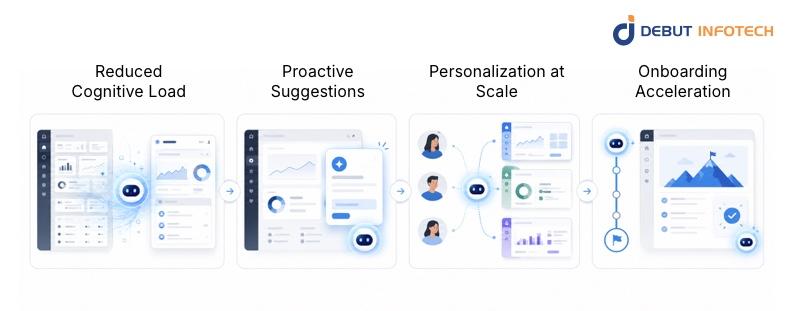
SaaS platforms evolve their functionality over time, and that evolution often increases navigation complexity. The copilot is a natural language interface to the whole product surface. No more scrolling through menus, users begin to describe what they want. This is especially useful for infrequent users who need product capabilities only occasionally but can’t be expected to remember where features live.
Instead of waiting for the user to ask for help, a well-designed copilot shows them appropriate options based on what they are doing. “A CRM copilot might notice that a deal has been sitting dormant for two weeks and nudge the sales rep. A copilot on an HR platform can warn that an onboarding job is overdue for a new hire. With such proactive suggestions, the copilot becomes an active player in the workflow rather than a reactive instrument.
Copilots can automatically modify the style of communication, the number of suggestions and focus regions to specific user behavior, without any manual configuration. This kind of customization is difficult to accomplish with standard UI features and rather easy with AI. The end result is a solution that feels tailor-made to each user’s workflow, which translates directly to satisfaction scores and renewal intent.
One of the highest-leverage embedded-copilot use cases is new user onboarding. No static documentation or recorded walkthroughs, but guided, interactive help that responds to what users are currently doing. Conversational AI in onboarding leads to quicker time-to-value periods for teams, helping to mitigate early turnover, a common concern for SaaS organizations across all sectors.
It’s important to be honest about the technical problems because they are real. Teams that understand these difficulties up front design better systems than teams that find them in the middle of a project.
AI models are only as good as the data they work on. Many SaaS products have been around for years and contain inconsistent data, such as duplicate records, missing fields, free-form text, and outdated schemas. Often, the data is messy and unstructured and needs to be cleaned and shaped before an AI copilot can reliably use it. This is typically far more effort than product teams expect, and it’s a major area where experienced AI consultants add value during initial scoping.
Consumer AI products have trained users to expect speedy responses. The combination of LLM API calls, RAG retrieval, and tool execution can introduce significant latency, often taking several seconds for sophisticated queries. The key levers for keeping perceived latency within an acceptable range are streaming responses, aggressive caching of retrieval results, and judicious model selection based on task complexity.
Generative AI models can provide responses that sound confident but are wrong. This is irritating in a consumer situation. It might be harmful in a SaaS product deployed for business choices. To reduce hallucination, responses should be grounded in recovered context, citation methods should be included, the UI should have unambiguous confidence indicators, and robust human-review protocols should be implemented for high-stakes outputs. Consideration of failure modes, in addition to success paths, is essential for an AI automation strategy.
Any copilot that can take action in a product should be bound by the same permissions as the user it is assisting. If a user cannot alter records for other teams, then the copilot cannot update records for other teams. Implementing permission-aware tool calling is a tricky business, and mistakes can introduce major security issues. This is non-trivial and has to be considered as a first-class engineering need from day one.
Traditional software quality is binary: the code either does what it is supposed to do, or it doesn’t. AI outputs range in quality and require human judgment to evaluate. Building evaluation datasets, establishing quality baselines, and maintaining regular feedback loops require effort but are critical to ensuring copilot quality as models and prompts evolve. This is probably the best argument for involving an expert AI consulting company in the architecture phase, before problems occur in production.
Single-tenant demos scale differently from multi-tenant production systems. When thousands of tenant accounts use Copilot simultaneously, with different data schemas, permission models, and usage patterns, several architectural challenges require deliberate decisions.
Tenant Isolation in Data Retrieval: Vector databases must enforce strict tenant boundaries by storing each tenant’s data with identifiers and filtering it during retrieval to prevent data leakage. Production systems typically use separate index namespaces or metadata filtering with access control.
Cost Management at Scale: Token costs are predictable at a small scale and unpredictable at a large scale. Usage spikes, verbose user queries, and poorly optimized prompts can drive costs well above projections. Production deployments need tenant-level usage metering, cost-attribution reporting, prompt token budgets, and circuit breakers that degrade gracefully under cost pressure. This planning belongs in the AI deployment model design, not as a retrofit.
Model Versioning and Rollout: When you update the underlying model or change prompts, behavior changes sometimes in ways that are difficult to predict. Rolling out changes to all tenants simultaneously is high risk. A/B testing frameworks, gradual rollout mechanisms, and rollback capabilities are necessary infrastructure for responsible model updates in a multi-tenant environment.
Customization Without Chaos: Enterprise clients want to customize copilot behavior with specific terminology, topics, and output formats. This requires a scalable configuration layer for effective management. Mature implementations use a base prompt layer with tenant-specific instructions and account-level custom tools.
| Component | Scaling Concern | Recommended Approach |
| Vector retrieval | Data isolation between tenants | Namespace-per-tenant or metadata filter + ACL |
| LLM API calls | Cost spikes, rate limits | Usage metering, quotas, model tiering by complexity |
| Prompt management | Inconsistent behavior across versions | Versioned prompt registry with gradual rollout |
| Customization | Configuration proliferation | Base prompt + overlay config per tenant |
| Observability | Root-cause analysis across tenants | Tenant-tagged logging, per-tenant quality dashboards |
| Auth and permissions | Privilege escalation via Copilot | Permission-aware tool definitions, pre-call auth checks |
Not every SaaS product needs the same deployment architecture. The right AI deployment model depends on your data sensitivity requirements, expected usage volume, performance targets, and engineering team capacity.
Choosing the right generative AI model for your copilot is important, but implementation quality often matters more. A well-designed RAG pipeline and effective prompt engineering can outperform a poorly executed system using a top-tier model. Key factors in model selection include context window size, tool reliability, latency, fine-tuning options, and pricing.
Models like OpenAI GPT-4o, Anthropic Claude, and Google Gemini have unique strengths. The best choice depends on the specific use case, often requiring different models for various tasks, necessitating robust orchestration. Collaborating with an experienced AI development company can streamline this process, leveraging their insights to avoid common pitfalls and save evaluation time.
The broader landscape of AI algorithms and AI models is also evolving fast enough that locking into a single provider at the architecture level is a strategic mistake. The teams shipping the most resilient SaaS copilots today are building provider-agnostic abstraction layers and treating model selection as a configuration decision rather than a foundational one.
Embedding AI copilots into SaaS products is not a task well suited to general-purpose development shops. The combination of AI engineering, product design, and enterprise software architecture required is genuinely specialized. When evaluating an AI copilot development company or individual AI consultants, look for the following:
The AI development companies best positioned to deliver on these engagements have backgrounds in both enterprise software and applied AI. That combination remains less common than it should be, and it is worth taking the time to verify it through references and case studies rather than taking it on faith.
Embedding AI copilots into SaaS products offers high returns for product teams. Companies that have implemented these copilots are gaining advantages over those still considering them. Early adoption enhances user behavior data, retention, and pricing power. The technology and business case are established; the main challenge now is execution.
Debut Infotech brings the combination of enterprise AI solutions experience and applied AI engineering depth that these projects require. From AI architecture design through multi-tenant scaling, our teams have navigated the full complexity of production copilot deployments across SaaS verticals. If your product is ready to move from evaluation to execution, the right next step is a scoped architecture conversation — not a generic demo.
A. AI copilots enhance user retention by seamlessly integrating into daily workflows, reducing support demands through in-app assistance, speeding onboarding for new users, and justifying premium pricing. Over time, this establishes a strong competitive advantage, as users are less inclined to switch platforms once they have adapted their workflows to the embedded copilot, even with comparable, lower-priced alternatives.
A. Copilots present relevant features in context, easing the learning curve for complex products. They guide new users interactively through workflows rather than relying on documentation, and make infrequently used features accessible via natural language, eliminating the need to remember UI layouts or workflows.
A. ROI varies by product type and implementation quality, with consistent returns from reduced churn, lower support costs (15–35% ticket deflection), and premium tier conversion lift (10–30% improvement).
A. Most teams start with a RAG-based integration using a commercial LLM API, linking the model to existing data for context-aware responses without custom training. This approach allows for incremental scoping, starting with a high-value use case to minimize risk and provide early user value, boosting internal confidence and product-market fit.
A. Integration costs vary based on scope, data infrastructure, and customization needs. A simple MVP can be developed in weeks, while a full-featured copilot takes months. Ongoing expenses include LLM API fees, vector database hosting, and engineering for optimization.
A. Privacy management varies by data sensitivity. Non-regulated data can use commercial LLM APIs with data agreements, while regulated industries require self-hosted models. Data isolation and permission-aware tool usage are essential for production deployments across multiple enterprise accounts.
A. Popular AI frameworks for copilot deployments include LangChain and LlamaIndex for orchestration, Pinecone, Weaviate, and pgvector for vector storage, and SDKs from OpenAI, Anthropic, and Google for model access. LangSmith is commonly used for observability. Open-source models like Meta’s Llama 3 and Mistral are favored for self-hosted deployments in regulated industries.

Our Latest Insights
USA
2501 Chatham, Rd Suite R Springfield, IL 62704
+1-708-515-4004
info@debutinfotech.com
UK
7 Pound Close, Yarnton, Oxfordshire, OX51QG
+44-770-304-0079
info@debutinfotech.com
Canada
154 Eden Oak Trail, Kitchener, ON N2A 0H9
+1-708-515-4004
info@debutinfotech.com
INDIA
Sector 101-A, Plot No: I-42, IT City Rd, JLPL Industrial Area, Mohali, PB 140306
9888402396
info@debutinfotech.com