ON THIS PAGE
Progress0%






Our Global Presence :



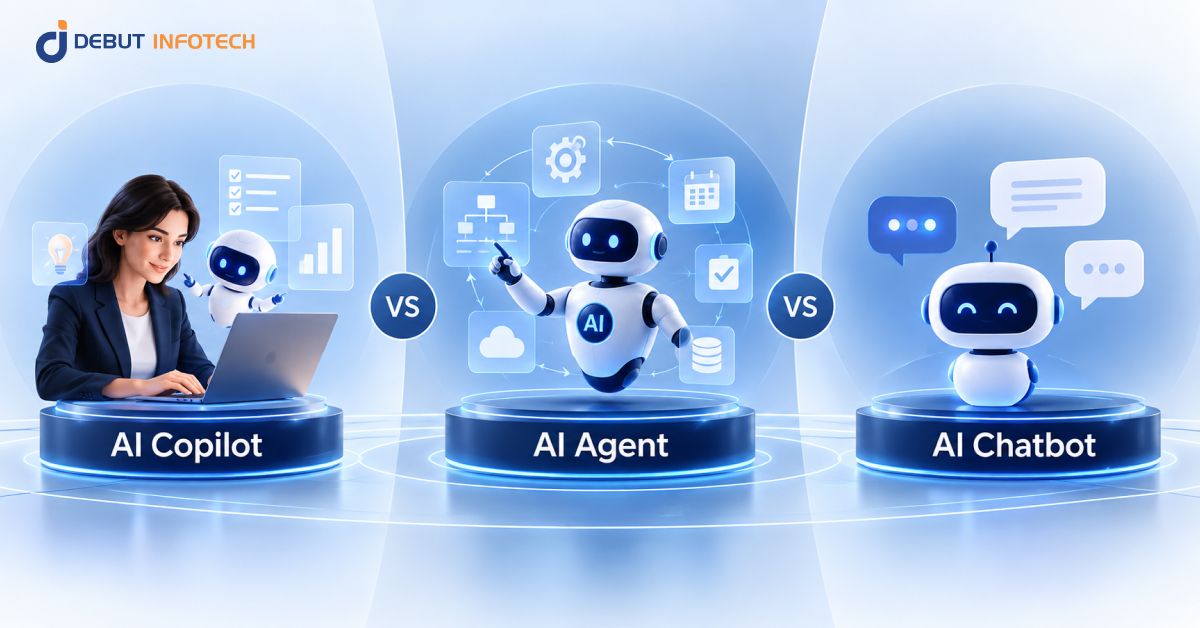


AI chatbots handle FAQs, support, lead qualification, and information retrieval with limited system access.
AI copilots support coding, content, analysis, sales, and other tasks while employees retain control.
AI agents plan and execute multi-step workflows across connected systems with limited human intervention.
Development costs range from $10K–$50K for chatbots, $25K–$100K for copilots, and $50K–$250K+ for agents.
Higher AI autonomy requires stronger controls, including permissions, monitoring, evaluations, audit logs, approvals, and rollback.
The right AI solution depends on task complexity, integrations, risk, volume, compliance, ROI, and required autonomy.
AI is becoming part of everyday enterprise workflows, but different AI systems serve different purposes. A chatbot can answer questions and handle routine conversations. A copilot can help employees complete tasks faster. An AI agent can take a defined objective and execute multiple steps with limited human direction. Understanding these differences matters when deciding where AI fits within your business.
The choice between an AI Copilot vs AI Agent vs AI Chatbot depends on factors such as task complexity, system access, autonomy, risk, cost, and expected ROI. Choosing the wrong approach can lead to unnecessary development costs or limited business value.
This guide compares the three technologies across their capabilities, use cases, limitations, costs, implementation requirements, and governance needs. It also explains how to evaluate each option and choose the level of AI autonomy that best fits your enterprise workflow.
The market for AI copilots, agents, and chatbots is expanding as enterprises move from AI experimentation toward practical business use. Current market data show strong investment in conversational AI, embedded assistants, and autonomous systems, although research firms measure these categories separately.
Together, these figures show a market moving beyond simple conversational use toward embedded assistance and autonomous workflow execution. For enterprises, the opportunity increasingly lies in selecting the right AI architecture for the task rather than adopting a single technology across every workflow.
An AI chatbot is a software application that communicates with users through natural-language conversations. It typically answers questions, retrieves information, follows predefined conversation flows, or routes requests to a human.
Modern chatbots can use retrieval systems to ground responses in approved business data. They are commonly deployed on websites, mobile apps, customer service portals and internal help desks where businesses need fast, consistent responses without granting the system broad authority to take action.
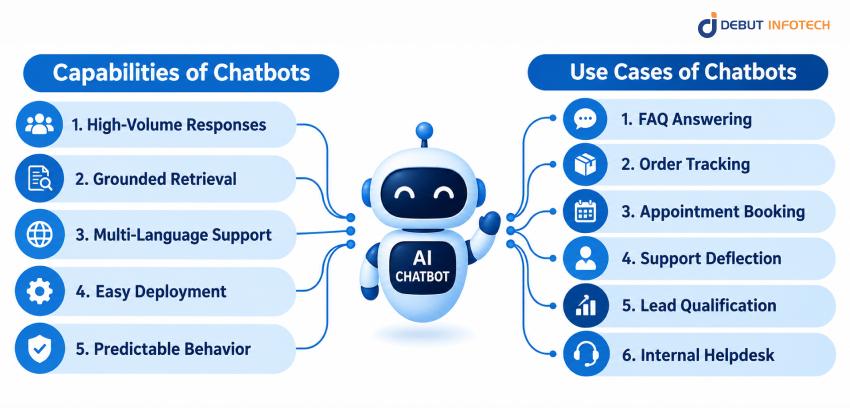
Chatbot capabilities determine how effectively the system can handle routine interactions. These features support faster responses, controlled information retrieval, broader language coverage, easier maintenance, and consistent behavior across high-volume customer and employee conversations.
Chatbots can handle large numbers of conversations simultaneously without adding support staff for every additional interaction. This makes them useful for repetitive questions, especially during traffic spikes, product launches, service disruptions, or other periods of high customer demand.
A chatbot can retrieve information from a defined knowledge base before generating an answer. This helps keep responses aligned with approved documents, policies, product information, and internal resources, rather than relying entirely on the model’s general knowledge.
Many chatbot platforms support multiple languages without requiring a separate application for each market. A business can configure the chatbot to recognize and respond in different languages, helping customers and employees access the same information across regions.
Custom AI chatbot development generally requires less engineering effort than autonomous AI systems. Teams can update knowledge sources, conversation flows, prompts, or response rules without redesigning an entire workflow. This makes them practical for organizations starting with a focused AI deployment.
Chatbots operate within relatively defined boundaries, making their behavior easier to test and monitor. Businesses can evaluate common questions, expected responses, escalation paths, and retrieval results before deployment. This predictability can simplify quality assurance and operational oversight.
Chatbots work best when businesses need to automate repetitive conversations with clear outcomes. Their applications range from answering customer questions to supporting internal teams, qualifying leads, tracking orders, and managing straightforward service requests.
Website and application chatbots can answer common questions about products, pricing, policies, account features, shipping, or services. They reduce repetitive requests reaching human support teams while giving users immediate access to information that is already documented.
A chatbot can connect to an order or logistics database and return shipment information when a customer provides an order number. This gives customers a simple way to check delivery progress without requiring a support representative to handle each request.
Chatbots can guide users through appointment scheduling by collecting required details, checking available slots, and confirming bookings. They work well for routine scheduling because the conversation can follow a controlled flow with clearly defined inputs and outcomes.
A chatbot can handle first-line support questions before escalating more complex issues to human agents. This reduces ticket volume and allows support staff to spend more time on cases requiring investigation, judgment, or direct customer intervention.
Chatbots can qualify prospects by asking predefined questions about company size, requirements, budget, use case, or purchase timing. The collected information can then be passed to sales teams, helping representatives focus on leads that meet defined criteria.
An internal chatbot can answer routine HR and IT questions, such as leave balances, benefits information, software instructions, or password-reset procedures. When connected to approved systems, it can also direct employees to the correct self-service process.
Despite their usefulness, chatbots have clear boundaries. They are less suitable for complex workflows that require persistent context, independent action, or decisions outside their defined scope of knowledge and conversation.
Traditional chatbots generally do not maintain useful memory across separate tasks or sessions. They may remember the current conversation, but they are not designed to build an ongoing state that allows them to manage complex work over time.
A chatbot primarily provides information or routes requests. It may trigger limited predefined functions, but it normally does not independently plan and execute a chain of business actions. Tasks requiring multiple decisions and system interactions usually require a different architecture.
Chatbots perform best when questions fall within a defined subject area. Ambiguous requests, unusual situations, or questions outside their knowledge base can produce weak responses or require escalation. Narrow scope helps maintain reliability but limits flexibility.
A chatbot cannot provide consistently useful business answers if its underlying information is incomplete or outdated. Product changes, policy updates, and internal process changes must be reflected in the connected knowledge sources. Poor maintenance can therefore reduce response quality.
An AI copilot is an assistant embedded within an existing application, workflow, or professional environment. It uses the user’s current task and available business context to generate suggestions, content, analysis, code, or other work outputs.
The human remains responsible for reviewing and deciding what happens next. This makes copilots useful when businesses want AI to reduce the time required for knowledge work without handing complete control of business processes to an autonomous system.
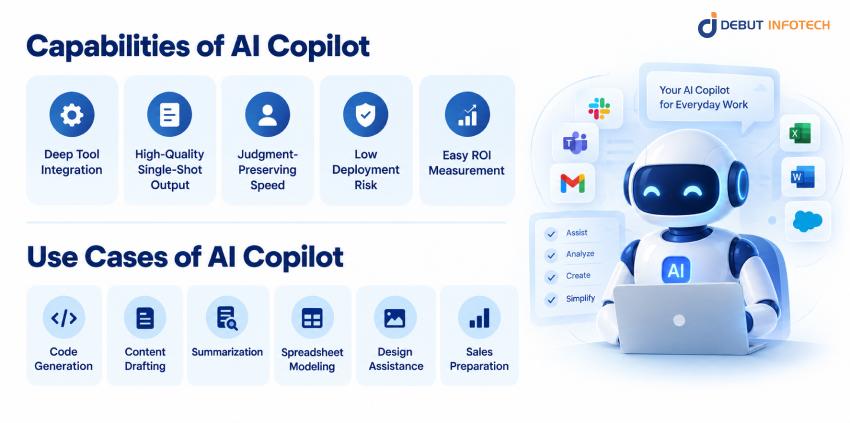
Copilot capabilities focus on helping employees complete work more efficiently. Deep application integration, contextual output, human oversight, and measurable productivity gains make AI copilot development solutions particularly useful for knowledge-based tasks across business functions.
An AI copilot operates inside the tools employees already use. It can access relevant application context, documents, records, or project data and assist without requiring users to move information into a separate chatbot interface.
Copilots can produce useful outputs from immediate task context. For example, a sales copilot can summarize a customer record and draft follow-up content using information already available in the CRM, reducing the amount of manual preparation required.
A copilot accelerates work while leaving important decisions with the employee. It can draft, analyze, recommend, or suggest, but the user remains responsible for reviewing the output and approving the final action.
Because humans generally remain in the execution loop, copilots can carry less operational risk than autonomous agents. The system can recommend an action without automatically performing it, providing organizations with a practical starting point for adopting artificial intelligence.
Enterprise copilot ROI can often be measured through time saved per task. Businesses can compare the time employees spend writing, researching, summarizing, coding, or preparing information before and after deployment to estimate productivity gains.
AI copilots can support employees across technical, creative, administrative, and commercial workflows. They are especially useful for tasks where generating, analyzing, organizing, or refining information takes significant employee time.
Coding copilots can provide autocomplete suggestions, generate functions, explain code, identify potential errors, and help developers work within an integrated development environment. Developers review the suggestions before incorporating them into production code.
Writing copilots can create first drafts of emails, reports, documents, presentations, and other business materials. They reduce the time spent starting from a blank page while allowing employees to edit the final content before distribution.
A copilot can summarize meetings, email threads, reports, transcripts, and lengthy documents. Instead of manually reviewing every line, employees receive a condensed version that highlights key information and provides a faster starting point for further work.
Spreadsheet copilots can generate formulas, explain calculations, identify errors, and help users structure models. This reduces repetitive spreadsheet work while allowing finance, operations, and business teams to review calculations before using the results.
Design copilots can generate assets, suggest edits, remove repetitive work, and provide variations based on a user’s instructions. Designers retain creative control while using AI to accelerate production and handle time-consuming editing tasks.
Sales copilots can prepare representatives for customer calls by summarizing account history, recent interactions, opportunities, and relevant documents. They can also draft follow-up emails after meetings, reducing administrative work while keeping salespeople in control.
Copilots improve human productivity, but they do not remove the need for human involvement. The usefulness of AI copilot development can also depend on user input, available application context, and the limits of the environment where they operate.
A copilot still depends on people to review outputs and make decisions. This limits its ability to scale unattended operations. If every task requires human approval, productivity gains remain tied to employee availability.
Copilots generally focus on the user’s current task instead of independently managing a long sequence of actions. They can assist with individual steps, but they do not normally maintain persistent state and coordinate an entire workflow without direction.
Copilot output can vary depending on the quality of the user’s instructions and available context. Clearer requests usually produce better results. Poor prompts, incomplete information, or unclear objectives can reduce the usefulness of generated outputs.
Many copilots are designed for a single application or work environment. This can limit their ability to coordinate information across multiple business systems. Cross-system workflows often require a copilot architecture with broader access to tools and APIs.
An AI agent is a software system that can pursue a defined goal by planning tasks, using tools, maintaining state, and taking actions with limited human direction. Unlike a chatbot, an agent can do more than provide information. It can interact with business systems, complete multiple workflow steps, respond to changing conditions, and continue working until the task reaches a defined outcome or requires human intervention.
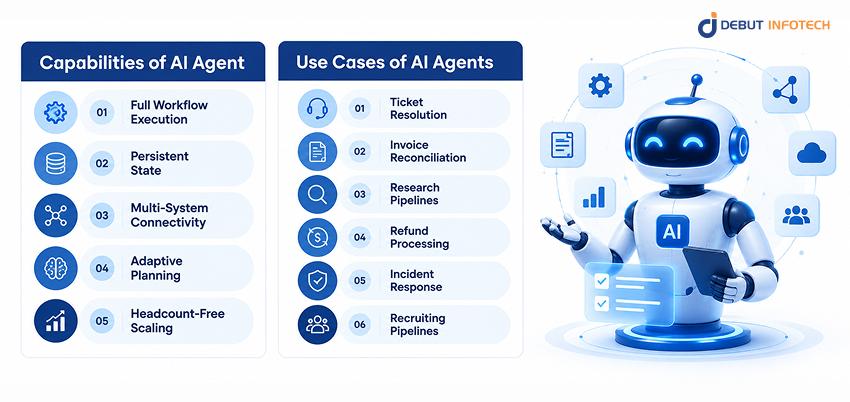
Agent capabilities allow AI systems to move beyond assisting in executing work. Persistent state, tool connectivity, planning, adaptation, and scalable execution make agents well-suited to workflows involving multiple systems and repeated decisions.
An AI agent can manage a complete workflow without requiring a person to direct every step. After receiving a defined objective, it can determine the required actions, call approved tools, evaluate results, and continue until the workflow reaches its stopping condition.
Agents can maintain relevant state across multiple actions and tool calls. This allows them to track what has already happened, what remains unfinished, and what information is needed next, rather than restarting from the beginning.
Agents can connect to multiple business systems through APIs, MCP servers, databases, or other approved interfaces. These multi-agent systems enable workflows that span CRM, ERP, support, finance, communication, and internal systems without requiring employees to manually transfer information.
Agents can change their approach when a tool fails, information changes, or an expected condition is not met. Rather than stopping after one failed step, the agent can reassess the situation and select another approved path.
Agents can handle repetitive, judgment-light work across large volumes without requiring a person to supervise every individual transaction. This makes them suitable for processes where demand is high, rules are clear, and exceptions can be escalated.
AI agents are best suited to workflows where several steps must be completed without constant human direction. Custom AI agent development can support operations, finance, research, infrastructure, customer service, and recruiting when tasks have clear boundaries and outcomes.
An AI agent can classify incoming tickets, gather account information, diagnose common issues, select an approved resolution, update the ticket, and close it. Complex or uncertain cases can be routed to human support staff.
An agent can collect invoices, compare them with purchase orders and payment records, identify discrepancies, request missing information, and prepare reconciliation reports. Financial teams can define approval thresholds for transactions that require human review.
Research agents can break a question into smaller tasks, gather information from approved sources, compare findings, organize evidence, and produce a structured report. This can reduce manual research time for recurring business intelligence and analysis workflows.
An AI agent can verify refund eligibility, check account and transaction records, calculate approved amounts, and initiate refunds within defined limits. Transactions outside those limits can be paused for human approval before money is moved.
An infrastructure agent can monitor alerts, investigate known failure patterns, gather system information, and execute approved remediation steps. For higher-risk incidents, escalation can be triggered by relevant evidence rather than by unrestricted infrastructure changes.
Recruiting agents can source candidates, screen applications against defined criteria, organize candidate information, schedule interviews, and send approved communications. Human recruiters can remain responsible for final hiring decisions and sensitive candidate assessments.
Greater autonomy also introduces greater technical and operational challenges. Agents can access more systems, behave less predictably, consume more resources, and require stronger controls before they can safely operate in production environments.
Every tool, API, database, and system connected to an agent introduces another potential security risk. Excessive permissions can increase the impact of an error or compromised workflow. Access therefore needs to be limited to specific actions and resources.
Agents can take different paths to reach the same goal. This non-deterministic behavior makes testing harder than testing a fixed workflow. Organizations need evaluations that test outcomes, tool usage, failure handling, and boundary conditions, rather than a single expected sequence.
Agents generally perform more model calls and tool interactions than simple chatbots. Long workflows can therefore consume more tokens, compute resources, and API capacity. Cost control requires clear task boundaries, efficient prompts, caching where appropriate, and sensible model selection.
Autonomous systems require stronger AI governance because they can affect real business systems. Before production use, organizations should define permissions, approval thresholds, audit logs, monitoring, rollback procedures, and escalation paths for unexpected behavior.
Understanding the differences between AI Copilot vs AI Agent vs AI Chatbot helps businesses choose the right level of capability. The AI Copilot vs AI Agent vs AI Chatbot comparison below examines autonomy, users, memory, system access, risk, cost, governance, and the outcomes each approach typically delivers.
| Feature | AI Chatbot | AI Copilot | AI Agent |
| Primary user | Customers, employees, visitors | Employees and professionals | Employees, systems, operations teams |
| Autonomy level | Low | Low to moderate | Moderate to high |
| Typical channels | Website, app, messaging, support portal | IDE, CRM, office tools, design tools | APIs, business systems, workflow platforms |
| Memory | Usually session-based | Current task/context | Persistent workflow state |
| System access | Limited | Deep within host application | Multiple systems and tools |
| Typical outcomes | Answers and guided support | Faster human work | Completed tasks and workflows |
| Risk profile | Lower | Low to moderate | Higher |
| Governance needs | Content and access controls | Data, output, and application controls | Permissions, auditability, monitoring, rollback |
| Cost | Usually lowest | Moderate | Usually highest |
| Timeline | Days to weeks for focused deployments | Weeks to months | Weeks to months, depending on workflow complexity |
| Example task | “Where is my order?” | “Summarize this customer account.” | “Investigate and resolve eligible support tickets.” |
| Helpful analogy | Receptionist | Assistant | Operator |
| Best fit | Information and repetitive conversations | Human-led knowledge work | Repetitive multi-step workflows |
Autonomy is one of the clearest differences between these three systems. A chatbot mainly responds to users, while a copilot assists people with active tasks. An AI agent can take multiple actions toward a defined goal with limited human direction. As autonomy increases, businesses gain greater automation potential but also face higher requirements for testing, permissions, monitoring, and governance.
The person or system controlling the workflow also changes across these technologies. With a chatbot, the user drives the conversation. With a copilot, the employee directs the work and reviews AI suggestions. With an agent, the AI can manage the workflow within defined boundaries. This distinction helps businesses decide whether they need assistance, conversation, or independent task execution.
The amount of system access given to an AI solution directly affects its risk profile. A chatbot may only retrieve approved information, while a copilot can work with data inside an application. An agent may access several systems and perform actions. Each additional permission increases what the AI can accomplish and what could go wrong, making access controls increasingly important.
Memory affects how well each system can handle tasks that extend beyond a single interaction. Chatbots often rely on the current conversation, while copilots use the context of the employee’s active task. Agents can maintain state across multiple actions and tool calls. This allows agents to manage longer workflows without requiring users to repeatedly provide information or instructions.
Businesses should match AI autonomy to the consequences of failure. A chatbot answering an FAQ presents relatively low operational risk. A copilot generating financial analysis requires human review before decisions are made. An agent processing refunds or changing infrastructure can create direct consequences. Higher-risk tasks therefore require stronger permissions, approval controls, monitoring, testing, and recovery procedures.
There is no single option that fits every enterprise workflow. Choose a chatbot when the goal is information access or guided support. Choose a copilot when employees need help completing knowledge-based tasks. Choose an agent when the goal is automated workflow execution. Selecting based on the desired outcome prevents businesses from adopting more autonomy, complexity, and cost than the task requires.
The right AI architecture for AI agent vs AI copilot vs chatbot for businesses depends on more than technical capability. Businesses should assess task predictability, failure costs, integration maturity, operational readiness, compliance exposure, workload volume, and the financial return expected from the deployment.
| Evaluation Criteria | AI Chatbot | AI Copilot | AI Agent |
| Task Determinism | Best for predictable, repetitive questions and guided flows | Best for structured tasks where employees review or refine AI output | Best for defined workflows that require multiple steps and decisions |
| Cost of Failure | Suitable when an incorrect answer has limited operational impact | Better when human review is needed before an output affects the business | Requires stronger controls when incorrect actions can create financial, operational, or customer impact |
| System Integration | Usually needs limited access to business systems or knowledge sources | Works within specific business applications and employee workflows | Often requires multiple APIs, databases, applications, and business tools |
| Team Readiness | Requires relatively little change to existing workflows | Requires employees to actively use and review AI assistance | Requires teams to manage permissions, monitoring, exceptions, and AI-driven workflows |
| Task Volume & Repeatability | Effective for high-volume conversations and routine requests | Useful for frequent knowledge-based tasks that still require employee involvement | Most valuable for high-volume, repeatable workflows that can be automated end to end |
| Regulatory & Compliance Exposure | Easier to control when access and actions are limited | Requires controls around the data and outputs employees handle | Requires stronger governance because the system may access data and perform actions independently |
| Expected ROI & Payback | Often justified by support deflection and reduced response workload | Typically measured through employee productivity and time saved | Often evaluated through workflow automation, reduced manual work, and operational savings |
| Recommended Starting Point | Start here when the primary need is information access or customer support | Start here when employees need AI assistance inside existing workflows | Consider it when the business has a clearly defined workflow that justifies greater autonomy. |
Start by asking how predictable the task is. If the workflow follows simple rules and produces a consistent outcome, a chatbot or conventional workflow automation may be enough.
If employees need assistance while making decisions, a copilot can provide support. An agent becomes more suitable when the workflow has multiple steps but still has clear goals, boundaries, and acceptable outcomes.
Highly unpredictable tasks should not be given broad autonomy simply because an agent can technically perform them.
Consider the consequence of failure before choosing an autonomy level. A wrong chatbot answer may create frustration or increase support volume. A wrong copilot suggestion can usually be reviewed before use.
A wrong agent action could create financial, operational, legal, or customer-impacting consequences. As the cost of an error increases, stronger controls and human approval become more important.
Review whether the systems involved already provide reliable APIs, permissions, structured data, and monitoring. A chatbot can operate with relatively simple knowledge retrieval. A copilot needs access to the application where work happens. An agent requires dependable connections across multiple systems.
Weak integration infrastructure can turn an otherwise useful agent into an unreliable and expensive project.
Agents do not always follow the same path to an outcome. Your team should be comfortable testing behavior across different scenarios, monitoring production runs, reviewing failures, and improving prompts and tools over time.
If the organization expects identical behavior on every run, a conventional workflow or copilot may be a better starting point than an autonomous agent.
Intelligent automation becomes more valuable when a task occurs frequently and follows a repeatable pattern. A low-volume process may not justify the cost of building and maintaining an agent.
High-volume tasks with clear boundaries can offer stronger returns because the system can handle more work without increasing manual effort at the same rate.
Examine what data the system will access and what decisions or actions it can influence. Regulated workflows may require stricter permissions, human approvals, audit trails, retention policies, and explainability.
A chatbot or copilot may be easier to control than an agent when sensitive data or high-impact decisions are involved.
Estimate the financial value before selecting the technology. Compare expected time savings, reduced support volume, faster processing, error reduction, or additional revenue against development, model, infrastructure, integration, and maintenance costs.
A chatbot may provide faster payback for simple use cases, while agents can deliver greater savings when they automate substantial recurring workloads.
Successful AI implementation starts with a clearly defined task and expands gradually. Businesses should establish workflow boundaries, map the required systems, select the appropriate level of autonomy, add controls, test performance, and increase access only when results support it.
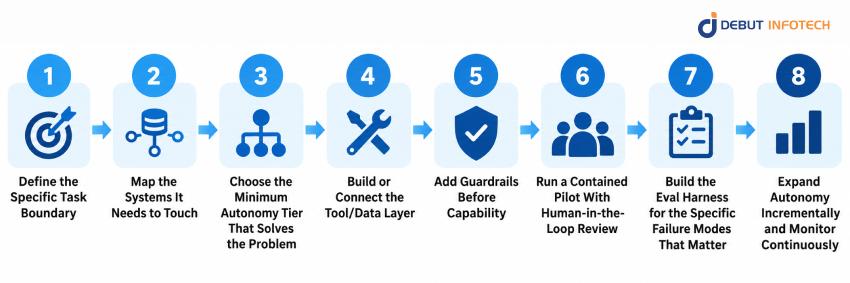
Start with one clearly defined business problem. Identify what the system should receive, what it should produce, which actions it may take, and when it must stop. Avoid starting with a broad objective such as “automate customer service.”
Define a specific workflow, such as classifying eligible refund requests or answering product-support questions. Document success criteria, failure conditions, escalation rules, and ownership.
A narrow boundary makes architecture decisions easier and gives the team a measurable target for testing. It also prevents unnecessary autonomy from being introduced before the business understands the workflow.
List every system required to complete the task. This may include CRM software, databases, ticketing platforms, ERP systems, communication tools, document repositories, payment systems, or internal APIs.
For each connection, identify what information the AI needs and what actions it may perform. Separate read access from write access. Also document authentication, rate limits, data quality, failure behavior, and system ownership. This mapping shows whether the proposed chatbot, copilot, or agent can work with the organization’s existing technical environment.
Select the least autonomous option that can deliver the required business outcome. Use a chatbot when access to information is enough.
Use a copilot when employees need help completing work.
Use an agent when the system must independently coordinate multiple actions.
Starting with lower autonomy reduces implementation risk and gives the organization time to learn how the workflow behaves with AI.
Higher autonomy can be introduced later when performance data shows that additional independence is justified.
Give the AI access to the information and tools it actually needs. Connect approved knowledge sources, APIs, databases, applications, and workflow functions. Keep interfaces simple and specific.
Each tool should have a clear purpose, defined inputs, controlled outputs, and appropriate permissions. The model should not receive unrestricted access simply because a system makes that access technically possible. Reliable tool descriptions and clean business data also matter, as poor inputs can lead to poor decisions even when the underlying model performs well.
Establish controls before expanding the system’s capabilities. Set permission boundaries, transaction limits, approval requirements, sensitive-data restrictions, timeout rules, and escalation conditions. Separate low-risk actions from high-impact actions.
For example, an agent may be allowed to prepare a refund but must obtain approval before issuing one for amounts above a defined amount. Guardrails should be enforced by the surrounding system where possible rather than relying only on instructions in the model prompt.
Begin with a limited pilot using real but controlled work. Keep humans involved in reviewing outputs and actions, particularly where errors could affect customers, money, security, or compliance. Track successful completions, escalations, incorrect answers, failed tool calls, processing time, and user feedback.
A contained human-in-the-loop pilot exposes problems that may not appear in demonstrations or test environments. Use these findings to improve prompts, tools, data, workflows, and approval rules before increasing the system’s autonomy.
Test the system against realistic business scenarios rather than relying solely on generic model benchmarks.
Include normal cases, incomplete information, ambiguous requests, incorrect data, unavailable tools, permission failures, unexpected inputs, and attempts to exceed the defined scope. Measure both final outcomes and intermediate behavior.
For agents, evaluate whether the system selected the correct tools, respected permissions, recovered appropriately from failures, and stopped when necessary.
Repeat evaluations whenever prompts, models, tools, or workflow logic change.
Increase autonomy only after the system demonstrates reliable performance within its existing boundaries. You can begin with recommendations, move to human approval, and later allow specific low-risk actions to execute automatically.
Monitor production behavior through logs, alerts, quality metrics, cost tracking, and periodic reviews.
Set clear rollback procedures for serious failures. Autonomy should remain tied to measured performance, not simply to the technical ability of the model to perform an action.
Development costs for AI chatbot vs AI agents vs copilots for enterprise automation vary substantially depending on integrations, security requirements, model selection, data preparation, user volume, and workflow complexity.
For an enterprise-grade custom implementation, the following planning ranges are reasonable starting points rather than fixed market prices.
| Solution | Typical Custom Development Cost | Typical Timeline | Main Cost Drivers |
| AI Chatbot | $10,000–$50,000 | 4–10 weeks | Conversational design, knowledge retrieval, UI, integrations, testing |
| AI Copilot | $25,000–$100,000 | 6–16 weeks | Application integration, business context, user workflows, security |
| AI Agent | $50,000–$250,000+ | 10–30+ weeks | Multi-system integrations, tool orchestration, state management, guardrails, evaluations |
| Enterprise agent platform | $150,000–$500,000+ | 4–12+ months | Multiple workflows, security architecture, governance, observability, large-scale deployment |
These figures cover custom development rather than simple subscription fees for existing AI products.
A basic chatbot using an established platform can cost far less, while a regulated enterprise agent connected to financial, healthcare, or infrastructure systems can exceed the ranges shown.
Ongoing model usage, hosting, monitoring, maintenance, security reviews, and third-party API costs should also be included in the total ownership budget.
Complexity directly affects development cost. A basic chatbot may cost around $10,000–$30,000, while a more integrated chatbot can reach $30,000–$50,000. Businesses can review AI chatbot development cost to understand how features, integrations, and development requirements affect the overall budget.
AI copilots typically range from $25,000–$100,000, depending on application integration, business context, security requirements, and workflow complexity. A detailed AI copilot development cost breakdown can help businesses estimate the investment required for development, testing, and deployment.
AI agents can cost $50,000–$250,000+ because they require more integrations, decision logic, testing, state management, and workflow automation. An AI agents development cost analysis can help businesses assess the development effort involved in tool integration, guardrails, monitoring, and multi-step execution.
A basic chatbot may need only a knowledge base and conversational interface, while a copilot may require deeper application integration. An AI agent can require multiple APIs, tool permissions, state management, monitoring, and recovery logic. As the number of systems, actions, and decision points increases, development and testing requirements generally increase as well.
Integration costs can range from $5,000 to $30,000+, depending on the number and complexity of systems involved. Connecting a chatbot to one CRM may require a relatively small integration budget. In contrast, a copilot connected to multiple enterprise applications or an agent working across CRM, ERP, payment, and support systems can push total development costs toward $100,000–$250,000+.
Existing systems can have a major effect on AI copilot development cost. Connecting an AI solution to modern APIs is usually simpler than integrating with legacy applications or fragmented databases.
Each additional integration requires development, authentication, testing, and ongoing maintenance. An agent that works across CRM, ERP, support, and payment systems will therefore cost more than one operating within a single business application.
Enterprise security and governance can add roughly 15–30% to the initial development budget. For a $50,000 AI solution, that could mean an additional $7,500–$15,000 for access controls, audit logging, monitoring, approval workflows, data protection, and other safeguards. Agent deployments often sit toward the higher end because they can perform actions across multiple systems.
Enterprise AI systems often require security controls beyond the core AI functionality. These may include role-based access, data protection, audit logging, approval workflows, monitoring, and rollback mechanisms.
The requirements become more demanding as AI gains access to sensitive information or can perform real business actions. Businesses should include these controls in the initial budget instead of treating them as later additions.
Development is only part of the total AI cost. Businesses also pay for model usage, cloud infrastructure, APIs, storage, monitoring, and ongoing maintenance.
Ongoing AI costs vary by usage, model, infrastructure, and workflow complexity. A basic chatbot may require $500–$5,000+ per month in model, hosting, storage, and monitoring costs, while enterprise copilots and agents can exceed $5,000–$20,000+ per month.
Chatbots with high conversation volumes can generate substantial recurring usage costs. Agents may cost more per task because they make multiple model and tool calls. These operating expenses should be estimated alongside the initial development budget.
Ready-made AI platforms can reduce the initial build cost to roughly $5,000–$30,000 for configuration and integration, although subscription and usage fees continue afterward. Custom chatbot development may start around $10,000–$50,000, while custom copilots and agents can reach $100,000–$250,000+ when advanced integrations and governance are required.
Businesses can reduce upfront costs by using existing chatbot, copilot, or agent platforms instead of building everything from scratch. However, ready-made tools may have subscription, usage, integration, or customization costs.
Custom development generally costs more initially but can provide greater control over workflows, data, integrations, and security. The right choice depends on how closely an existing platform matches the business requirement.
The cheapest option is not always the most valuable. Cost should be measured against the value the system can generate. For example, a $30,000 chatbot that saves $5,000 per month could recover its development cost in about six months. A $150,000 AI agent may require a larger upfront investment but could make financial sense if it eliminates substantial recurring manual work across a high-volume workflow.
A chatbot may cost less to develop but deliver limited savings if the underlying problem requires employees to complete most tasks manually.
An agent may require a larger investment but generate stronger returns when it automates a high-volume workflow. Compare development and operating costs with measurable savings, productivity gains, revenue impact, and expected payback time.
Chatbots, copilots, and AI agents solve different enterprise problems. A chatbot is strongest when users need reliable information and guided conversations. A copilot is suited to human-led work where AI can reduce effort while leaving decisions with employees. An agent is appropriate when the business needs AI to execute defined multi-step workflows with limited human direction.
The right choice should start with the task, not the technology. When comparing AI Copilot vs AI Agent vs AI Chatbot, assess the workflow, risk, required integrations, level of human involvement, and expected return.
In many organizations, the practical path is to start with a chatbot or copilot, measure the results, and introduce agentic AI automation where the evidence supports greater autonomy.
Turning that decision into a working AI solution requires the right architecture, integrations, and level of autonomy. Debut Infotech brings experience across chatbots, AI agents, and copilot-style products.
These projects show how AI can support different levels of enterprise work, from answering customer queries to assisting employees and handling automated workflows. We can help businesses with AI integration services, development, testing, and deployment tailored to their specific requirements.
An AI chatbot mainly responds to user questions and carries out simple conversations. An AI copilot works alongside people, helping them complete tasks, make decisions, or create content. An AI agent goes further by planning and executing tasks with less human input. The main difference lies in how much responsibility each system takes on.
No, an AI copilot and AI agent are not the same. A copilot is designed to assist people while they remain involved in the process. An AI agent can take action toward a goal, often across multiple steps, with limited human intervention. Some copilots can include agent-like features, but their roles differ.
Neither is automatically better. The right choice depends on what your business needs. An AI copilot is a better fit when employees need support while keeping control of decisions and tasks. An AI agent makes more sense when you want to automate multi-step workflows and let AI handle actions independently.
An AI chatbot mainly interacts with users through conversation, answering questions or providing information. An AI copilot is built into a person’s workflow and helps them complete specific tasks. For example, a chatbot might answer a customer question, while a copilot could help an employee draft a response, analyze data, or prepare a report.
A business should use an AI copilot when employees need help with tasks but still require review, guidance, or approval of the final work. Copilots work well for writing, coding, research, data analysis, customer support, and other knowledge-based tasks where human judgment remains part of the process.
Businesses should use AI agents for repetitive, multi-step workflows that can be handled with limited human involvement. Agents can collect information, make decisions based on set rules, use business systems, and complete tasks from start to finish. They are especially useful when manual processes consume significant employee time.
Yes, AI agents and copilots can work together. A copilot can help an employee review information, make decisions, or approve actions, while an AI agent handles the tasks that follow. This setup provides businesses with a practical balance between automation and human oversight, especially for workflows where certain decisions still require employee input.
AI agents are generally the best AI solution for business automation because they can handle multi-step processes and take actions without constant human input. However, copilots are better when employees need to stay involved, while chatbots are better suited to customer conversations and basic support. The best option depends on the workflow you want to automate.
Use an AI copilot when people need to stay involved and make the final decisions. Choose an AI agent when you want AI to handle tasks or workflows with less human input. A copilot suits writing, analysis, coding, and decision support, while an agent works better for repetitive, multi-step processes.
Start by looking at how much control you want people to have. If employees need to review, guide, or approve AI outputs, a copilot is usually the better choice. If the task follows a defined process and can run with minimal supervision, an AI agent may be a better fit.

Our Latest Insights


USA
2501 Chatham, Rd Suite R Springfield, IL 62704
+1-708-515-4004
info@debutinfotech.com
UK
7 Pound Close, Yarnton, Oxfordshire, OX51QG
+44-770-304-0079
info@debutinfotech.com
Canada
154 Eden Oak Trail, Kitchener, ON N2A 0H9
+1-708-515-4004
info@debutinfotech.com
INDIA
Sector 101-A, Plot No: I-42, IT City Rd, JLPL Industrial Area, Mohali, PB 140306
9888402396
info@debutinfotech.com